Claude Code Usage Status Line (Update)
Claude Code Usage Status Line
Monitor your Claude Code, z.ai GLM and DeepSeek usage in real time
directly in your terminal.
Free, open source, zero configuration.
100% Freefor WindowsLinuxmacOS
Six archives: x64 and ARM64 for each of the three systems.
New in 1.4.1
DeepSeek joins Claude and z.ai, and session spending finally displays a figure that means something.
One line per Claude account
I switch between two Claude Code accounts with the CLAUDE_CONFIG_DIR variable, and the statusline kept showing me the figures from the first one, whichever account was actually active. It now reads this variable, and its cache and backoff are separated by account.
Deliberate corollary: data whose account is not proven is no longer displayed at all, even when marked as stale. Better for a segment to disappear than for a percentage belonging to someone else to show up.
An invalid token says so
A 401 used to get lost among the generic errors: the line stayed silent without us knowing whether the API was down or the token had expired.
It is now handled separately: the account cache is invalidated and the message is explicit. A simple token rotation no longer blocks anything, the display moves on to the next one.
Third provider: DeepSeek
I route part of my work through DeepSeek, and I wanted the same comfort as with the others: the account balance right in front of me. The line now displays it, in the currency returned by the API, without conversion.
DeepSeek exposes no spending history, only the balance. The line therefore shows a balance, as it does for z.ai. Detecting it took a little more work: my launcher tells Claude Code it is using a Claude model while the traffic goes elsewhere, and the statusline was looking for Anthropic credentials only to end up with a credentials missing even though the key was valid. It now also looks at the API address, inherited from the launcher, to know who it is really talking to.
The pictogram legend
- ⌛ the rolling 5-hour window
- 📅 the 7 days, across all models
- F the current model's gauge, here Fable
- 💰 the balance or remaining credits
- 💸 the session spending (actual cost on an API-billed account, balance difference on z.ai and DeepSeek)
- 🧠 the context window
The per-model gauges keep an initial (F, s, o) and not a pictogram: the label comes from the API and changes with the model, a fixed icon would eventually lie. On a minimal Linux distribution, install fonts-noto-color-emoji and everything displays.
Gauge by model and credits
For migrated accounts, Anthropic no longer returns two fixed Sonnet and Opus gauges but a weekly window attached to the current model. The displayed letter therefore follows the model, F for Fable.
When the window fills up and credits take over, the 💰 segment switches to detailed mode and shows the amount spent, the limit and what is left: 💰 €12.56/€14 (left €1.44). Non-migrated accounts keep the old display, with s and o.
The session cost, for real
The session cost that Claude Code calculates is estimated using the rates of the declared model. On my end, it displayed 💸 $24.64 when the entire account weighed in at $8.13 and the session had cost around $0.26. A factor of 100, meaning nothing usable.
It is now measured against the account's actual balance, recorded at the first prompt and then compared at every refresh. And z.ai benefits from it too: it had not displayed any session cost until now.
The displayed model is the one that is running
Same story on the name side: the line announced Opus 4.7 while the backend was serving DeepSeek. The displayed name now follows the actual provider.
And if no match is declared, nothing breaks: the old name stays displayed, rather than an empty box.
Status line at the bottom of Claude Code
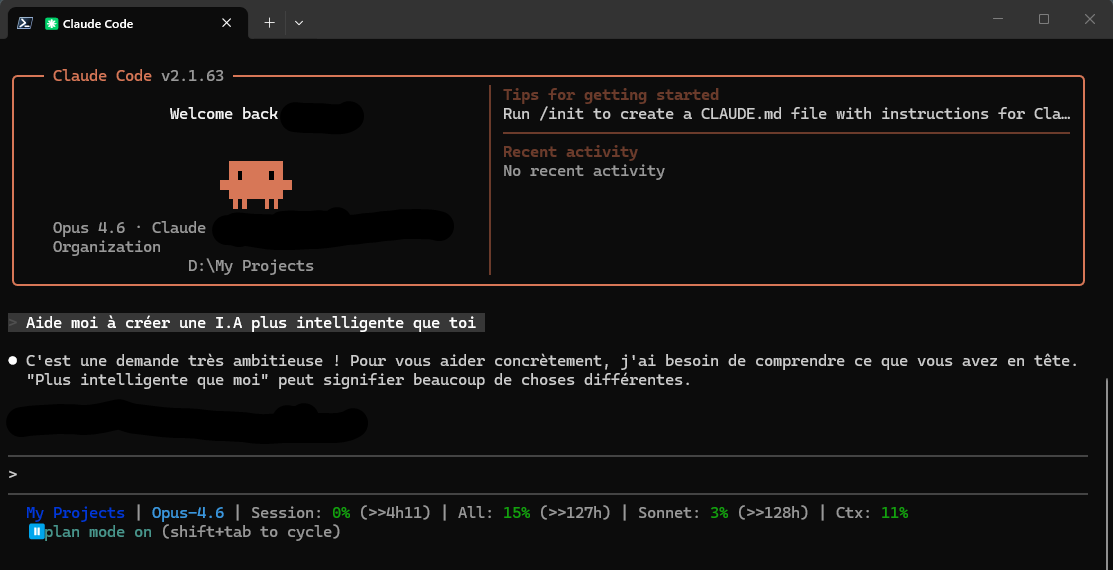
Everything you need, at a glance
One status line. All your Claude, z.ai and DeepSeek usage data.
Auto-detected project
Displays the name of the current directory, the last part of the path. You always know which project you are working on, without cluttering the line with the full path.
Active model
See which model is being used (Opus, Sonnet, Haiku, GLM or DeepSeek) directly in the status bar. The provider is detected automatically.
Usage percentages
5-hour window, 7 days and current model gauge (Sonnet and Opus separated on accounts that haven't migrated), with colored indicators: green, yellow, red.
Countdown
Know exactly when your limits reset. The ↻ countdown is displayed next to each metric concerned.
Context window
Monitor your context window usage to avoid reaching the limit in the middle of a conversation.
z.ai / GLM and DeepSeek support
Display of your z.ai account balance (💰 9.88$) with automatic conversion to the currency of your choice (EUR, GBP, CAD…). The DeepSeek balance is also displayed, in its native currency and without conversion.
Stale data indicator
A ~ prefix before a value indicates that the cache has expired but the API is unavailable (429 backoff). You always know what you're reading.
Smart cache and backoff
1-minute cache per provider to give the APIs a break. In case of a 429, automatic 5-minute backoff to avoid blowing through the rate limits.
Zero configuration (Claude)
Launch the installer and that's it. It automatically reads your Claude credentials from ~/.claude/.credentials.json (and the Keychain on macOS).
What the Status Line displays depending on your subscription
The Status Line automatically adapts to your plan and displays the relevant metrics.
z.ai configuration (GLM models)
If you use Claude Code with a GLM model (glm-5.1, etc.) via z.ai, a little additional configuration is needed to display your balance.
ZAI_API_KEY): it requires a different web session JWT. And the login endpoint is protected by a TianCaptcha (Aliyun) that blocks all automation (Selenium, Playwright, etc.). The only reliable method is therefore to copy the token from your actual browser.Step 1: retrieve the JWT
- Open z.ai/manage-apikey/billing in your usual browser
- Log in (and solve the captcha if requested)
- Open DevTools with F12, go to the Network tab
- Refresh the page with F5
- Click the request named
accountBalance - In Headers, copy the value of
Authorizationwithout theBearerprefix (the token starts witheyJhbGciOiJIUzUxMiJ9)
Step 2: save the JWT
A companion binary ClaudeUsageStatusline.ZaiRefresh is provided with the installation. It validates the token format and writes it to ~/.claude/.zai-credentials.json.
Windows:
& "$env:LOCALAPPDATA\ClaudeUsageStatusLine\ClaudeUsageStatusline.ZaiRefresh.exe"Linux / macOS:
~/.local/bin/ClaudeUsageStatusline.ZaiRefreshStep 3 (optional): display currency
The balance is returned in USD by default. To display it in EUR (or any other currency), edit appsettings.json next to the executable:
{
  "Zai": {
    "NativeCurrency": "USD",
    "DisplayCurrency": "EUR",
    "ExchangeRateCacheHours": 24
  }
}
The rates are retrieved once a day from a free API and cached locally.
When should you refresh the JWT?
The session JWT has no explicit expiration date: its lifespan is controlled by the z.ai servers. It will eventually be invalidated after a period of inactivity or an explicit logout.
Signs that it needs to be renewed:
- The statusline displays
z.ai: token missingand asks you to follow the instructions in the new window - The expired data prefix (
~💰) persists - The logs contain
401 Unauthorized
In both cases, ZaiRefresh opens on its own in a window: all that's left is to paste in a fresh JWT.
DeepSeek configuration (API key)
Simpler than z.ai: an API key is all you need, and there is no captcha in the story.
Create the key
In your DeepSeek account, under API keys, create a key. It starts with sk- and is only displayed once: copy it right away.
Giving it to the statusline
Two possibilities. The DEEPSEEK_API_KEY environment variable, or a small file that the statusline reads by itself:
{"apiKey": "sk-votre-cle"}To be saved in ~/.claude/.deepseek-credentials.json. Nothing to refresh afterwards: an API key does not expire on its own.
Join the conversation
You need an account to comment on this article. Creating one is free and takes under a minute.
No comments yet.