Azure DevOps API for your AI systems
Your AI assistant can read code, but it can't see what's sleeping in your Azure DevOps repositories. This API builds the bridge: projects, files, commits, pull requests, all in simple JSON, with your own access rights.
Let's be clear from the start: I designed it first and foremost for machines. An AI agent, an MCP server (the protocol that lets an assistant like Claude call external tools) or a simple script. Humans are welcome, but the idea is that an AI can ask “show me this file” or “what changed in this commit” without having to guess how the Azure DevOps API works, which is powerful but frankly pretty dense.
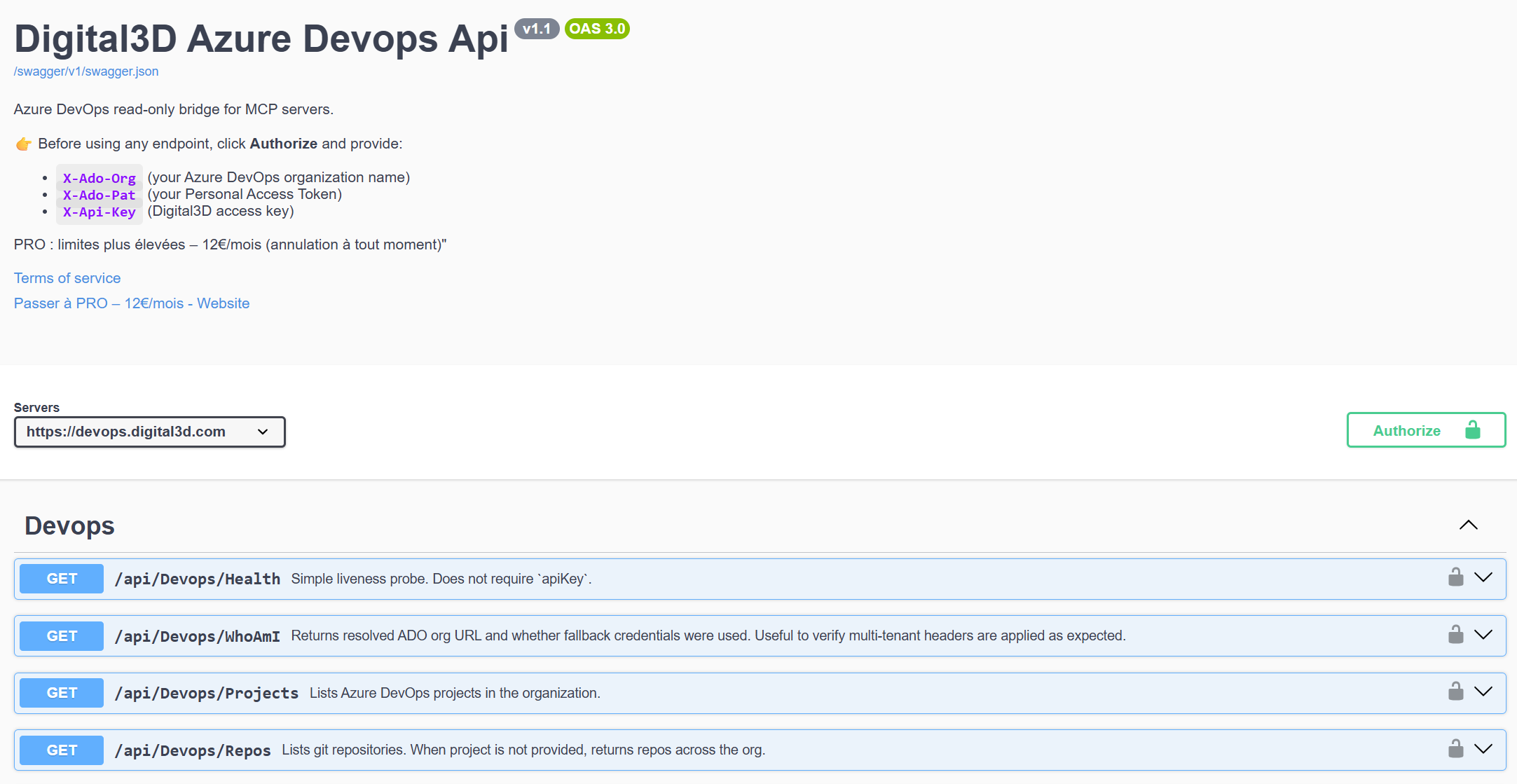
Here's the Swagger page for the service, where all the calls are listed:
Free or PRO: what you get
Both plans give access to the same calls, including writing. The only difference is the number of requests per day. The green bar shows what you can request in a day.
Free API
€0, your account key is all you need
- 10 requests per day
- All calls, reading and writing included
- Up to 50 files read in a single request
- Enough to connect an agent and see whether it understands your code
PRO API
€12 per month, all my software included
- 1000 requests per day
- Enough for an agent working all day on your repositories
- The complete TV guide over 11 days and my software thrown in
- Active from the next request, with the same key
The counter resets at midnight UTC, so at 1 a.m. or 2 a.m. in France depending on the season. Ten requests can go fast with a chatty agent. My advice to make them last: the files:batch call brings back up to 50 files and only counts as a single request.
What the API can do
About twenty calls, all under https://devops.digital3d.com/api/Devops/. I grouped them by need rather than alphabetical order:
| Need | Calls | What it returns |
|---|---|---|
| Find your way around | Projects, Repos, Repos/{repoId} | The organization's projects, Git repositories (all of them, or those in a project), and a repository's details with its default branch. |
| Browse the code | tree, files, search | A folder's tree, the list of all the files in a branch, or a pattern search such as **/*.cs. |
| Read files | file, fileAt, files:batch | The raw contents of a file on a branch or at a specific commit, or up to 50 files at once. |
| Track the history | branches, tags, commits, pushes | The branches, tags, commit log (filterable by path and branch), a commit's details and the list of its modified files. |
| Review pull requests | pullrequests | Active, completed or abandoned pull requests, and the details of one of them. |
| Write | write | Creating or modifying a file, delivered as a push containing a single commit. |
There are also two service calls: Health, which responds without a key and is never counted, and WhoAmI, which confirms that your headers are properly understood.
The three headers to send
Every request carries three headers. One for me, two for Azure DevOps.
| Header | What you put in it | What it is for |
|---|---|---|
Authorization | Bearer VotreCleApi | Your Digital3D key. It's the one that carries the quota. |
X-Ado-Org | The name of your organization | Tell the API which Azure DevOps organization to query. |
X-Ado-Pat | Your personal access token | Call Azure DevOps on your behalf, with your permissions and nothing more. |
The Digital3D key. Create an account, verify your email address, then copy the key displayed in your account. It's the same key as for my other services. If you used the old version, pay attention: the X-Api-Key header has been replaced by Authorization.
The organization name. Sign in at https://dev.azure.com and look at the address. In https://dev.azure.com/ma-societe/, the value to send is ma-societe. It's the organization name, not that of a project.
The personal access token (the PAT, a sort of password with limited permissions). In Azure DevOps, click the user settings icon at the top right, then "Personal access tokens" and "New Token". Give it a meaningful name, a short duration (30 or 90 days), and only the permissions you need: "Code (Read)" and "Project and Team (Read)" are enough to read everything. Add "Code (Read & Write)" only if your agent needs to write. Copy the token right away, Azure DevOps only displays it once.
A word of caution, because it's your code: this token gives access to your repositories, and it passes through my server with every request. Give it the minimum permissions, an expiration date, and revoke it the day you no longer need it. That's what I would do in your place.
First calls
Start by checking that the three headers go through:
curl "https://devops.digital3d.com/api/Devops/WhoAmI" \
  -H "Authorization: Bearer VotreCleApi" \
  -H "X-Ado-Org: ma-societe" \
  -H "X-Ado-Pat: VotreJetonAzure"
Next, the list of repositories. Each repository has an identifier (a GUID), and that's what all the other calls expect instead of {repoId}:
curl "https://devops.digital3d.com/api/Devops/Repos?project=MonProjet" \
  -H "Authorization: Bearer VotreCleApi" \
  -H "X-Ado-Org: ma-societe" \
  -H "X-Ado-Pat: VotreJetonAzure"
To search for all the C# files in a repository, on its default branch:
curl "https://devops.digital3d.com/api/Devops/Repos/{repoId}/search?glob=**/*.cs" \
  -H "Authorization: Bearer VotreCleApi" \
  -H "X-Ado-Org: ma-societe" \
  -H "X-Ado-Pat: VotreJetonAzure"
And to read several files in a single request, it's a POST with the list of paths:
curl -X POST "https://devops.digital3d.com/api/Devops/Repos/{repoId}/files:batch" \
  -H "Authorization: Bearer VotreCleApi" \
  -H "X-Ado-Org: ma-societe" \
  -H "X-Ado-Pat: VotreJetonAzure" \
  -H "Content-Type: application/json" \
  -d '{ "paths": ["/README.md", "/src/Program.cs"], "refName": "main" }'
Anywhere a branch is expected (refName), you can write main or the full form refs/heads/main. If you don't put anything, the repository's default branch is used.
Comparing and writing
Now, it becomes really interesting for an agent. To find out what separates two commits:
curl -X POST "https://devops.digital3d.com/api/Devops/Repos/{repoId}/diffs/commits" \
  -H "Authorization: Bearer VotreCleApi" \
  -H "X-Ado-Org: ma-societe" \
  -H "X-Ado-Pat: VotreJetonAzure" \
  -H "Content-Type: application/json" \
  -d '{ "baseCommit": "abc123", "targetCommit": "def456", "summaryOnly": true }'
With summaryOnly set to true (the default value), the response is a compact summary: the totals and the paths of the modified files. That's intentional. An AI pays for every word it reads, so there's no point serving it Azure DevOps's raw response when a summary is enough.
And to write a file:
curl -X POST "https://devops.digital3d.com/api/Devops/Repos/{repoId}/write" \
  -H "Authorization: Bearer VotreCleApi" \
  -H "X-Ado-Org: ma-societe" \
  -H "X-Ado-Pat: VotreJetonAzure" \
  -H "Content-Type: application/json" \
  -d '{
    "path": "/docs/notes.md",
    "content": "# Notes\n\nEcrit par mon agent.",
    "branch": "feature/notes",
    "createBranch": true,
    "commitMessage": "Ajout des notes"
  }'
Okay, let's be serious for two minutes: letting an AI write to a repository requires guardrails. Three settings exist for that. createBranch creates the branch if it doesn't exist, which lets the agent work separately and lets you review its work in a pull request. expectHeadCommit announces the last commit the agent saw: if someone pushed in the meantime, the write is refused instead of overwriting their work. And the size of the written file is capped on the server side. And if you don't want any writing at all, the safest option remains a read-only token: Azure DevOps will refuse it on its own.
Under the hood
A few technical choices that explain the API's behavior.
You're the one who says, with each request, which organization to query and with which token. The same API therefore serves any Azure DevOps organization, and it sees nothing more than what your token authorizes.
The Digital3D key is checked first. A request is counted as soon as the key is accepted, whatever Azure DevOps responds afterward. A bad organization name or an expired token therefore costs a request: hence the interest in validating your configuration with WhoAmI once and for all, rather than fumbling around.
Two 401 errors look alike and don't have the same cause. The one that carries the WWW-Authenticate: Bearer header comes from me: the Digital3D key is missing or refused, and nothing is counted. The one that doesn't carry it comes from Azure DevOps: look at X-Ado-Org and X-Ado-Pat.
Responses are capped to remain manageable: 50 files and around 2 MB per grouped read, 2000 entries by default for a file list, 50 commits by default for a log. These caps are configured with the top and maxItems parameters.
Track your quota
As soon as the key is accepted, each response carries three headers: X-RateLimit-Limit (your limit for the day), X-RateLimit-Remaining (what you have left) and X-RateLimit-Reset (the time of the reset, in Unix seconds). A well-behaved agent reads X-RateLimit-Remaining and eases off before running into the wall.
429: the day's quota is used up. TheRetry-Afterheader gives the number of seconds to wait before the reset.503: the service was unable to verify the key. Try again 30 seconds later.- Other errors are a JSON object with an
errorfield that says what's wrong.
Testing without writing a line of code
Everything is documented in the API Swagger. Click on "Authorize", fill in the three fields (the key, the organization, the token), then try each call with the "Try it out" button. Just be careful: these tests count towards your quota, like any request. This same Swagger serves as a contract for an AI: give it the address of the file https://devops.digital3d.com/swagger/v1/swagger.json and it discovers the calls all by itself.
Why a subscription?
Because all this runs on a server that I pay for. The free version stays there for testing and light use. If an agent works on your repositories every day, the PRO subscription at €12 per month raises the limit to 1000 requests per day, includes the complete TV guide and all my software, and that's what keeps the service alive. Commercial use without a subscription is not allowed. And if you need more, write to me.
Join the conversation
You need an account to comment on this article. Creating one is free and takes under a minute.
No comments yet.