OpenAI launches two new transcription models: should you really migrate?
At the end of July, OpenAI sent an email to its developers to announce two new transcription models, that is, two engines that convert voice into text. gpt-transcribe processes already recorded files. gpt-live-transcribe handles live situations. The demonstration that accompanies the announcement is frankly bold: in the presentation video, a guy plays guitar while singing, and the text is displayed correctly on the screen. His own guitar is screaming at him, and the machine still keeps up.
If you are already using whisper-1 in a project, the real question is not whether the demonstration is impressive. You want to know if you should migrate. I looked at the performance, pricing, and especially the features that disappear in the process. Curiously, the email places less emphasis on this part.
Two models because there are two professions
People often confuse the transcription of a file with that of a live conversation. However, these are not the same uses.
gpt-transcribe works on a finished file. You send it a recording, and it returns the text. This is the mode suitable for a podcast, a meeting report, a voice memo, or a video to be subtitled. It processes audio at about 34 times its real speed. Therefore, one hour of recording is transcribed in less than two minutes.
gpt-live-transcribe works differently. It maintains an open connection and sends the text as the person speaks, piece by piece. This is the model intended for live subtitles or a voice assistant. You can also choose between speed and accuracy with five settings, from minimal to xhigh. The longer you wait, the more context the model has and the fewer mistakes it makes.
These are two endpoints, meaning two distinct access points in the API. The second one costs four times more than the first. So no, you don't choose live "just in case".
The numbers, and what they don't say
OpenAI publishes its results on its own testing platform, named Real World Audio Benchmark. The measure used is the word error rate. In other words, the percentage of words that the machine writes incorrectly.
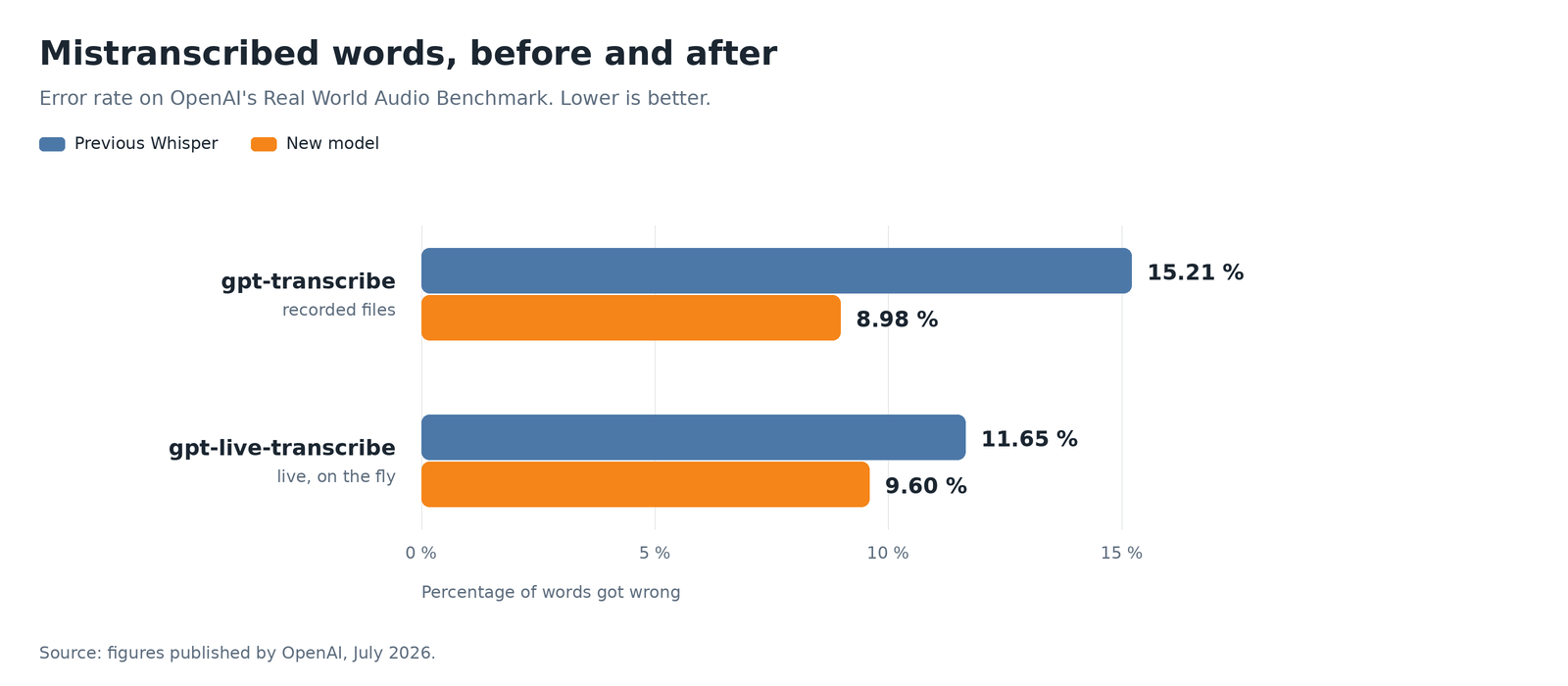
The file mode makes almost half as many mistakes. The live mode, on the other hand, mainly earns the right to say it has improved.
On another testing platform, based on Common Voice voices in 22 languages, the gap is even more pronounced. The old Whisper made mistakes on 40.37 percent of the words. The new one drops to 19.27 percent. It makes less than half the mistakes on exactly the same audio.
Now, the cold shower. An article that merely repeats the seller's numbers is useless. In an independent ranking reported by The Decoder, gpt-transcribe ranks fourth. Its error rate reaches 3.31 percent, compared to 2.3 for Scribe v2 from ElevenLabs, 2.9 for Gemini 3 Pro, and 3.0 for Voxtral Small from Mistral. OpenAI has made progress. OpenAI has not won.
One last precaution, and it's the most useful: these percentages are averages obtained on clean audio. With a really difficult corporate recording, like a multi-person conference call, error rates can rise to 43.8 percent. No model can save a bad microphone. A good microphone costing 60 euros will always improve your transcription more than changing models.
The price, which is the pleasant surprise
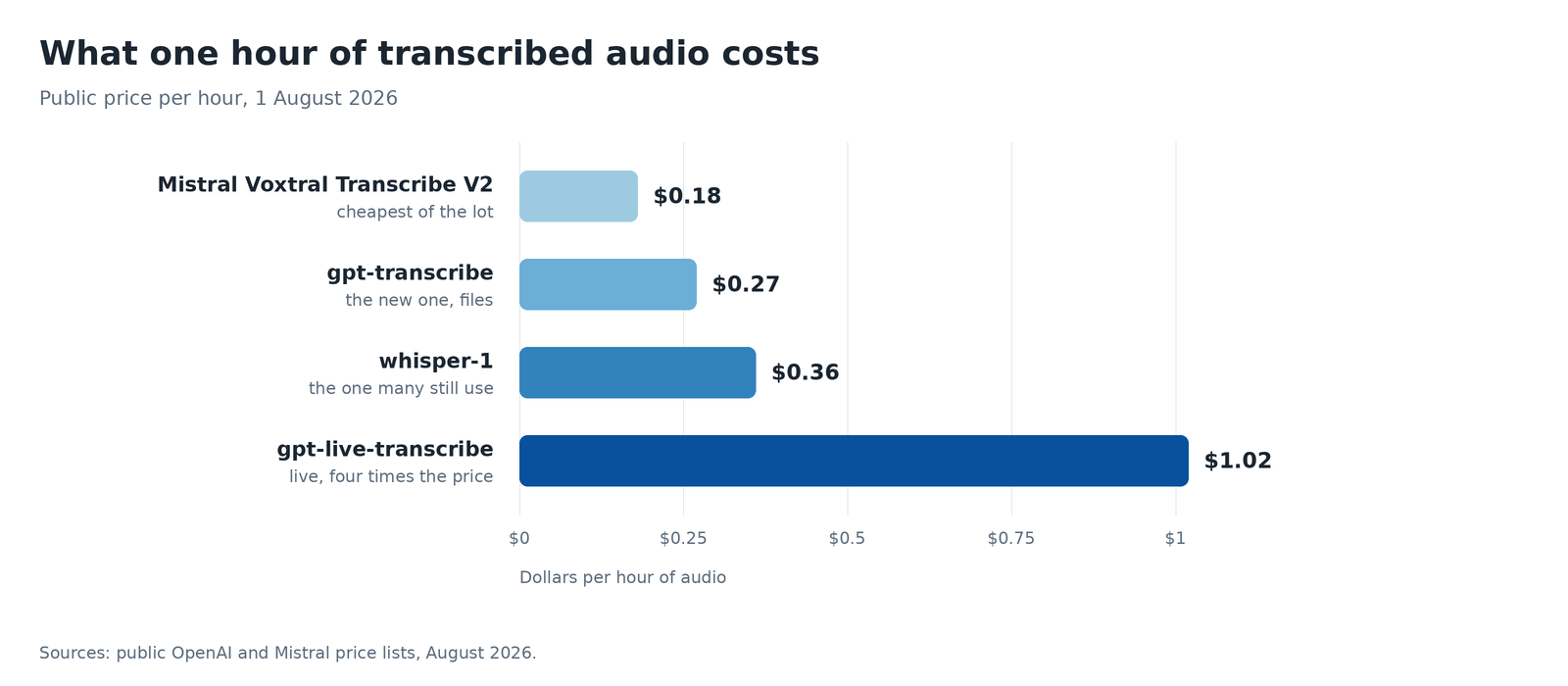
For once, the newest is also cheaper. Let's enjoy it, it doesn't happen every day.
One hour of transcribed audio costs 36 cents with whisper-1, compared to 27 cents with the new model. That's 25 percent less for a significantly better result, which is still quite rare in this business. The live transcription costs 1.02 dollars per hour, nearly four times the file mode rate. At this price, a two-hour meeting subtitled live costs the price of a coffee.
What you really gain: you can finally brief the model
The price drop is nice, but the main change is elsewhere. You can now provide context to the model before it listens to the recording.
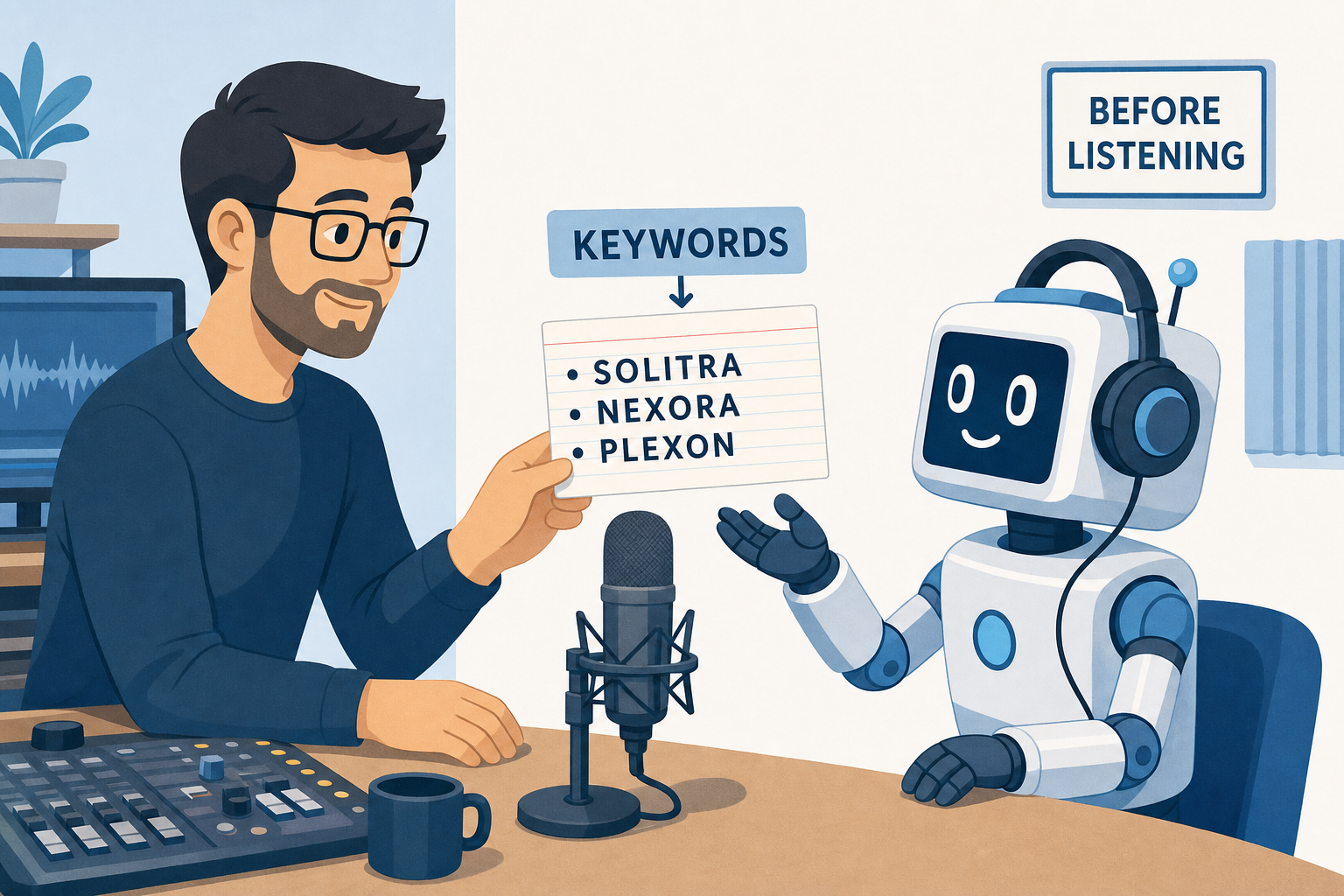
The model has never heard the name of your product. Now, you can give it to him beforehand, instead of correcting everything afterward.
Three parameters allow you to guide it. prompt describes the situation in a free sentence. keywords contains the words that the machine cannot guess on its own: proper names, product references, acronyms, or industry jargon. languages indicates the expected languages. This prevents a sentence in English, slipped in the middle of a meeting in French, from going off the rails.
from openai import OpenAI
client = OpenAI()

with open("meeting.mp3", "rb") as audio:
    result = client.audio.transcriptions.create(
        model="gpt-transcribe",
        file=audio,
        response_format="json",
        prompt="Technical meeting on billing software.",
        extra_body={
            "keywords": ["Digital3D", "AC-42", "PostgreSQL"],
            "languages": ["fr", "en"],
        },
    )
print(result.text)
If you have ever spent evenings correcting the same proper name, butchered by Whisper at every occurrence, you understand why this paragraph is the most important part of the article. There are two details left to know. Each keyword must fit on a single line and must not contain the characters < and >. You should also not send both the old parameter language, in singular, and the new languages, in plural.
What you lose by leaving whisper-1
This is the part that the OpenAI email carefully forgets to mention. Yet it is the one that can decide the migration.
- Word-by-word timestamps disappear. If your project highlights the word read or replaces the audio when clicking on a word, this function no longer works.
- The subtitle formats
SRTandVTTalso disappear. The new model returns text, not a subtitle file ready to be loaded into a video player. - The translation to English is no longer available in the same way. The old translation endpoint is not compatible. You then need to use a real translation model.
- Speaker identification allows you to know who is speaking and when. It still exists, but on a third model:
gpt-4o-transcribe-diarize.
In other words, whisper-1 has not become useless. It has become specialized. At OpenAI, it remains the only one to offer all these functions.
Let's take this opportunity to kill a rumor: no, whisper-1 is not doomed. I checked the official deprecation page, because the opposite is read everywhere. The announcement of July 20, 2026, plans to withdraw several audio models on January 20, 2027, but it never mentions whisper-1. Therefore, it is not urgent to flee. It may be interesting to migrate, which is not at all the same thing.
And what about the free Whisper that you download, what is it worth?
I was asked the question, and it deserves its own section. Many people are unaware that this version exists. Yes, Whisper is available for free. Since September 2022, OpenAI has been publishing the code and model weights, that is, the learned data that allows it to function, under a free license. You download everything, run it on your machine, and you pay nothing to anyone. No subscription, no per-minute billing, no account to create.
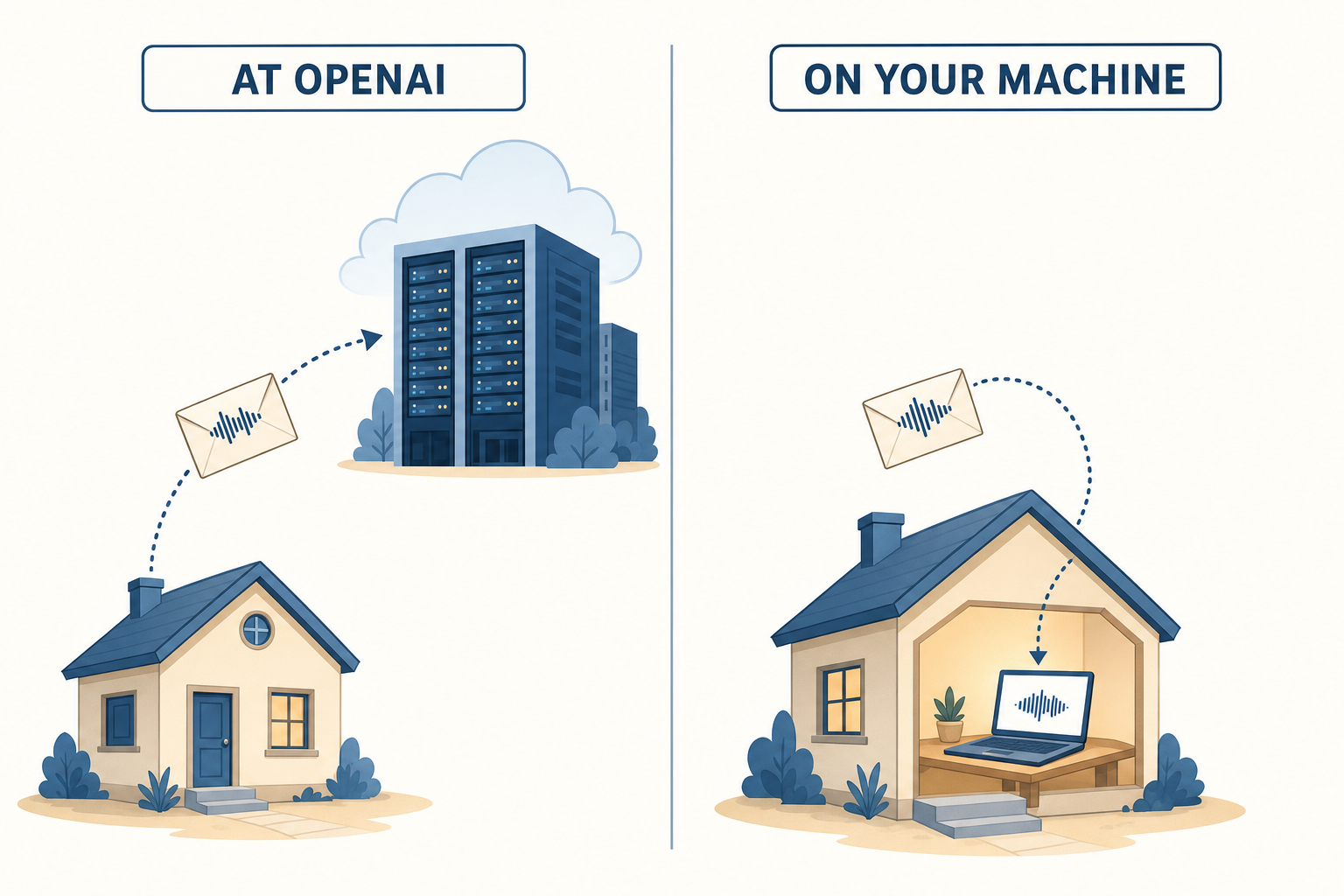
The only argument that really matters. On the left, your audio goes away. On the right, it stays at home.
The difference with whisper-1, and it will surprise you
Here is the counterintuitive part. whisper-1, the paid model offered by the API, internally uses the large-v2 version. The most recent free version is large-v3. According to OpenAI, it has 10 to 20% fewer errors than large-v2.
Yes, you read that right. The free version you download is newer and more accurate than the one charged at 36 cents per hour. It is often read the other way around. That is false.
The local model can also produce word-by-word timestamps, create subtitles, and translate content into English. These are precisely the three functions you lose with gpt-transcribe. It imposes no file size limit, whereas the API rejects files larger than 25 MB.
What it demands from your machine
The trade-off is hardware. The large model contains 1.55 billion parameters, the values learned during its training. It takes up about 3 GB on your disk and requires around 10 GB of video memory, that is, the memory of the graphics card, to run comfortably. In short, you need a real graphics card. The kitchen laptop might struggle.
However, there is a version designed for less powerful machines. Released in October 2024, it is called large-v3-turbo. It uses 4 decoder layers, the part that produces the text, instead of 32. As a result, it is about 8 times faster and requires 6 GB of video memory instead of 10. Its error rate only increases by 0.3 to 0.7 points. It is one of the best compromises I have seen in this field. The only concession is that it can no longer translate.
For actual speed, two software share the field. whisper.cpp is written in C and leverages the graphics processor of Macs. On a recent Apple machine, it processes audio about 10 times faster than its actual duration. An hour of recording thus takes six minutes. faster-whisper targets NVIDIA cards and the processor, with a speed of about 3 times real-time in economy mode. On Mac, whisper.cpp wins hands down.
So why pay, exactly
The calculation breaks a small illusion. At 27 cents per hour of audio, you need to transcribe more than 1,100 hours to spend the equivalent of 300 dollars. One thousand one hundred hours is more than a month and a half of audio without any breaks. A decent graphics card costs more. And it does not manage its updates, drivers, and failures on its own. Strange lack of initiative.
Local processing is therefore not justified by its price, except with industrial volumes. Its real arguments lie elsewhere, and they are much stronger.
- Your files do not leave your machine. For medical data, legal documents, a confidential interview, or simply your family's voice messages, this argument often suffices to settle the debate.
- The model works without the internet, on a train, in a plane, or on a construction site.
- You have no size limit, no quota, and no model cut off overnight because a provider decided to clean house.
- No cost is charged to you for usage. Zero euros per hour remains zero euros per hour, even if your service works better than expected.
There remains one limit, and it is simple: the two new models presented in this article are not downloadable. gpt-transcribe and gpt-live-transcribe remain with OpenAI. The keywords, the error rate of 8.98%, and the guitar demonstration will not end up on your hard drive. The free version gives you the previous generation of Whisper, but in a newer and more accurate version than the paid Whisper. And without a bill. That’s already not so bad.
So, are we migrating or not
For the file mode, the call address does not change. You still use POST /v1/audio/transcriptions. You modify the model name, and that’s it. OpenAI offers a transcription guide and a migration recipe that get straight to the point. Here is the short answer, in the order of questions to ask:
- You transcribe files and you only want to retrieve text: migrate without hesitation. It's cheaper, more accurate, and the call remains the same.
- You need timestamps, subtitles, or translation: stick with the old model. There is no direct replacement. You would lose one function to gain another.
- You want live: it's a project, not a simple migration. It requires another endpoint, a permanent connection, audio in
PCMat 24,000 Hz, and a budget four times higher. Only do it if live is truly at the heart of the product. - Your recordings are confidential, or you want an invoice that stays at zero: look at the local free Whisper, just above. You lose the keywords, but you gain the fact that nothing leaves your premises.
- Your audio is poor and filled with jargon: test before choosing. It's precisely in this situation that the new model can take the most advantage, thanks to the keywords.
In any case, keep an exit door in your code. The model name should be in a configuration file, not in the middle of your calls. Right now, models are changing faster than the projects that use them.
And speech synthesis, what about that
If your application also speaks with gpt-4o-mini-tts, the model that transforms text into voice, nothing changes on that side. No new features have been announced. The rate remains around $0.015 per generated minute.
However, a vicious trap deserves thirty seconds of verification. If you chose a dated version of the model instead of its generic name, the version gpt-4o-mini-tts-2025-03-20 was unplugged on July 23, 2026. It has been replaced by gpt-4o-mini-tts-2025-12-15. Look precisely at what your configuration contains. A call that fails in production on a Sunday night for this reason is the kind of evening you don't forget.
What does this change for you
You don't write code and everything above seemed incomprehensible? Here’s what these changes can produce in your life, without you having to configure anything.
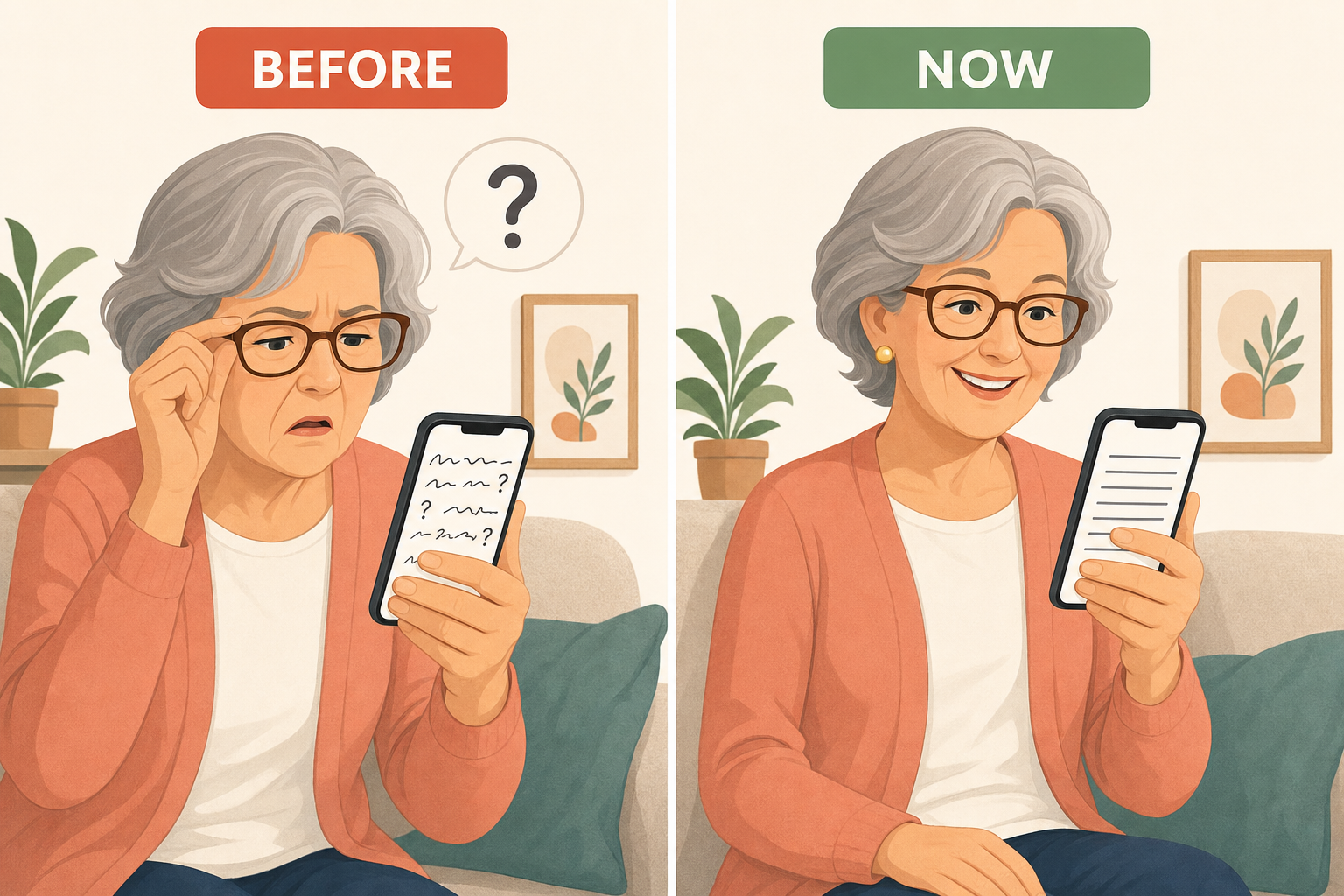
The difference between a text you have to decipher and a text you can simply read. That's it, and it's huge.
1. Voicemail becomes readable
You know that two-minute voicemail you can't listen to because you're on the train. Your phone is already transcribing it, but it's doing it poorly. The first names are butchered, the numbers are made up, and you end up listening to the message anyway. Going from 15 to 9 percent of incorrect words is not an abstract statistic. It's the difference between a text you decipher and a text you read.
2. Subtitles on videos where no one articulates
Automatic subtitles work very well with a presenter speaking clearly in a studio. They collapse in front of a video of a cousin explaining something in a noisy kitchen, with an accent and unfinished sentences. The new models specifically target this type of audio. The guitar demonstration serves to show this. For a person who hears poorly, it's not comfort. It's a matter of access.
3. The doctor's appointment
Many doctors dictate their report after a visit. A miswritten drug name can have real consequences. It's not just a typo. Providing the model, before transcription, with the names of medications and industry vocabulary helps precisely to reduce this problem. It's not the most spectacular part of the announcement. It's probably the most useful.
Let's be honest: none of this will appear tomorrow morning. These are building blocks that applications will be able to integrate in the coming months, without necessarily shouting it from the rooftops. You may not see any announcement. You will simply notice, one day, that transcribing your voicemails annoys you less.
What I think about it
The real novelty is not the error rate. It lies in the keywords. For years, transcription worked like a black box: you sent sound, you received text. If your box's name came out mangled, all you had to do was run a search-replace. Being able to indicate to the model what it will hear solves, in a line of code, one of the most frustrating problems of transcription.
For the rest, let's stay clear-headed. OpenAI ranks fourth in accuracy, Mistral remains cheaper, and OpenAI has mainly just caught up. The guitar demonstration is successful, but it was chosen and filmed by the seller. The only measure that really matters is yours. Take ten minutes of your worst recording, with the accent, noise, and impossible proper names. Run it through both models. It costs less than a cent and will teach you more than all the test benches in the world.
Join the conversation
You need an account to comment on this article. Creating one is free and takes under a minute.
No comments yet.