Huawei SUN2000 Inverter and Jeedom

If you have solar panels and a Huawei SUN2000 inverter, you can retrieve data directly via TCP/IP through the inverter or via an API on the FusionSolar application (requested from your installer), as I don't like going through a "cloud" system that doesn't belong to me and is therefore not directly accessible, I looked for how to "pump" the information directly from my inverter and it wasn't simple. My goal was to take all the information and send it to my home automation box Jeedom.
My research
On Jeedom there are a few "Modbus" plugins, it's an application that takes TCP/IP data from an internal table of the inverter but none of them work, or rather, I have no visual data, after 2 days of trying everything I gave up... too long and tedious. So I rolled up my programmer sleeves and developed a small Console application (available on Windows and Linux), then I ran this application on my Synology which extracts data from my inverter, it works! Now it has passed the value to a virtual command on Jeedom and bingo!

How does it work?
1) Download the Windows or Linux version, extract all files into a directory of your choice
2) Open the Preferences.json file with Notepad
3) Change the address of your inverter, the port which by default is 502 and also the Device Id if it is different from 1
4) Make sure to put the URL where you want to push the values from an address (note only in GET), you will notice in the URL there is an example, you can put the ID {0} and the value {1} of a virtual command Jeedom (see next section point 8)
5) Also put just below, the ID of the virtual command separated by a comma with the address from which the value will be sent (see next section point 8)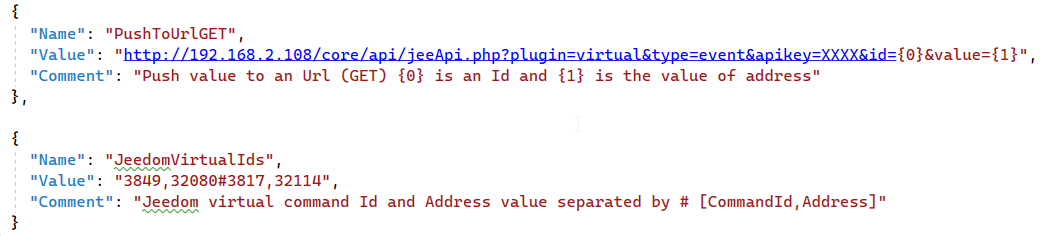
The address 32080 of the SUN2000 inverter corresponds to the current production at the present moment, and the address 32114 corresponds to the value of the day's production, you can of course add other values that you find in the PDF file of HUAWEI interfaces
In Jeedom:
1) You must have installed the VIRTUAL plugin
2) Once the plugin is installed, go into the plugin
3) Add a new Virtual component that you call "Inverter"
4) Open "Inverter" and go to "Commands" above
5) Add a command via the "Add a virtual info" button and put the name "Prod Now"
6) Add a second virtual command and put the name "Prod Day"
7) Save, now you have an ID that appears in front of each command, note these IDs in the Preferences.json file of the application you downloaded
8) In the "Equipment" tab under the Virtual plugin, you have the exact URL with your Jeedom key to push the values, copy this URL and put this URL in the Preferences.json file but #cmd_id# must be replaced by {0} and #value# by {1}
Run everything and see if the virtual command of Jeedom is updated
On Synology
You can run the LINUX version on Synology via a task to execute at startup
1) Make sure that the ".Net 6" package is properly installed on your Synology
2) Download the Linux version of the application and copy all files into a directory of your choice on your Synology (for example in "/home/RepInverterTCP")
3) You must give execution permissions on the "InverterTCP" file, you can do this in "File Station" by right-clicking on the file, then "Properties" under the "Permission" tab, check all boxes (or do it via ssh with the command "chmod +rwx InverterTCP")
4) On your Synology, open the "Control Panel" then "Task Scheduler"
5) Create a new "triggered" task, a window will open, make sure to select "Startup" next to "Event", it will launch the InverterTCP app as soon as the Synology starts
6) Under the "Task Settings" tab, you need to note the path where the "InverterTCP" file is located, for example: /volume1/homes/[your username under synology]/RepInverterTCP/InverterTCP
That's it! For the first time manually execute the task with the "Execute" button, you can see the logs if the app runs well under the "Action" > "Show result" button
Installation
Note, for Windows or Linux (as well as Synology) you must have previously installed the .Net 6 Runtime (https://dotnet.microsoft.com/en-us/download/dotnet/6.0)
You can download the PDF file with the addresses of Huawei's SUN2000 interface here: PDF
Join the conversation
You need an account to comment on this article. Creating one is free and takes under a minute.
No comments yet.