Windows Trick: How to Change the PATH Environment Variable Without Restarting
When you want to type in a command line and enter the name of a software, you sometimes get this kind of error:
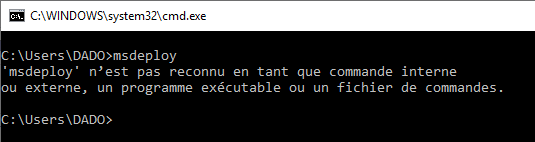
But you do have, for this example, the file msdeploy.exe located in "C:\Program Files (x86)\IIS\Microsoft Web Deploy V3", however it cannot be called everywhere, you would need to explicitly type: "C:\Program Files (x86)\IIS\Microsoft Web Deploy V3\msdeploy.exe" which is cumbersome and long.
There is therefore the possibility to tell Windows where exactly "msdeploy.exe" is located, wherever you are, this is called Windows environment variables. To access it, you need to open the control panel, then click on "System and security", then on "System" and on the left side of the screen, click on "Advanced system settings", a window opens like this:
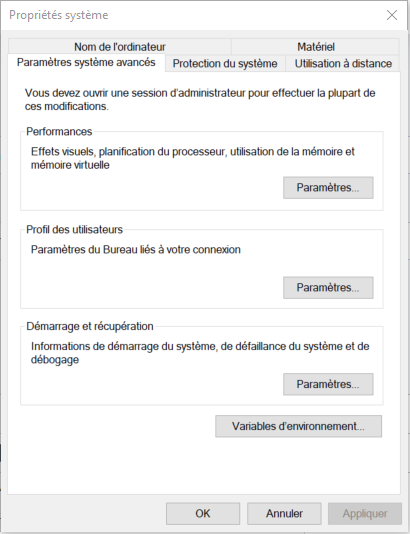
You now click on the button at the bottom "Environment Variables", a new window opens and you will find at the bottom, in the 2nd part of the screen, a list of system variables, but the most important is "PATH", find it in the list and double-click on it:
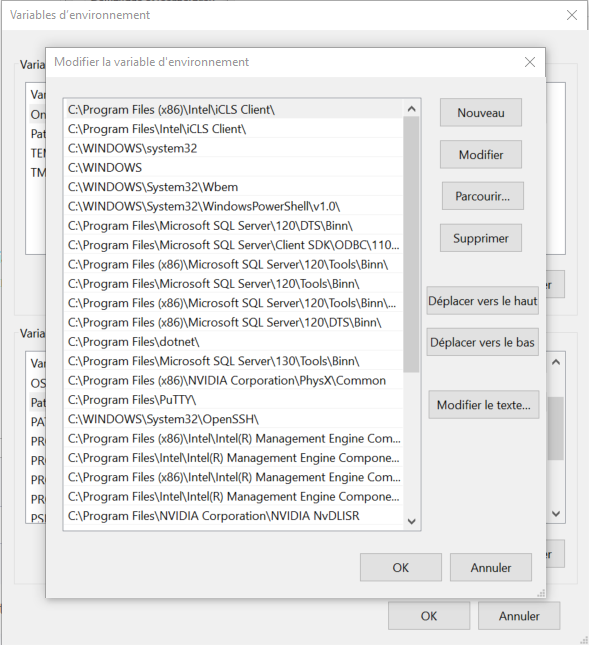
Just add the new path here so that Windows, wherever you are, finds the executable "msdeploy.exe", so click on the "New" button and add the path, for the example, I add my path here: "C:\Program Files (x86)\IIS\Microsoft Web Deploy V3" without the quotes.
If you open a command line again and type "msdeploy", you will still get the same error:
Normally you need to restart the machine, but here, on a server, you cannot restart as you wish, so here is a VBScript that allows you to reload the variables with a single click:
Set oShell = WScript.CreateObject("WScript.Shell")
filename = oShell.ExpandEnvironmentStrings("%TEMP%\resetvars.bat")
Set objFileSystem = CreateObject("Scripting.fileSystemObject")
Set oFile = objFileSystem.CreateTextFile(filename, TRUE)

set oEnv=oShell.Environment("System")
for each sitem in oEnv
    oFile.WriteLine("SET " & sitem)
next
path = oEnv("PATH")

set oEnv=oShell.Environment("User")
for each sitem in oEnv
    oFile.WriteLine("SET " & sitem)
next

path = path & ";" & oEnv("PATH")
oFile.WriteLine("SET PATH=" & path)
oFile.Close
Create a Text file, paste this code and rename this file with the .vbs extension, and here is a script that will refresh the variables without restarting the PC!
Join the conversation
You need an account to comment on this article. Creating one is free and takes under a minute.
No comments yet.