ChatGPT and Codex: why your quota is draining 40% faster, and what changes in December?
In Monopoly, there's that card everyone loves: “Bank error in your favor”. Well, OpenAI has just played the reverse version. For a week, its two new models, GPT-6.2 Astra and GPT-6.2 Sol, cost less than expected in your ChatGPT subscription. Not on purpose, obviously. It's been fixed since November 26, and as a result, you're going to hit your limit up to 40% faster. And that's not all: in December, ChatGPT and Codex will share one single counter.

The tank didn't leak. It's the counter that started counting properly again
An error… in your favor
When you pay $20 a month for ChatGPT Plus, you don't get unlimited access: you get a work allowance, a quota, which resets every five hours, with a weekly limit on top of that. Every question you ask uses up a bit of it, and a question asked to a large model uses more than one asked to a small one. It's exactly the same system as the five-hour windows in Claude Code, which I keep an eye on every day.
When GPT-6.2 Astra and Sol came out on November 19, nobody knew that OpenAI had made a mistake in the calculation: these two models were “incorrectly counted with a discount” for most users, as acknowledged by Thibault Sottiaux, who looks after Codex and ChatGPT at OpenAI, on X on November 26. In plain English: you were working with a discount nobody had planned for.
It's fixed. The same work therefore eats up more of your quota now: compared with last week, you reach the end 40% faster with Astra, 25% faster with Sol. Put another way, Astra leaves you with roughly two thirds of what you had, and Sol three quarters. The other models don't change.
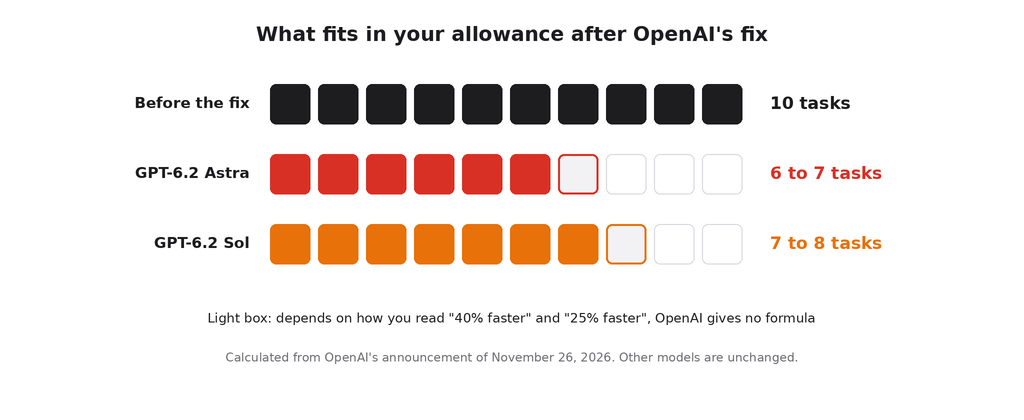
Where you used to do ten tasks, Astra leaves you with six or seven. Sol is a little more generous
Concretely, what does “40% faster” mean? OpenAI does not give the exact formula, and depending on how you do the calculation, it doesn't come out the same. The Compound site did both readings: if you used to do ten tasks with Astra before reaching the limit, you have six or seven left. With Sol, seven or eight. It's not a catastrophe, but on a busy day, you feel it.
The compensation: a reset to keep in reserve
Good point for OpenAI: they aren't making you pay the difference for the past week. And every Go, Plus, Pro and Business account gets one free “reset”, just one, which stays set aside until you use it. On Plus, it fills your five-hour quota AND your weekly quota right to the brim.

The reset is the gas can in the trunk. You don't empty it to go buy bread
There are a few rules to know. You can only use it if you've already used up at least a fifth of one of your quotas, so not to “fill up” an already full tank. It activates in the usage settings, on the website or in the desktop app, but not from the mobile app. And an expiration date is displayed before you confirm, so look at it.
My advice: don't burn it on a quiet Tuesday afternoon. Save it for the day when you have a deadline, a project to deliver, and you run out of gas at 4 p.m. That day, you'll be glad you kept it!
In December, one counter for everything
The second piece of news is more important, and it concerns everyone who codes with Codex, OpenAI's agent that writes and modifies code in your project. Until now, there were two separate counters: one for conversations in ChatGPT, another for Codex and ChatGPT Work (the mode where ChatGPT performs tasks for you). If you had exhausted one, you could still work with the other. A sort of spare wheel.
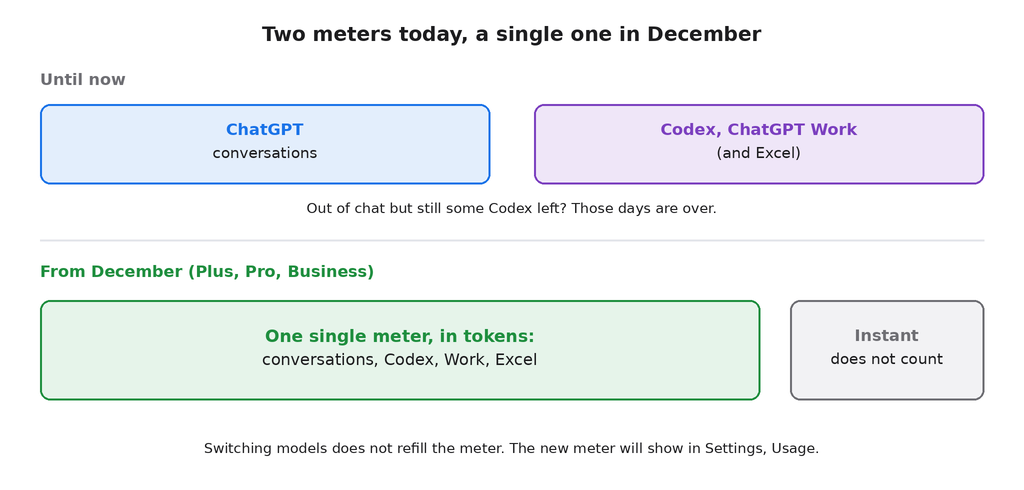
Two tanks, that was handy. In December, only one remains, and the whole family drinks from it
Starting in December, on Plus, Pro and Business subscriptions, all of that goes into the same pool, as OpenAI's help page explains. And the pool is measured in tokens. A token is a small piece of a word, the unit an AI uses to read and write: in French, roughly count one token for every three or four letters. The bigger the model and the longer the task, the more it uses.
One exception, and it matters: Instant mode, the fast version for simple questions, does not touch the counter. OpenAI warns that changing models does not refill the pool. If you have burned through everything with Astra, switching to Sol will not give you anything back.
OpenAI says that most people will not have to wait more often than they do today. Maybe. But the size of the new pool for each subscription is published nowhere. We are being asked to trust a counter whose maximum we do not know, the very day after a counter error. Sorry, but I am going to keep an eye on the gauge.
How many messages, really?
The Codex pricing page does give some ranges, per five-hour period, for the Plus subscription. They are broad, because a small question and a major project modification obviously do not cost the same.
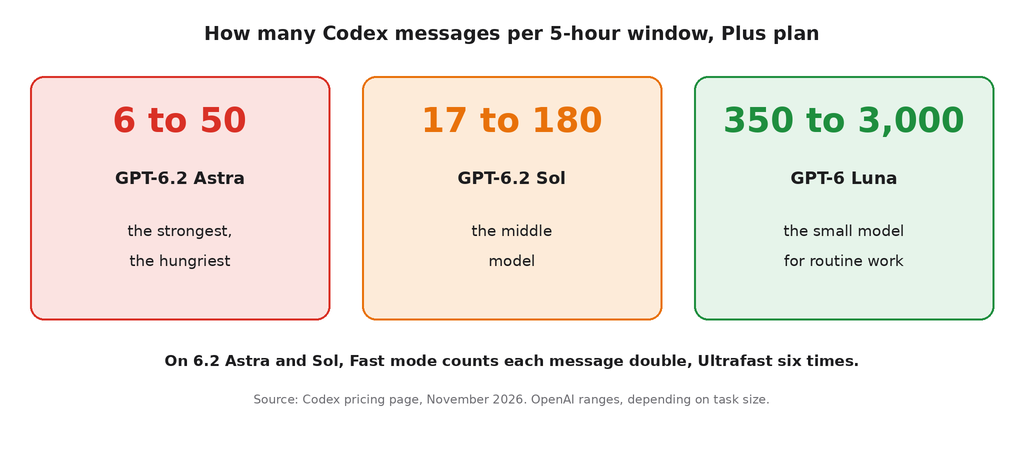
Six messages in five hours in the worst case. You had better choose them carefully
Six messages in five hours with Astra, in the worst case, according to OpenAI's own page. Six! Imagine: you ask Codex to make major changes to your project, one at a time, and after the sixth, it's over, come back in five hours. Your coding evening stops there. With Sol, for the same requests, you would have more like twenty. And the page does not even say whether these figures already take the correction into account. Watch out for the speed modes too: on Astra and Sol, Fast mode counts double and Ultrafast counts six times. Compound did the math: where you used to do around sixty tasks, you do ten. The "faster" button is a quota vacuum.
My tricks for not running dry
I had already done the same exercise on Anthropic's side, in September, about the Claude Code quota that runs out too fast. The recipes are the same, and they work.
First, the right model for the right task. Astra is the surgeon: you do not call it to put on a bandage. A quick question, a rewording, a short summary, that goes into Instant, which costs nothing. For everyday code, Sol does very well. And Astra, you save it for the real headache, the one where Sol has already gotten stuck.
Next, forget Ultrafast except in an emergency. Waiting thirty seconds longer costs less than dividing your quota by six.
Third trick: check the credits. When the quota is exhausted, ChatGPT can keep going by drawing from paid credits, if you have any. And watch out: writing "ask me before using credits" in your instructions does not add any validation step, according to Compound. It is in the billing settings that you need to decide whether you allow automatic reloading, and up to how much.
Finally, as soon as the new meter arrives, go to Settings, under Usage, to see what a normal week costs you, then a busy week. You'll quickly know whether your subscription holds up or whether you need to change your habits.
And the next time you see a billing error in your favor, enjoy it, but don't get used to it. At Monopoly as at OpenAI, the bank always ends up landing on its feet!
Sources
- OpenAI, help center: understanding ChatGPT and Codex usage limits (in English)
- OpenAI: Codex pricing and limits page (in English)
- Notebookcheck: ChatGPT limits reached up to 40% sooner after OpenAI's fix (in English)
- Compound: ChatGPT and Codex's shared meter, the calculations (in English)
Article written with the help of Claude Code, proofread and corrected by me.
Join the conversation
You need an account to comment on this article. Creating one is free and takes under a minute.
No comments yet.