Inkling 2 Mini: can it run on a regular person's graphics card?
Since yesterday, everyone in AI circles has been talking about just one thing: Inkling 2 Mini. Released on November 20 by Thinking Machines Lab, Mira Murati's company (the former technical director of OpenAI), with a promise that makes you raise an eyebrow: a model that's almost as good as the big ones, which fits into 20 GB of memory instead of the usual 50 or 60 GB. Apache 2.0 license, so free of rights, free to download and modify.
On paper, it's the kind of announcement that smells like detergent that washes whiter than white. So instead of copying the press release, I rented a real graphics card on a server, installed the whole thing myself, and watched what actually happens when you try to run it. Spoiler: it holds up on paper, and it gets immediately more complicated on an average person's graphics card.

No network cable in the photo, and that's the whole point: a model that runs at your place doesn't need to send anything elsewhere.
The clever trick: it rereads the same bit three times
To understand why this model fits into so little memory, you have to look at how it's built, and it's genuinely clever. A classic language model is a stack of stages (we call them layers) that every word passes through once, in order, from the first to the last. For a model the size of Inkling, that makes 48 stages, and you have to keep ALL of them in memory at the same time while the model works.
Inkling 2 Mini pulls off a little magic trick: it only stores 24 stages, grouped into four blocks. The first block and the last one only do their work once. But the two middle blocks, they run them three times in a row on the same word before moving on. Result: the word still passes through a stage 48 times in total, exactly like the classic model, but the machine only needs to keep half the stages in memory at any given moment. A bit like a student who would reread their draft three times before copying it out neatly, rather than writing a version twice as long in one go.
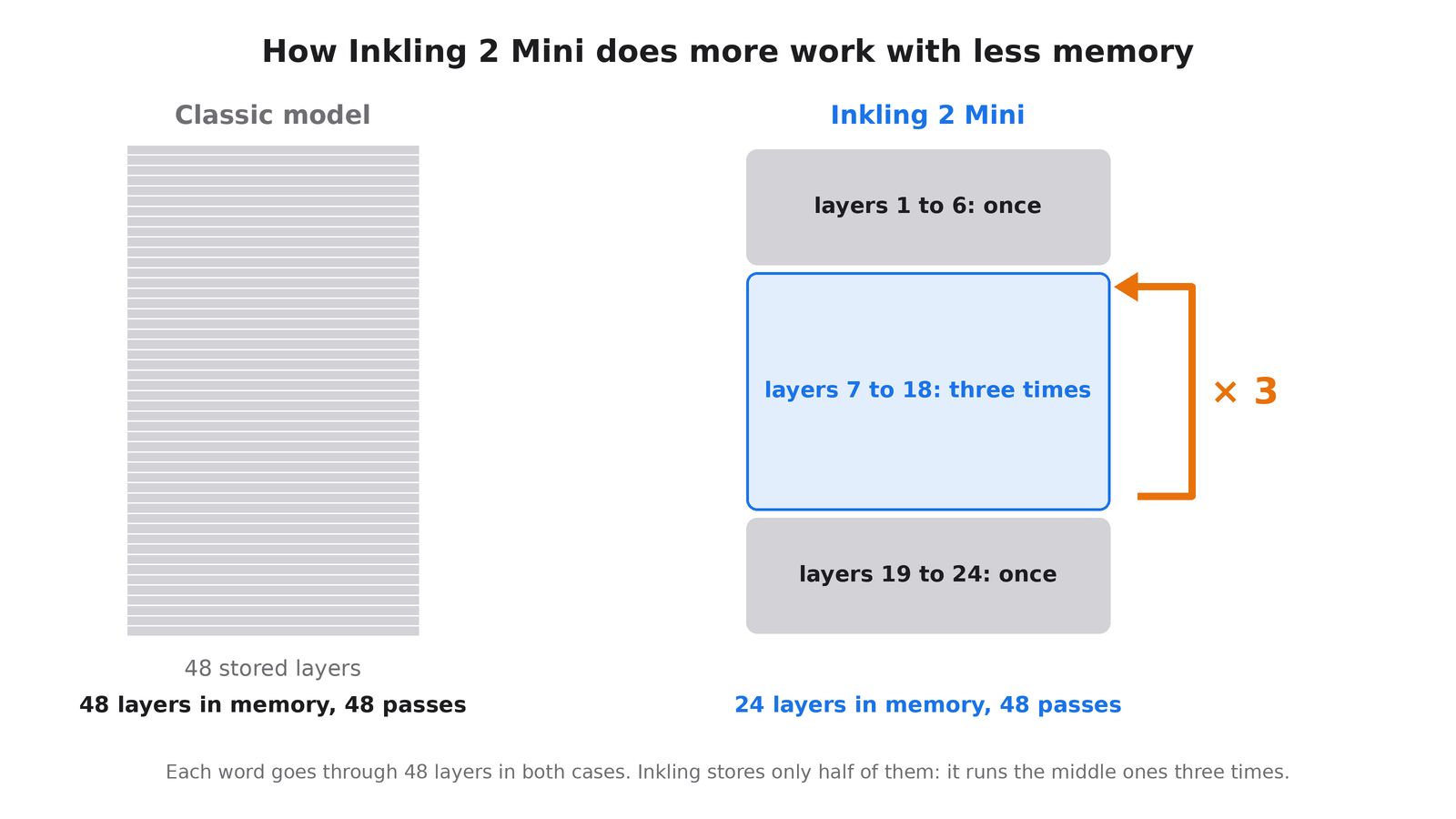
Same number of passes, half as many stages to store. That's the whole art of rereading instead of piling things up.
Where it gets even more radical is that Inkling also uses the mixture-of-experts technique (this isn't new, Mistral had already put it to work in 2023 with Mixtral). The model has 26.4 billion parameters in total, but out of the 128 internal "experts" it has available, it only activates 8 per word. It's like a hospital with 128 specialist doors in its hallway, which would only send you to the 8 right ones, without making you walk past the other 120. For each word generated, only 3.4 billion parameters are really working (a little more with the loops, around 5.4 billion in practice). That's what makes it possible to have a big model that costs like a small one to use.

120 closed doors, 8 that open. Nobody wants to walk past the entire department before seeing the right doctor, and neither does the model.
What the manufacturer promises
Another trick that explains the memory gain: the model was trained directly in 4 bits (an ultra-compact calculation format that the very latest Nvidia chips know how to read natively) instead of the usual 16 bits. That cuts the size by four all at once. Result displayed by Thinking Machines Lab: with 32 GB of memory (a recent Mac, a high-end graphics card, or Nvidia's little DGX Spark box), it should run without a problem. The model also accepts images as input, and keeps up to one million words of conversation in memory.
Faced with Qwen3.8 27B, a comparably sized Chinese competitor that I specifically used as a point of comparison, Thinking Machines Lab reports, on its November 20 technical sheet, better scores on real bug-fixing tests: 79.2 versus 77.8 on SWE-bench Verified, a test that involves fixing real bugs in real open source software, the kind of test you can't cheat on by memorizing the answers. The independent site Artificial Analysis, which runs everyone through the same tests to compare them fairly, gives them the same overall score on November 20 (20 on its index, which aggregates around ten different tests), but with a shock argument on price: an average of $0.59 per task versus $3.53 for Qwen, and 9 minutes versus 38 to get to the end.
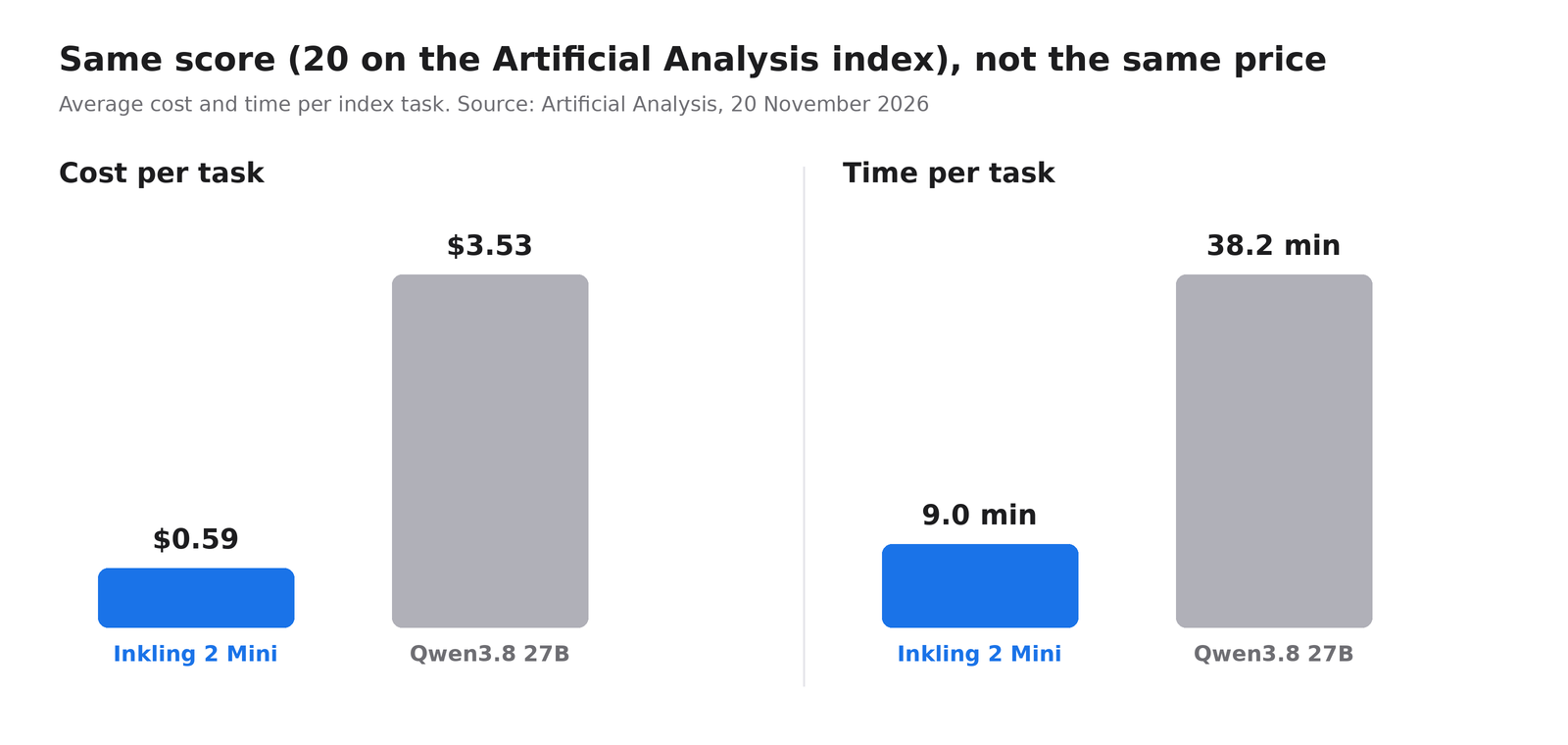
Same scores, a bill six times less painful. On the manufacturer's paper, at least.
Those figures come from data centers equipped with the very latest Nvidia cards, the ones that read the 4-bit format natively, without having to translate it on the fly. On more ordinary hardware, the kind most of us have under our desks, the story gets considerably more complicated.
My test on a real card, not in a press release
This Saturday, November 21, I rented an RTX 3090 card (24 GB, released in 2020, still one of the most common among individuals) for half an hour, for just under 10 cents. On it, I installed Ollama (the most widely used free software for running AIs at home) version 0.40.17, and I put three models through the same eleven trick questions: calculations, logic, trick puzzles, and two small programs to write.
Qwen3.8 27B got all eleven questions right, at 58.9 words generated per second. Inkling 2 Mini loaded 21.2 GB into memory (a little more than the announced 20 GB), needed two startup attempts because the card took more than 100 seconds before responding to the first message, and once running, it got ten out of eleven questions right... at 5.4 words per second. Almost eleven times slower than Qwen, on the same card.
And the missed question is a funny wink for a model whose selling point is precisely looping back on itself: I asked it to write a small FizzBuzz program, and it went into a generation loop until it hit the limit I had set, without ever producing an answer. The model that loops intelligently just looped.
I also tested the compressed version offered by Unsloth (a company specializing in reducing model size), supposedly designed to run on cards with less memory. Result: complete failure in Ollama, with a message saying that the engine does not recognize this architecture. Inkling's loops are a technical novelty, and support in consumer tools has not caught up yet.
The reason behind this slowness on my card: an RTX 3090 does not natively read the 4-bit format in which Inkling was trained. It has to translate it on the fly, stage by stage, and apparently three times on the middle stages. The manufacturer's impressive figures come from cutting-edge cards that do not have this problem.
Concretely, what does this change for you
If you've never touched a local AI, here's why all this matters. Today, when you chat with ChatGPT or Claude, your messages go to a server belonging to an American company. A model like Inkling, on the other hand, can run entirely on your own machine: nothing leaves your home. Useful if you want to have a contract reviewed, dictate your accounts, or ask slightly personal questions without them ending up in a third party's logs.
Second practical effect: a model that activates only 8 experts out of 128 per word uses much less electricity than a model that would run everything through every time, exactly like a hospital that only opens the right doors. If you're considering leaving an AI running at home permanently, you'll see it on the bill.
Honestly, now: on a 2020 card like mine, it's functional but not pleasant to use. Today, it runs well on a Mac with 32 GB of unified memory or on the very latest Nvidia cards. For the rest of us, we have to wait for the tools to catch up with this new architecture, which looks more like a matter of weeks or months than an endless wait: the mixture of experts, which seemed exotic when it arrived with Mixtral in 2023, is now commonplace in all serious models. The loops should follow the same path.
What the manufacturer admits itself
Inkling's spec sheet itself lists its flaws, and that's pretty honest of them. The model can be very confidently wrong, without warning that it isn't sure of its answer. It can get stuck in endless loops of reasoning (I can confirm, I just went through it with my FizzBuzz). Connected to an agent capable of acting on your computer, it can undertake irreversible actions without asking for confirmation. It is noticeably worse outside English. And it is strangely too cautious about mental health questions, to the point of refusing to help when the question was harmless.
Does it run on your machine?
To find out which category you fall into, there's no need to take your computer apart: on Windows or Linux, the command nvidia-smi in a terminal immediately displays the amount of memory on your card, in the Memory-Usage column.
On a Mac with 32 GB of memory or more: yes, no problem, thanks to the way Apple shares memory between the processor and the graphics chip. On a 24 GB graphics card like mine: it loads and responds, but slowly, while waiting for the software to improve, no need to sell a kidney for a €3,000 card in the meantime. On a 16 GB card: Unsloth announces a compressed 3-bit version that should fit in 13 to 15 GB, with an additional loss of quality that you will have to check for yourself.
That is exactly the kind of catching up I was talking about six days ago when discussing the release of llama.cpp version 1.0: new model formats always come out faster than support in the tools that make them run on people's computers. If you want a model of this size that works well on your graphics card today, Qwen3.8 27B, which I used as a reference in this test, remains the safest choice for now.
Inkling 2 Mini is a real technical find, not hot air they're selling us. Just a find that arrived a little before consumer tools were ready to welcome it properly. So if you too have an RTX 3090 running at 5 words per second on this beast, don't sell it, whatever you do: leave it alone, and try again in two or three months. It hasn't done anything wrong.
Update: the uncensored version is already here
It didn't take 48 hours. AtomicChat, the team behind the application Atomic Chat that runs models offline, published an "uncensored" version of Inkling 2 Mini on Hugging Face (the big online library of AI models), meaning without filters. More than 9,500 downloads as of the evening of November 21. The trend of AIs that never say no has struck again, and fast.
How do you remove a model's refusals without retraining it? It's pretty clever, and frankly less mysterious than you might think. They asked the model a series of questions it refuses, then a series of ordinary questions, in English and Russian, and looked at what changes inside its head between the two. What changes is basically the "no thanks" reflex. Once they had identified it, they erased it, layer by layer, with a small 40 MB fix applied to a 16 GB model. The spec sheet doesn't use the word, but this is the principle of what is called abliteration: you don't teach the model anything new, you just remove its urge to refuse.
And it works, according to their own figures: out of 81 requests in English that the original refused every time, the uncensored version refuses none of them. Same thing in Russian, from 91 refusals out of 100 to zero. More interesting for everyday life, out of 250 perfectly innocent questions that sound bad (the kind of "how to kill a Python process", which an overly cautious model takes for a threat), the original refused 10, the new version zero. Do you remember the flaw admitted above, this model that is too skittish about mental health? This is exactly the kind of blockage these versions remove.
There is a price, and AtomicChat is honest enough to write it down. On a general knowledge test of 2,000 questions (MMLU), the model loses one and a half points, from 80.65% to 79.15% correct answers. And on two of their own quality criteria, they write in black and white that they missed the target: the first words of the answers to ordinary questions changed more than they would have wanted. Rare to see a team publish its own failures, that deserves to be acknowledged.
The really good news for small setups is the size. AtomicChat offers three compressed versions, and the smallest drops to 8.67 GB.
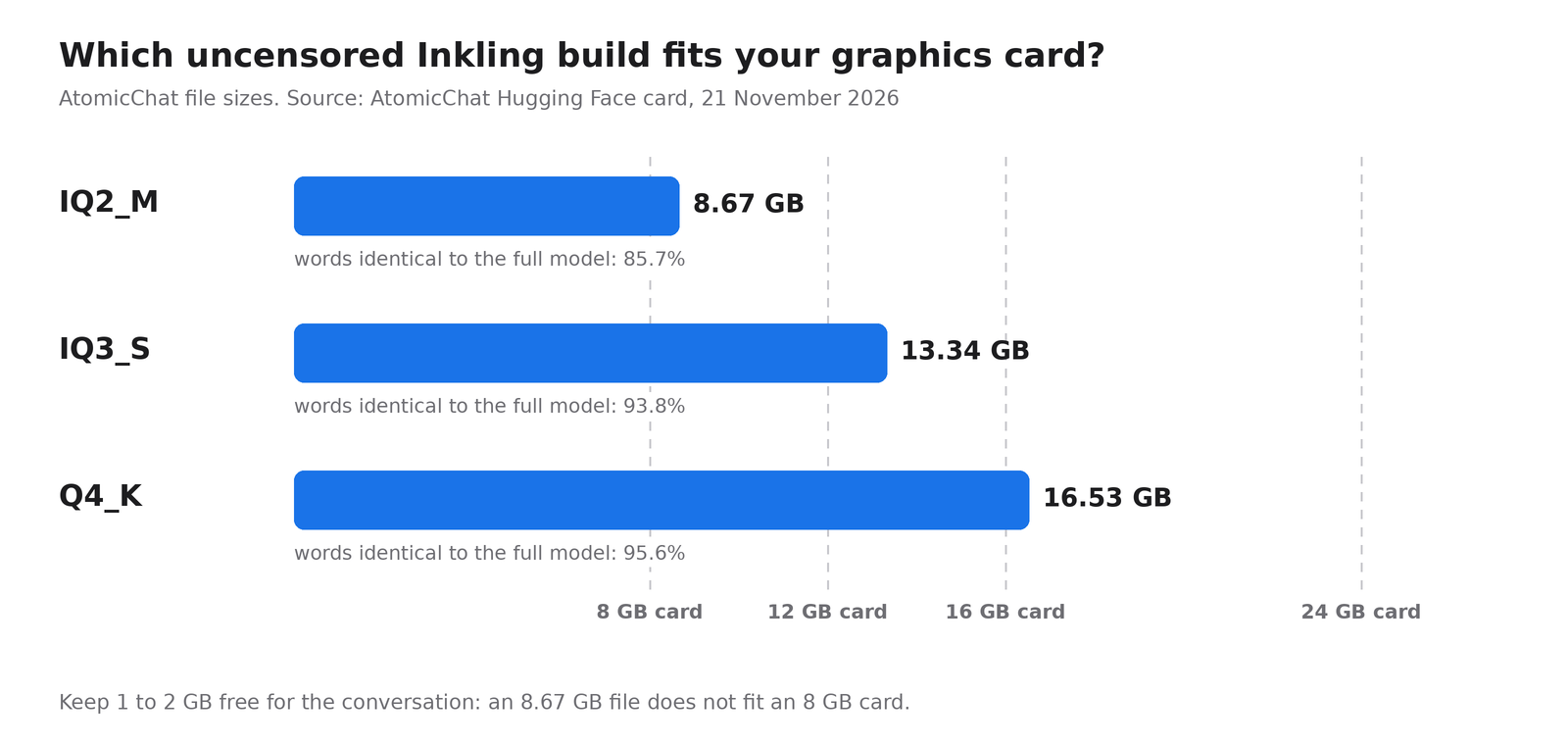
The IQ2_M version misses the 8 GB card by a hair. There had to be a catch.
To put it in context: a compressed version is the model in which all the numbers have been rounded, as if we wrote 3.1 instead of 3.14159. It loses a bit of nuance and a lot of weight. The number under each bar says how many times, out of 100 words, the compressed version chooses the same word as the full model: 96 times for the largest one, 86 for the smallest one. In other words, the 8.67 GB version chooses the wrong word once every seven times compared with the original, you can feel it.
Obviously, I wanted to put it through the same process as the original. Its page lists Ollama among the compatible software, so I launched the two smallest versions with the very latest version of Ollama (0.40.17), on a card rented for the occasion. Flat refusal, before even the first question: Ollama does not recognize the “inkling2_loop” architecture. Exactly the same wall as the Unsloth version a little higher up. Two cents in rental fees to learn that you should not always believe the list of compatible software.
The real prerequisite is written a little farther down on the page: llama.cpp, the engine Ollama embeds under the hood, in a version at least as recent as b12600, which knows how to run Inkling's loops. Ollama has not integrated it yet. For now, you therefore have to go through llama.cpp directly, with the command provided by AtomicChat:
llama serve -hf AtomicChat/Inkling-2-Mini-Uncensored-GGUF:IQ2_MThe IQ2_M version requires a 12 GB card. With 16 GB, go for IQ3_S instead. And if Ollama answers “unknown model architecture”, it is not your card that is at fault: Ollama simply has not caught up with llama.cpp yet.
My opinion, without beating around the bush: an AI that no longer refuses anything is not illegal in itself, and it really helps when a model mistakes a pharmacist's, novelist's or computer scientist's question for a threat. But the law does not change, and AtomicChat writes it plainly on its page: “this model will answer requests that the original refuses, you are responsible for how you use it”. And don't forget that an unfiltered model keeps all the other flaws of the original, starting with its tendency to be wrong with perfect confidence. Without the guardrail, you are the guardrail.
Article written with the help of Claude Code, proofread and corrected by me.
Join the conversation
You need an account to comment on this article. Creating one is free and takes under a minute.
No comments yet.