PostgreSQL 19 is out: what changes for developers?
On Wednesday, November 19, PostgreSQL 19 was released, two months later than its usual September appointment. If you're not a developer, PostgreSQL is a database: the big cupboard where applications store everything they need to remember, customer accounts, orders, inventory. It's free, open source, and it runs behind a crazy number of websites and apps. As for me, it's the database I use every day in my projects, alongside SQL Server. So when there's a new version, I read it line by line. And this time, there are two new features that are really going to make my life easier.

The elephant is PostgreSQL's mascot. And it puts its shelves in order without closing the library
The big cleanup without closing shop
To understand the first one, you need to know a little secret about PostgreSQL. When you modify or delete a row, it doesn't erase it right away. It keeps the old version, in case another query that's still running needs it. Automatic cleanup, the famous VACUUM, comes back afterward to mark those old rows as reusable, but it doesn't give the space back to the disk. On a table that's modified very often, the file ends up weighing much more than the data it actually contains. English speakers call this “bloat”, the swelling.
Until now, to get that space back, there was VACUUM FULL. It rewrites the table cleanly... but locks it for the entire operation. Nobody reads, nobody writes. On a big table, that means an app brought to a stop, or the famous “site under maintenance” on a Sunday at 3 a.m. A lot of people therefore went through pg_repack, an extension that has to be installed separately, which does the job without blocking everything.
PostgreSQL 19 finally includes it directly, with a new command: REPACK. It replaces VACUUM FULL and CLUSTER, which are still there so nothing breaks, and above all it knows how to work gently:
-- Rebuild the table and give the free space back to the disk
REPACK clients;

-- Same thing, without blocking reads and writes
REPACK (CONCURRENTLY) clients;

-- Rebuild and sort the rows along an index (what CLUSTER used to do)
REPACK clients USING INDEX clients_pkey;
With CONCURRENTLY, PostgreSQL copies the table while the app keeps running, notes the modifications that arrive in the meantime, and only takes its exclusive lock right at the end, for the time it takes to swap the files. A short moment, instead of the entire length of the operation. For you, if you're not a developer, that means less “scheduled maintenance” on the sites you use.

With REPACK (CONCURRENTLY), we tidy up the aisles while customers do their shopping
Still, read the conditions before rushing in. The table must have a primary key, it can't be partitioned, split into several pieces, and the command refuses to run inside a transaction. The documentation also warns about a subtler trap: a query that started before the REPACK and rereads the table right afterward can see it... empty. It's rare, but it's better to know before launching it in the middle of the day on the invoices table!
The “get it or create it”, finally without a hack
The second one is something every developer has hacked together at some point. You want to save a client if they don't exist yet, and if they already exist, retrieve their record. Since 2016, PostgreSQL has known how to do “insert, and in case of a duplicate, do nothing” (ON CONFLICT DO NOTHING). The problem is that in that case, it doesn't return anything at all. So we cheated with a fake update, just to get the row back:
-- The old trick: a fake update, only to get the row back
INSERT INTO clients (email, name) VALUES ('alice@example.com', 'Alice')
    ON CONFLICT (email) DO UPDATE SET name = EXCLUDED.name
    RETURNING *;
It works, but it rewrites the row for no reason. And what does every rewrite leave behind? An old version of the row. Enough to make the table swell, and there you have it. PostgreSQL 19 therefore adds DO SELECT, which does exactly what we wanted from the start:
-- PostgreSQL 19: insert, or simply return the existing row
INSERT INTO clients (email, name) VALUES ('alice@example.com', 'Alice')
    ON CONFLICT (email) DO SELECT
    RETURNING *;

-- Same, and lock the existing row so nobody changes it meanwhile
INSERT INTO clients (email, name) VALUES ('alice@example.com', 'Alice')
    ON CONFLICT (email) DO SELECT FOR UPDATE
    RETURNING *;
DO SELECT: you already have a reservation, so we hand you your key instead of opening a second room for you
The little gifts you notice afterward
The COPY command, which is used to export data in bulk, can now output JSON, the text format that all web apps understand. No need to go through a script to turn an export into a JSON array:
-- Export a query straight to JSON, as one single array
COPY (SELECT id, email FROM clients) TO STDOUT (FORMAT JSON, FORCE_ARRAY);
The functions that fetch the previous or next row (lag, lead and their cousins) can finally skip gaps. Handy for a series of readings with missing values:
-- For each reading, the last temperature that is not missing
SELECT measured_at, temperature,
       lag(temperature) IGNORE NULLS OVER (ORDER BY measured_at) AS previous_known
FROM readings;
The random() function can also pick a date at random between two bounds, which will please those who make test data. And foreign key checks (which stop you from saving an order for a customer who doesn't exist) are faster: according to the PostgreSQL team, bulk inserts were almost twice as fast in their tests.
Read this before migrating
JIT, a just-in-time compilation that theoretically speeds up large queries, is now turned off by default. The team explains that PostgreSQL was too often wrong about when it was worth using. If you run a lot of large analytical queries, measure before and after, and turn it back on if needed with jit = on.
Passwords stored the old-fashioned way, in MD5, now trigger a warning after every successful login. MD5 is an old method, deprecated since version 18, and it will disappear in a future version. It's time to switch to SCRAM, the modern method. RADIUS, an old network authentication system, is disappearing entirely. If you had manually set the number of input-output processes (io_workers), the setting is replaced by two new ones, io_min_workers and io_max_workers. And if you use full-text search or the pg_trgm extension (approximate search, the one that finds “Brussels” when you type “Bruxel”), the team recommends rebuilding these indexes after the update.
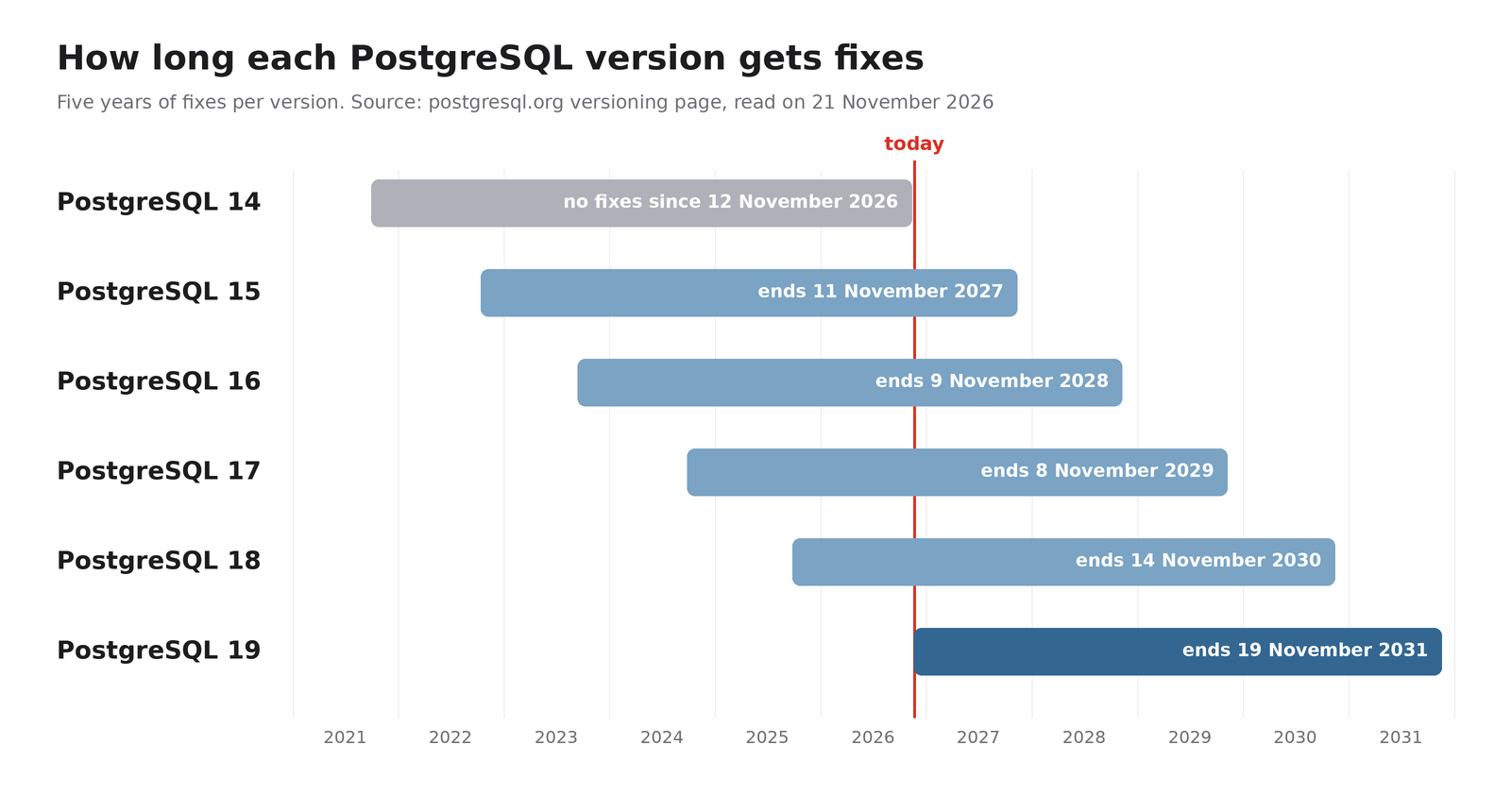
Five years of patches per version, and 14 has just dropped off the list
And the truly urgent point isn't even in version 19. Each version receives five years of patches, and PostgreSQL 14 hasn't received any since November 12. If one of your databases is still running on 14, that's the one you need to migrate first, long before dreaming of REPACK.
As for me, I'm testing 19 in development right now. In production, I'll wait for 19.1, the first patch version. A “point zero” version is like a restaurant on opening night: the menu is promising, but I let others deal with the teething problems. As for VACUUM FULL, it remains available “for compatibility”. A bit like the fax machine in some offices: nobody should be using it anymore, but nobody dares unplug it!
Sources
- PostgreSQL, November 19, 2026: announcement of the release of PostgreSQL 19 (in English)
- PostgreSQL: complete release notes for PostgreSQL 19 (in English)
- PostgreSQL: documentation for the REPACK command and its limitations (in English)
- PostgreSQL: version support timeline (in English)
- Neon: PostgreSQL 19's new features explained (in English)
Article written with the help of Claude Code, proofread and corrected by me.
Join the conversation
You need an account to comment on this article. Creating one is free and takes under a minute.
No comments yet.