ChatGPT can now make animated GIFs: I tested OpenAI's new image model
I asked OpenAI's AI for a birthday cake with seven candles that light up one by one, and little children's hands clapping. Thirty-two seconds later, I had an animated GIF. Pretty, smooth, honestly successful. With eight candles.
Since November 4, OpenAI has been rolling out Images 2.6, the new version of its image generator, in ChatGPT and in its API, the gateway developers plug into their own programs. OpenAI promises images that are 50% faster, without touching its prices. Since the photos for my articles happen to come from the previous version, 2.5, I wanted to know what I was missing, and this morning I launched the old and the new ones on my server, with the same requests, stopwatch in hand.
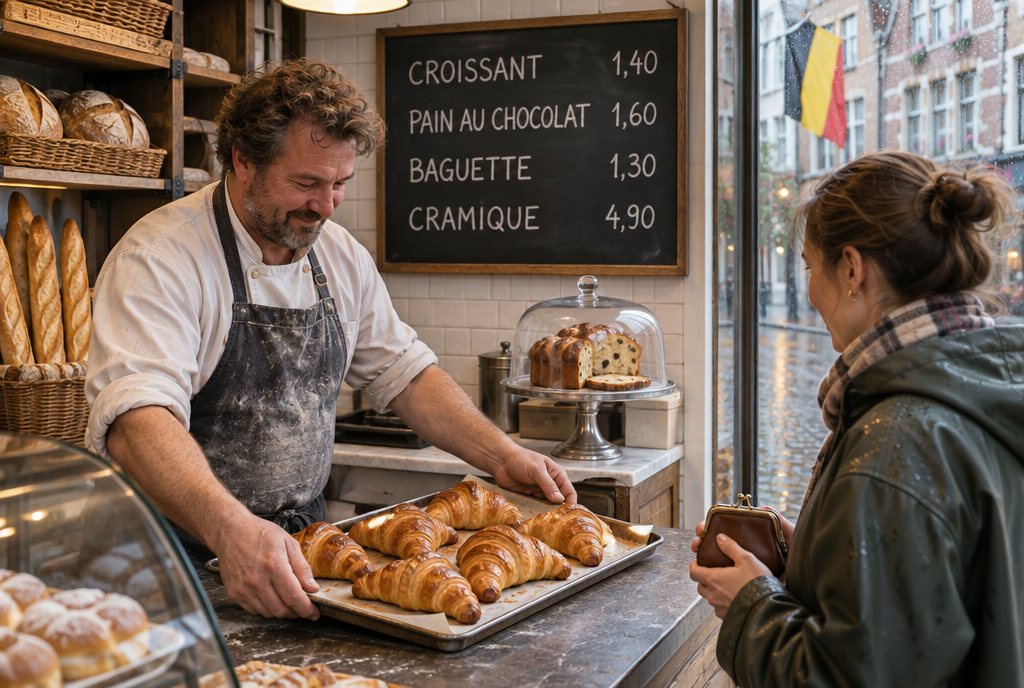
Photo generated by GPT Image 2.6 Sunburst, slate included. The Belgian flag, it added all by itself
What changes in ChatGPT
The new feature everyone is going to use is GIFs, those little animated images that loop. You describe a scene and the movement you want, or you give it a photo to animate, and then you can ask it to slow down or speed up. According to OpenAI, it's for all subscription plans, but it's arriving gradually, so if you don't have it yet, that's normal.
My advice for a first try: describe the movement as if you were talking to a child, and say that it has to loop. For example: “Animate this photo of my dog: he wags his tail and tilts his head, slowly, in a loop.” And if the result is too fast, simply ask for “twice as slow”. When there's a precise number in it (candles, people), count again before sending, you'll understand why.
Two other additions. You can scribble directly on an image to show the area to change, instead of trying to explain it with words (“no, the other chair, the one on the left”). And you can export as SVG, a format where the image is described by shapes and not by points, which keeps it sharp even when enlarged on a poster. Handy for a logo.
My eight-candle cake
Here's the GIF as it came out, without any retouching. Nine images, a quarter of a second each, a little over 2 MB.
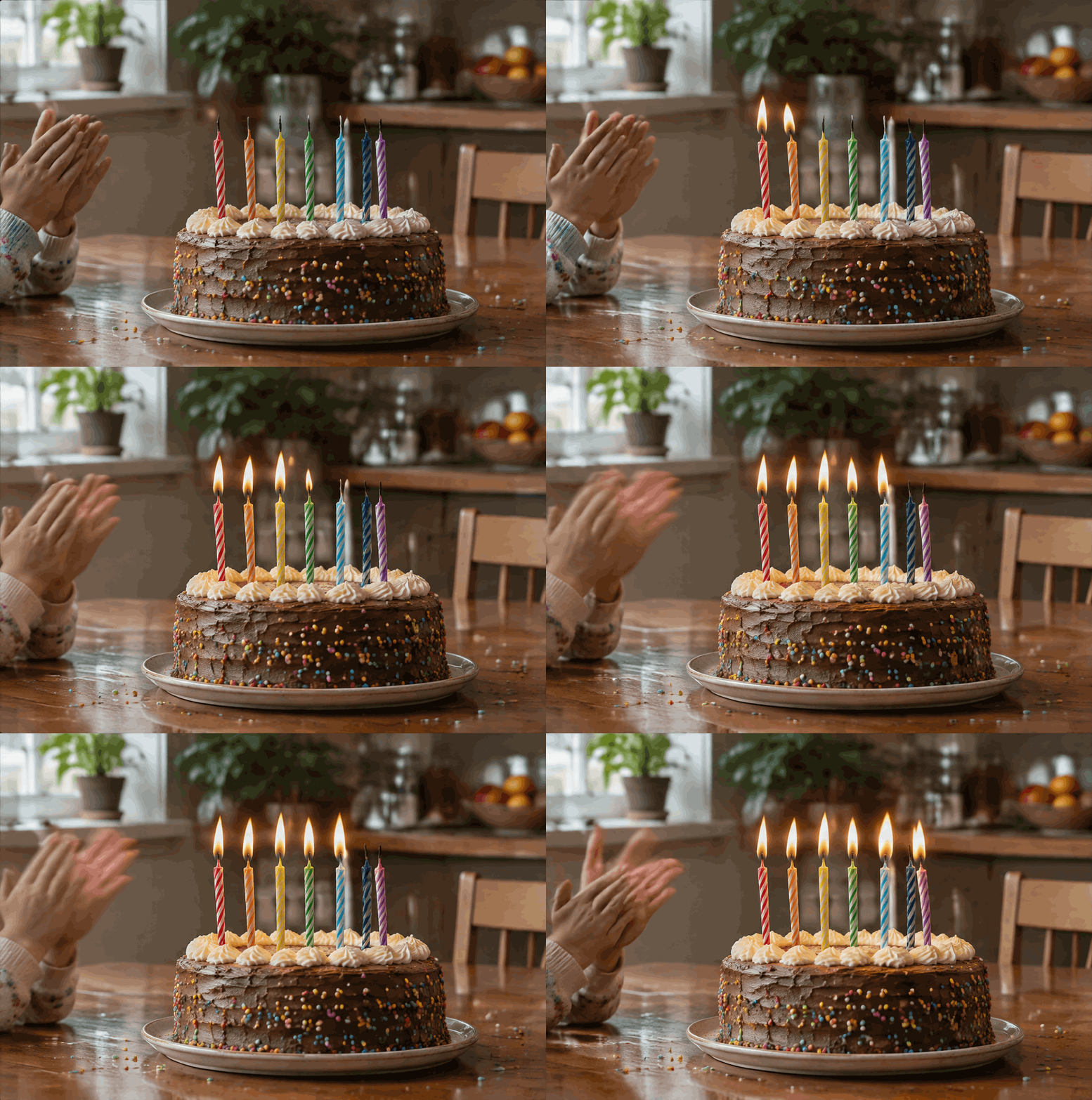
The GIF generated by GPT Image 2.6 Sunburst, in 32 seconds, for about 8 cents
It's really impressive for a first try. The candles light up in order, the flame moves, the hands clap. But look closely behind the light blue candle: there's an eighth one, white, hiding there from the beginning. I had asked for seven.
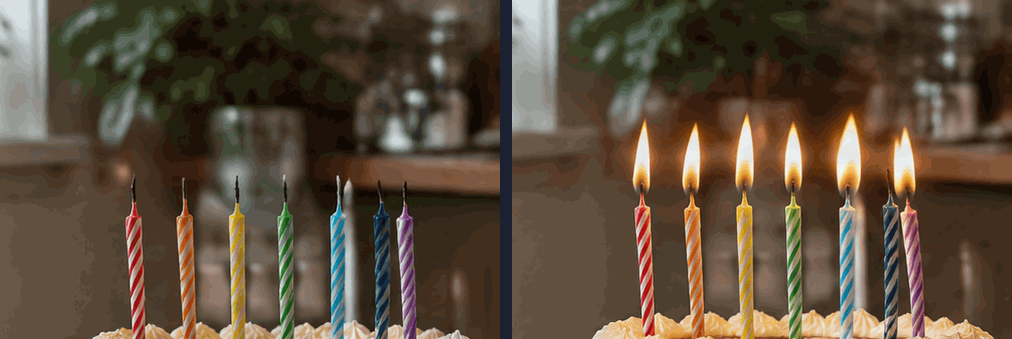
First and last image of the GIF: seven colored candles, and an extra white one behind the blue one
OpenAI admits it itself, by the way: its model still struggles with long texts and with keeping characters consistent from one image to another. For a birthday card sent to Grandma, nobody will count. For the little one's seventh birthday, he will!
The match: 2.5 versus 2.6, same request
For developers, OpenAI offers two versions of 2.6: Sunburst, the polished one, and Flare, the fast one. I gave exactly the same request to the old Sunburst 2.5 and the two new ones: a Belgian bakery early in the morning, with a chalkboard on which four prices are written in chalk. Same size, same “medium” quality setting, the one I use for this blog. Then I started over a second time with another scene, so as not to judge based on a single attempt.
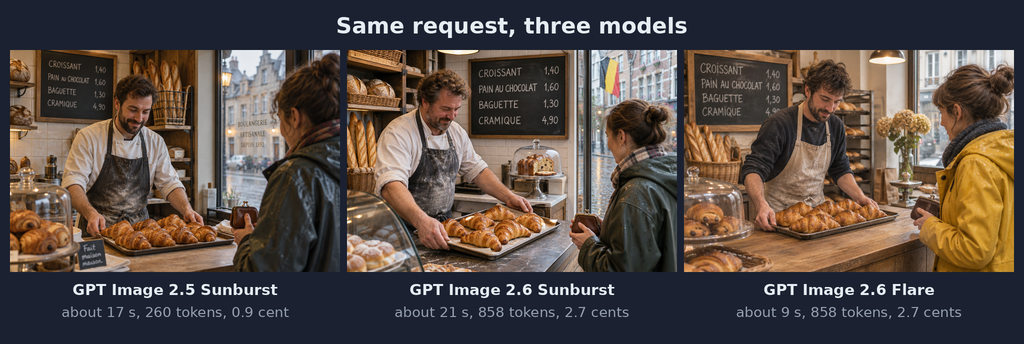
My measurements from November 6, average of two attempts per model
On the image side, honestly, at the size of a blog article, I don't see any difference in quality. All three write the prices without a mistake, which was still quite a feat two years ago. In the Arena rankings, a site where users vote blindly between two images, Sunburst 2.6 comes second among all generators. The 2.5 added a sign saying “Artisan bakery since 1983” and a “Homemade” label all by itself, the 2.6 Sunburst planted a Belgian flag in the window. To each their own sense of detail.
On the speed side, surprise. The new Sunburst was not faster for me: 25 seconds on the first attempt, 17 on the second, compared with 18 and 16 for the old one. Flare is the one that delivers on the promise, with 10 and 8 seconds, twice as fast. Two attempts are not a scientific study, and these times also include downloading the image to my server. But if you're waiting for a miracle from Sunburst 2.6, don't hold your breath.
Same price per token, three times more expensive per image
And here comes the part that stings. On paper, OpenAI has not raised its prices: its pricing table still shows $30 per million generated tokens, exactly as for 2.5. A token is the AI's billing unit: the image is made little piece by little piece, and each piece has to be paid for.
Except that 2.6 uses many more pieces for the same image. For me, 858 tokens against 260, down to the token, across the six images, and the eesel site finds the same ratio with OpenAI's official calculator. So 2.7 cents per image instead of 0.9. Same price per kilo, but the bag weighs three times as much.
For you, who make three images a week in ChatGPT, it changes absolutely nothing, it's included in your subscription. For an online shop that makes 10,000 product photos, the bill goes from about $90 to $270. And for large volumes, 2.6 does not yet offer batch processing at half price (thousands of requests are sent at once and you agree to wait for the response), which exists on 2.5.
All three took a selfie
On the second attempt, I had asked for a grandmother holding out her phone to show a photo to her grandson. All three models, without consulting each other, did the same thing: the grandmother takes a selfie with him.
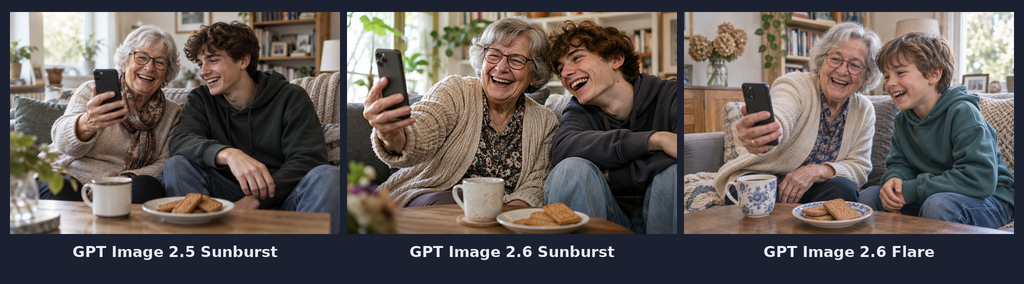
Asked for: a grandmother showing a photo to her grandson. Obtained, three times: a selfie
Apparently, in 2026, a phone held at arm's length is necessarily a selfie! Makes sense, when you've learned about the world by looking at millions of holiday photos.
So, am I switching?
If you use ChatGPT, you have nothing to decide: 2.6 arrives all by itself, with GIFs thrown in. And this is the kind of thing that will be a hit in family groups, between the dog waving hello and the greeting card that sparkles. There are less than two months left before the New Year's greetings, you've been warned.
For my blog, though, I'm sticking with 2.5 for my photos. Paying three times more for a difference I can't see doesn't interest me. Flare 2.6, on the other hand, I'm keeping in a corner for the days when I need to churn out ten image drafts quickly.
Sources
- OpenAI, November 4, 2026: presentation of Images 2.6
- Pasquale Pillitteri, November 4, 2026: GIFs, line art editing, SVG export and detailed pricing
- eesel, November 2026: the real cost per image of 2.6 compared with 2.5
- Arena, November 4, 2026: the ranking of the new models against other image generators
Article written with the help of Claude Code, proofread and corrected by me.
Join the conversation
You need an account to comment on this article. Creating one is free and takes under a minute.
No comments yet.