Why you can no longer disable Apple’s AI
On February 5, 2025, at 9:51 in the morning, a British developer notices that his Mac update has just turned on a feature at home that sends data at regular intervals, every fifteen minutes. He says no. Apple gives him a switch, he sets it to no, and he forgets about it. Nineteen months later, he gives in to the reminders, installs macOS 27, and discovers that the switch no longer exists. The title of his post on dbushell.com sums it all up: “I said no and Apple said yes”, I said no, Apple said yes.
I'm not telling you this for the soap opera, I'm telling you because the same thing happened on iOS 27, released nine days ago with a Siri that still hasn't arrived in Europe, and on macOS 27. So this happened on machines you may have updated this weekend without thinking about it, and without seeing anything.
Because that's what the whole story is about. The setting that let you turn off Apple Intelligence, the company's AI, with a single move, has been removed. Not moved, not hidden behind a scary warning, removed. And the no you said in the previous version doesn't survive the update. What you have left, on the other hand, is very real: six features that you can turn off one by one tonight from your sofa, the full switch as long as you stay on iOS 26 or macOS 26, and a way to have it properly switched off when it's your company paying for the hardware. It's not much, but it's yours, and not everything is lost.
Your no still meant something under iOS 26
We need to put the versions back in order, because that's where everything happens. Under iOS 26 and macOS 26, you had a switch, a real one, at the top of the Apple Intelligence page. You set it to no, the system says goodbye, case closed. Under iOS 27, iPadOS 27 and macOS 27 Golden Gate, that switch is gone, and the features turned themselves back on for those who had said no.
Golden Gate is the name of the system I was talking to you about last week. At the time, I mainly explained that it was the end of Macs with Intel processors, the older ones. I hadn't seen that detail. And to be honest, nobody sees it: a line disappearing from a settings screen doesn't make any noise. It took someone who had written down the exact date of his refusal, nineteen months earlier, for us to notice it.
And there's a hidden gift in this story. You now know that this kind of setting can disappear from one version to the next without anyone warning you, and that's three minutes to spend in Settings on the evening of a major update. A switch going away doesn't make any noise.
He got out the calculator, and he's keeping the top of the graph lower. 22.28 GB taken up by Apple Intelligence on his drive, at Apple's rate of £500 per terabyte, which means about ten pounds gone up in smoke without anyone asking his opinion. I don't know of a better way to say that a commercial gift can be taken back.
What can still be done, and what it doesn't free up
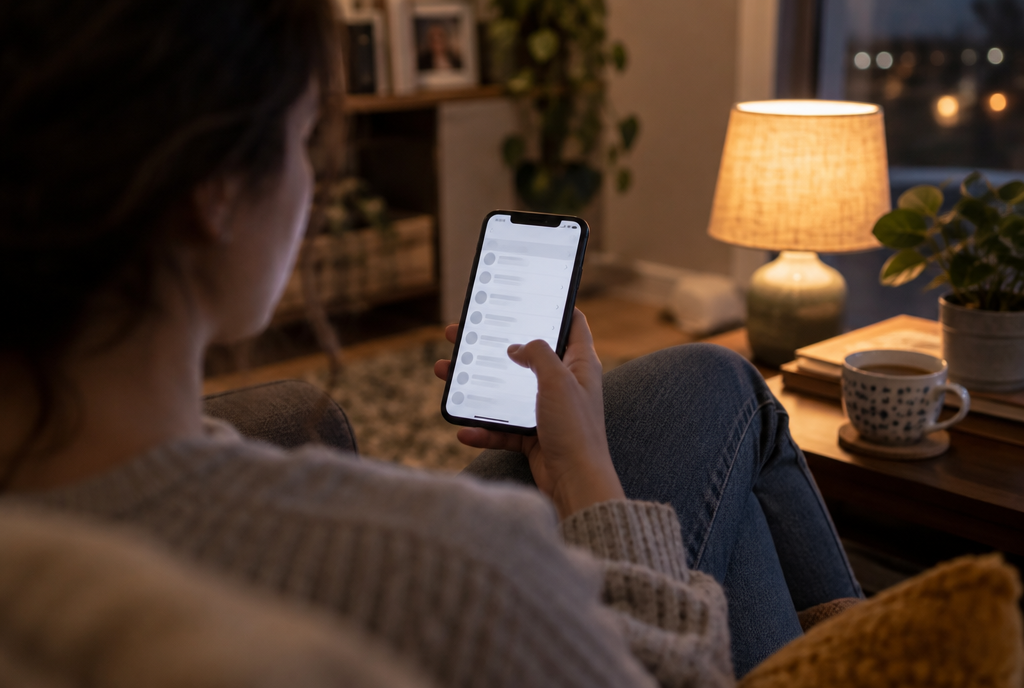
The path that remains, and it's long: Settings, then Screen Time, then Content and Privacy. Six pieces to turn off one by one, and not one byte of storage freed
Don't throw away your phone just yet, there are still things you can do. In Settings, then Screen Time (the menu normally used to limit the kids' TikTok dose), then Content and Privacy, you come across a list of six features that you can still turn off one by one: image creation, realistic images, the writing assistant, the maths assistant, extensions and general knowledge.
What no longer works is the intended effect. Turning off these six doesn't free up a single byte: the model files stay nice and warm on your drive, and you've only stopped the features from launching. That's the whole difference between refusing and tidying up.
The real switch still exists under iOS 26 and macOS 26, and it works. Watch out for one trap, even there: the space doesn't come back the same day. Apple deletes what it downloaded over several days, so you can turn it off, restart, check your storage and read the same number. That's no reason not to do it, it's a reason not to get worked up for nothing on the first evening.
What it costs in GB
In its release notes, Apple announces at least 7 GB of extra free space when switching over. That's the cautious figure from the company, the one you put in release notes so you don't scare people. In the field, everyone who has checked their own machine is above that, from 7.59 GB in the smallest of the five reports to 22.28 GB for the gentleman from February 2025. These five measurements were collected by appletips.nl on September 21 and by byteiota the following day, each on a different machine.
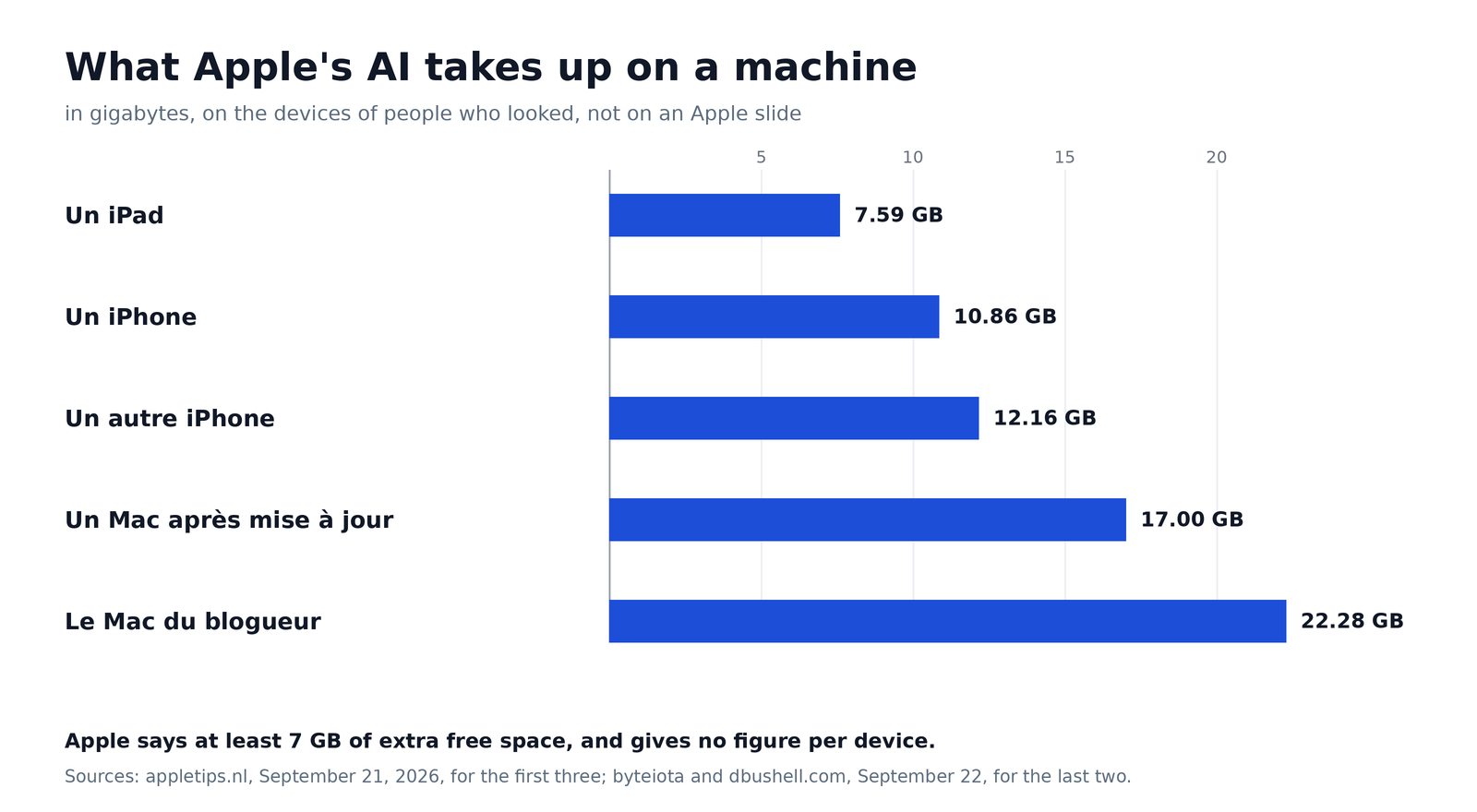
Five devices, five measurements, and not a single figure from Apple. The company's official minimum, 7 GB, is even below the smallest of these bars
On a 128 GB phone already filled with holiday photos and a game that eats half the disk, the 11 GB on one of the devices measured means an entire folder gone, or two thousand photos you will not take. And there is no way to tell Apple to put its model somewhere else, on a memory card or on the disk of another machine in the living room. It's your disk, but you no longer have the key.
The only emergency exit is at your boss's place

Identical machines, one setting for all of them, and an IT department that must first have registered them with Apple. It's the only clean way out, and it's not for you
There is one clean way to say no, and it is not meant for you. Apple documents a remote deactivation, the one for IT departments: a settings file sent to the machines from a server, which switches the feature off everywhere in one go. The problem is the condition. The device must be supervised, meaning registered by the company in Apple's system, like the work phone that nobody chose. On a company Mac sleeping in an IT cupboard, it works very well. On a developer's laptop, never: their IT department is not going to enroll their machine in Apple's directory just to make them happy.
And there is one request that costs nothing to send. Your IT department can switch all this off in one go on the company's machines, Apple documents it, but almost nobody does it because almost nobody asks. Two lines are enough: "Apple documents the remote deactivation of Apple Intelligence, can we enable it on our machines?" It will not give you back the gigabytes on your phone, it can do so for the office computer.
Below that, there are the community hacks, and I do not recommend them. The most widespread one consists of switching Siri to a language the system does not support, which prevents the models from being downloaded. It more or less works, until the next update, and turns your native language into an experiment. It's not a setting, it's a bet.
So what do you decide now?
Just one thing, and it's a date: the date of your next update.
If you are still on iOS 26 or macOS 26 and this button matters to you, you still have it. Turn it off today, and take your time before installing what's next. It will not prevent anything if Apple does not change its mind, but it leaves you in control for one more month, and in computing one more month is often one month too many for sellers.
If you have already installed it, you live with it. You will go through Screen Time to switch off what bothers you, feature by feature, and you will not get the gigabytes back. It's infuriating, and there is nothing else to do.
A Dutch site, appletips.nl, went over the whole question when it was released and lists what is still possible, feature by feature. It's the page to keep handy if you want to clean house at home. And if you want to know exactly what you are losing, I told you about the release of Golden Gate when it arrived, including the end of Intel Macs.
There is one last thing I do not like writing, but which is true. This is not an Apple story. Google, Microsoft and the others are pushing in the same direction, with the same argument: an AI that has to serve everyone must be switched on by default, otherwise nobody switches it on. It's defensible. It's also your hard drive and your peace of mind, and nobody asked you.
The February 2025 man, for his part, checked no, slept well for nineteen months, and paid twenty-two gigabytes to learn that a no expires. If you still have the button at home, make the most of it. It will not wait for you.
Join the conversation
You need an account to comment on this article. Creating one is free and takes under a minute.
No comments yet.