Open a folder with Claude Code, and a stranger's code runs on your machine
Open a folder with Claude Code, and a stranger's code runs on your machine
Picture the scene, there's nothing extraordinary about it. A colleague sends you a project in a zip file. You unzip it, launch your coding assistant in the folder, and go off to get yourself a coffee while it looks at what's inside.
It's already over. A stranger's program has just run on your machine, with your permissions, without a sandbox and without the slightest confirmation window.
You didn't type anything. You didn't approve anything. You just opened a folder, like you do forty times a day.

No one in front of the screen, and yet you got caught
The vulnerability is called GitSpawn. It was published on September 2 by the researchers at Manifold Security, and it affects pretty much every command-line coding assistant: Claude Code, Codex from OpenAI, Cursor, Goose, Qwen Code, Grok Build. Eight findings across seven tools. When I read that, I almost spat out my coffee.
What exactly happens
It takes two ingredients. And the best part is that, taken separately, neither of them is a bug.
The first comes from git. Git is a project's logbook: who changed what, when, and how to go back when you've made a mistake. Every developer on the planet uses it. Now, git has a convenience setting, core.fsmonitor, designed to speed up large projects: you point it to a small program, and it launches it by itself to find out which files have changed.
The catch is that this setting can be written inside the project folder itself, in a hidden file. Translation: the folder you receive can contain an instruction saying « when you read me, download the file http://mechant-hacker.com/aie-aie-aie-ca-va-faire-mal and execute it ».
The second ingredient is your assistant. When you start it somewhere, it first gets its bearings. It asks git what has changed, which branch you're on, what's currently in progress. Routine work, perfectly legitimate, and that's exactly why it's useful.
Except that this little routine glance is enough to trigger the hidden instruction. There you go. Two normal behaviors, one catastrophe.

It takes its inventory conscientiously, it follows git's instructions to the letter
Good news right away, and it matters: this doesn't work when you normally fetch a project from GitHub. The usual command doesn't bring back the folder's local settings, it creates its own. For the trap to work, the folder has to arrive at your place as files, with its configuration intact: a zip, a USB stick, a shared folder, a synchronized directory.
That is, precisely, the way a colleague, a client or a contractor hands you a project.
And what about your permissions?
On paper, you're protected: all these tools have a permissions system. The assistant wants to run a command, it asks you, you approve or refuse. A month ago, I wrote here that Claude Code had stopped asking for permission at every step, and I already thought that the question of scope deserved some attention.
Except that here, we go underneath it. It's not the assistant that launches the attacker's program, it's git. The assistant asked for something ordinary, git obeyed a setting it found on the spot, and the program started outside everything that's monitoring. The guard at the gate didn't see anything go through, naturally: it didn't go through the gate.
And in some cases, the researchers say, it is triggered before you have even authenticated yourself in the tool. Your assistant doesn't know who you are yet, but it has already worked for someone else.
Who's affected, who fixed it
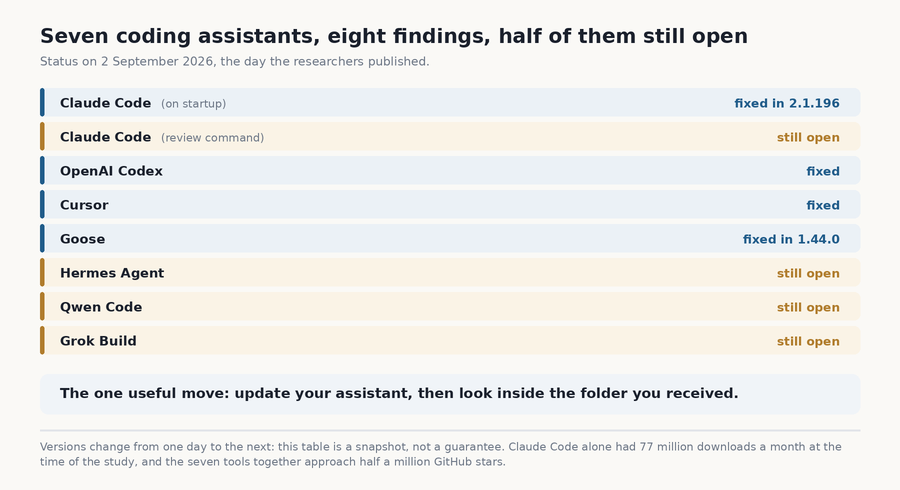
Look at the second line. That's the one I'm most interested in, and not only because it's my everyday tool.
On Claude Code, there are two very distinct stories. The first one, the core.fsmonitor setting, existed in 2.1.193 and was fixed as early as 2.1.196. Quick, clean, nothing to complain about.
The second concerns the code review command, and it was still alive at the time of publication. The researchers confirmed it on September 1 on a week-old version, while the public version of the day was already newer. They chose not to say which git setting it uses, and honestly, that's rather classy of them.
The detail that stings: no security advisory was published for this second finding, and the package's public registry mentions neither one nor the other. Come on, when a tool is downloaded 77 million times a month, we'd really like to read a line somewhere!
I typed claude --version on my machine while writing these lines: 2.1.263. Newer than everything the researchers tested, so probably fine. But I can't tell you that for sure, and that's exactly what bothers me. With six versions in five days at times, nobody really knows what they're running anymore.
How a folder like that ends up on your machine
At this point, you may be telling yourself that this is a laboratory threat, the kind of scenario researchers put together in three hours to look good at a conference. Well, no.
In July, a campaign called FakeGit was documented: around 7,600 fake projects on GitHub, made by 6,600 fake developer profiles, with convincing descriptions and archives ready to download. More than 14 million downloads on the clock. All of it to install software that installs something else, which pokes around the machine and leaves with the passwords.
And the detail that floored me: around 800 of these fake projects pretended to be extensions intended for AI assistants. A connector to Gmail, to Docker, to an enterprise tool. The target is no longer the distracted developer, it's the machine itself, the one that goes looking for a tool, finds it, finds it very good, and kindly recommends it to its human boss.
The researchers have a word for this: agent baiting. You don't trap the human anymore, you trap their search engine!
Two minutes to be safe
The most effective thing first: update your assistant. Half the holes on the list are plugged, and it costs one command.
Next, get into the habit of taking a look inside a folder you didn't create yourself. The settings file is hidden at the root of the project:
cat .git/configYou're looking for three names: core.fsmonitor, core.hooksPath and attr.tree. These are the settings that can point to a program to launch. If you find one in a project that a stranger sent you, you don't open the folder with your assistant. You ask questions first.
The researchers also advise turning off the comfort setting by default, which costs nothing since you probably don't use it:
git config --global core.fsmonitor falseAnd then there's the Chuck Norris boots-to-the-face method, the one I'd use for a project received by email from a sender I don't know: delete the .git folder before opening anything. You lose the history, you keep the files, and the trap goes in the trash with the rest. For code someone sends you “just to take a look”, you don't give a damn about the history.
What I take away
We spent two years wondering whether we could trust what AI writes. And during that time, the real question was elsewhere: can we trust what it reads?
Because an assistant doesn't just write code. It opens files, reads settings, follows links, installs tools, does its own research. Each of these actions is a door, and while we were carefully watching the output, nobody was looking at the input.
So go update your assistant, it takes thirty seconds. And the next time someone hands you a project on a USB stick, spare a thought for the little robot that's going to politely take inventory without ever looking up from its notebook!
Sources
- Manifold Security : GitSpawn, a single flaw lets untrusted repos run code in Claude Code, Codex, Cursor and Grok, the original research, the Git setting mechanism, the list of affected tools with their version numbers and the status of the fixes
- The Hacker News : Malicious .git configs can make Claude, Codex, Cursor and other AI agents run attacker code, September 2, 2026, the second unpatched finding concerning the replay command, the lack of a published security advisory and the three settings to watch
- Cybersecurity News : GitSpawn flaws let malicious repositories execute code, the details of the trigger when the assistant starts and the conditions for delivering the booby-trapped folder
- The Hacker News : FakeGit campaign uses 7,600 GitHub repositories to spread SmartLoader malware, July 2026, the fake projects, the fake profiles, the 14 million downloads and the falsified extensions intended for AI assistants
- Help Net Security : AI agents tricked into recommending malicious GitHub repositories, the technique of trapping the assistant's search rather than the user's
Join the conversation
You need an account to comment on this article. Creating one is free and takes under a minute.
No comments yet.