Status-Bar Mod for Claude Code and Claude Desktop
Switch to the usage-bar mod on Claude Code and Desktop
Claude Code and Claude Desktop now accept mods (small extensions that modify Claude's interface itself). So I rewrote this bar as a mod, and frankly it's much simpler: no more binary to download, no more status line to configure, nothing to compile.
To install it, type this line in a Claude Code session:
/plugin install usage-bar --marketplace Digital3D/claude-usage-barClaude first asks you whether it can add the marketplace (the repository the mod comes from). Answer y, confirm, and the bar appears above the prompt. I tried it on a brand-new WSL Linux, it worked on the first try. The code and documentation are on GitHub: Digital3D/claude-usage-bar.
Two things to know. The mod only displays Claude quotas, not those of z.ai GLM or the DeepSeek balance. And Claude Code Usage Status Line, described below, remains downloadable but will no longer receive updates: its current version will remain the last .NET version.
Claude Code Usage Status Line
(This software is replaced by the MOD above, it will no longer be maintained)
Monitor your Claude Code, z.ai GLM and DeepSeek usage in real time
directly in your terminal.
Free, open source, zero configuration.
100% Freefor WindowsLinuxmacOS
Six archives: x64 and ARM64 for each of the three systems.
New in 1.4.1
DeepSeek joins Claude and z.ai, and the session spending finally displays a figure that means something.
One line per Claude account
I juggle between two Claude Code accounts with the CLAUDE_CONFIG_DIR variable, and the statusline kept showing me the figures for the first one without batting an eye, whatever the account actually active. It now reads this variable, and its cache and backoff are separated by account.
The deliberate consequence: data whose account has not been proven is no longer displayed at all, even when marked as stale. Better to have a segment disappear than a percentage belonging to someone else.
An invalid token says so
A 401 used to get lost among the generic errors: the line would go silent without us knowing whether the API was down or the token had expired.
It is now handled separately: the account cache is invalidated and the message is explicit. A simple token rotation no longer blocks anything, the display resumes on the next one.
Third provider: DeepSeek
I route part of my work through DeepSeek, and I wanted the same comfort as with the others: the account balance right in front of me. The line now displays it, in the currency returned by the API, without conversion.
DeepSeek exposes no spending history, only the balance. The line therefore shows a balance, as it does for z.ai. Detecting it took a little more work: my launcher tells Claude Code that it is using a Claude model while the traffic goes elsewhere, and the statusline was looking for Anthropic credentials and ending up with credentials missing even though the key was valid. It now also looks at the API address, inherited from the launcher, to know who it is really talking to.
The legend for the icons
- ⌛ the 5-hour rolling window
- 📅 the 7 days, across all models
- F the gauge for the current model, here Fable
- 💰 the remaining balance or credits
- 💸 the session spend (actual cost on an account billed through the API, balance difference on z.ai and DeepSeek)
- 🧠 the context window
The per-model gauges keep an initial (F, s, o) and not an icon: the label comes from the API and changes with the model, a fixed icon would eventually lie. On a minimal Linux distribution, install fonts-noto-color-emoji and everything displays properly.
Gauge by model and credits
On migrated accounts, Anthropic no longer returns two fixed Sonnet and Opus gauges but a weekly window attached to the current model. The displayed letter therefore follows the model, F for Fable.
When the window fills up and the credits take over, the 💰 segment switches to detailed mode and shows the amount spent, the limit and what is left: 💰 €12.56/€14 (left €1.44). Non-migrated accounts keep the old display, with s and o.
The real session spend
The session cost Claude Code calculates is estimated using the rates of the declared model. For me, it displayed 💸 $24.64 when the entire account was at $8.13 and the session had cost around $0.26. A factor of 100, which is to say nothing usable.
It is now measured against the account's actual balance, recorded at the first prompt and then compared at each refresh. And z.ai benefits from it in passing: it had not displayed any session spend until now.
The displayed model is the one that is running
Same story for the name: the line announced Opus 4.7 while the backend was serving DeepSeek. The displayed name now follows the actual provider.
And if no match is declared, nothing breaks: the old name remains displayed instead of an empty box.
Status line at the bottom of Claude Code
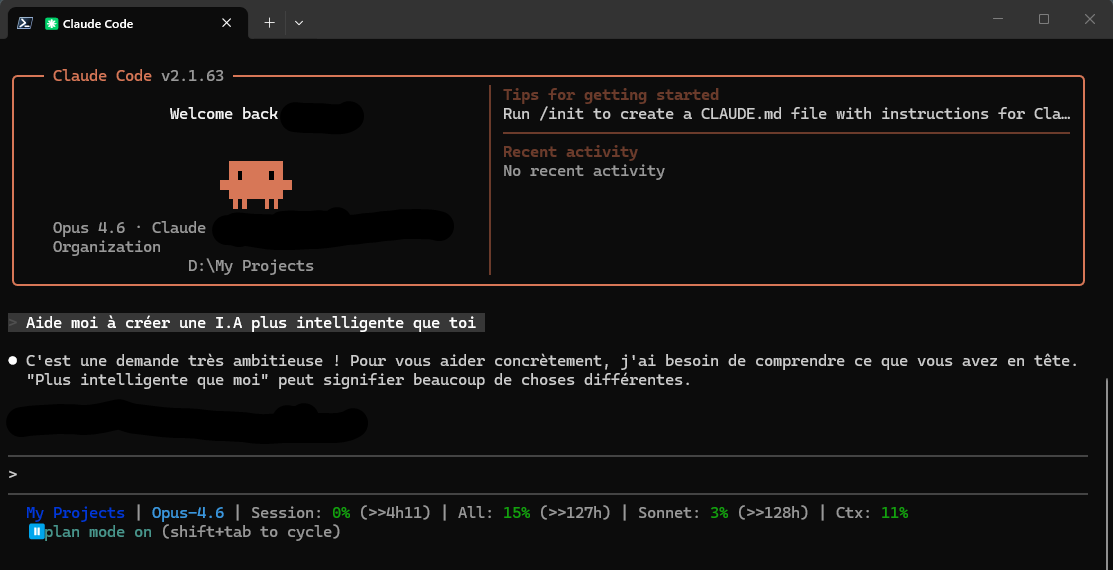
Everything you need, at a glance
One status line. All your Claude, z.ai and DeepSeek usage data.
Auto-detected project
Displays the name of the current directory (the last part of the path). You always know which project you're working on, without cluttering the line with the full path.
Active model
See which model is being used (Opus, Sonnet, Haiku, GLM or DeepSeek) directly in the status bar. The provider is detected automatically.
Usage percentages
5-hour window, 7 days and current model gauge (Sonnet and Opus separated on accounts that haven't migrated), with colored indicators: green, yellow, red.
Countdown
Know exactly when your limits reset. The ↻ countdown is displayed next to each relevant metric.
Context window
Monitor your context window usage to avoid reaching the limit in the middle of a conversation.
z.ai / GLM and DeepSeek support
Displays your z.ai account balance (💰 9.88$) with automatic conversion to the currency of your choice (EUR, GBP, CAD…). The DeepSeek balance is also displayed, in its native currency and without conversion.
Stale data indicator
A ~ prefix before a value signals that the cache has expired but the API is unavailable (429 backoff). You always know what you're reading.
Smart cache and backoff
1-minute cache per provider to ease the load on the APIs. In case of a 429, automatic 5-minute backoff to avoid blowing through the rate limits.
Zero configuration (Claude)
Launch the installer and that's it. It reads your Claude credentials automatically from ~/.claude/.credentials.json (and the Keychain on macOS).
What the Status Line displays depending on your subscription
The Status Line automatically adapts to your plan and displays the relevant metrics.
z.ai configuration (GLM models)
If you use Claude Code with a GLM model (glm-5.1, etc.) via z.ai, a small additional configuration is needed to display your balance.
ZAI_API_KEY): it requires a different web session JWT. And the login endpoint is protected by a TianCaptcha (Aliyun) that blocks all automation (Selenium, Playwright, etc.). The only reliable method is therefore to copy the token from your real browser.Step 1: retrieve the JWT
- Open z.ai/manage-apikey/billing in your usual browser
- Log in (and solve the captcha if requested)
- Open the DevTools with F12, go to the Network tab
- Refresh the page with F5
- Click the request named
accountBalance - In Headers, copy the value of
Authorizationwithout theBearerprefix (the token starts witheyJhbGciOiJIUzUxMiJ9)
Step 2: save the JWT
A companion binary ClaudeUsageStatusline.ZaiRefresh is provided with the installation. It validates the token format and writes it to ~/.claude/.zai-credentials.json.
Windows:
& "$env:LOCALAPPDATA\ClaudeUsageStatusLine\ClaudeUsageStatusline.ZaiRefresh.exe"Linux / macOS:
~/.local/bin/ClaudeUsageStatusline.ZaiRefreshStep 3 (optional): display currency
The balance is returned in USD by default. To display it in EUR (or any other currency), edit appsettings.json next to the executable:
{
  "Zai": {
    "NativeCurrency": "USD",
    "DisplayCurrency": "EUR",
    "ExchangeRateCacheHours": 24
  }
}
Rates are retrieved once a day from a free API and cached locally.
When should you refresh the JWT?
The session JWT has no explicit expiration date: its lifetime is controlled by z.ai's servers. It will eventually be invalidated after a period of inactivity or an explicit logout.
Signs that it needs to be renewed:
- The statusline displays
z.ai: token missingand invites you to follow the instructions in the new window - The stale-data prefix (
~💰) persists - The logs contain
401 Unauthorized
In both cases, ZaiRefresh opens by itself in a window: all that's left to do is paste a fresh JWT.
DeepSeek configuration (API key)
Simpler than z.ai: one API key is enough, and there is no captcha involved.
Create the key
In your DeepSeek account, in the API keys section, create a key. It starts with sk- and is displayed only once: copy it right away.
Give it to the statusline
Two possibilities. The DEEPSEEK_API_KEY environment variable, or a small file that the statusline reads by itself:
{"apiKey": "sk-votre-cle"}Save it in ~/.claude/.deepseek-credentials.json. Nothing to refresh afterward: an API key does not expire by itself.
Join the conversation
You need an account to comment on this article. Creating one is free and takes under a minute.
No comments yet.