Mac: Apple is going to lock down full disk access because of AI agents, check yours
Apple published a message of a few lines for developers on October 2, and it is more important than it looks. The title: “Updates to Full Disk Access in macOS”. The gist: some apps abuse a Mac setting that gives them access to absolutely everything, and with AI agents, Apple thinks it is going to become downright dangerous.
I quote Apple, and for once they are not mincing words: some developers use this access “in a way that can put users at risk, by exposing everything on their system, including files, emails, messages and even browsing history, without them really knowing it”. Ouch.

You only asked it to water the plants and it is reading your mail
What is Full Disk Access?
Your Mac is normally fairly compartmentalised. An app that wants to read your photos, contacts or Documents folder has to ask for your permission, one by one, with those little windows that we often accept without reading. But there is a setting that knocks down almost all those barriers in one go: Full Disk Access. An app that has obtained it can read your emails in Mail, your conversations in Messages, your Safari history, your Time Machine backups, and the files of other users on the Mac.
Why does such a master key exist? For backup software. An app that copies your whole Mac to an external drive or an online service must, by definition, be able to read everything. It makes sense. It is a bit like giving the moving company the keys to the whole house: it has to be able to get everywhere, otherwise it cannot do its job.
The problem is when it is no longer movers asking for the keys.
Why Apple is worried about it now
Because of AI agents. These assistants that no longer just answer a question, but act in your place on your computer: they read your files, sort your emails, fill in forms. And to do all that properly, some of them specifically ask for Full Disk Access. Apple writes it without beating around the bush: “As AI agents become more capable and autonomous, the risks associated with this level of access will increase significantly.”
Apple names no names, but the context is pretty telling. Meta Muse, Meta's agent, the subject of my explanation three weeks ago of why I wouldn't install it on my iPhone, offers the option of enabling this access on Mac. A journalist from Inc. magazine, Jason Aten, said that Muse knew the content of his private messages even though he says he had not given it that permission. Meta disputes this. Wired, for its part, revealed a flaw in the ChatGPT app for Mac that could have allowed hackers to access sensitive data. And OpenAI has just launched its “dots”, agents that work constantly, even when you have closed the tab.
And Apple adds a point I had not thought of: for a messaging app, this access does not just put YOUR privacy at stake, but also that of the people you talk to. Your sister never gave you permission to have a robot read her messages.
Go check your Mac, it takes a minute
No need to wait for Apple. You can look right now at who has the keys to your place.
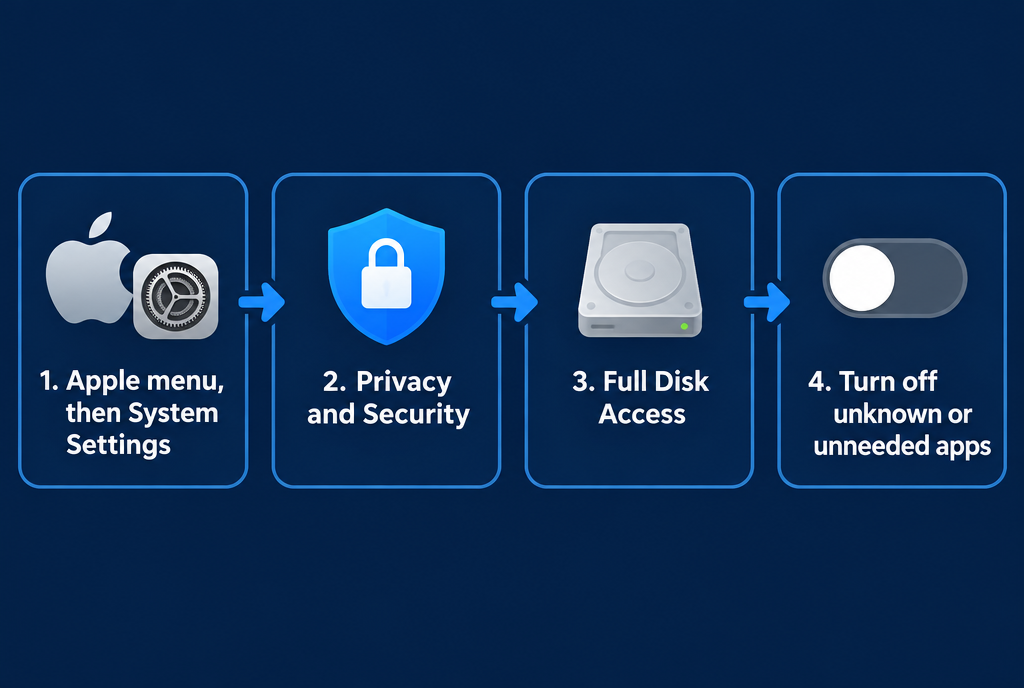
Four clicks to find out who is rummaging through your drawers
You open the Apple menu at the top left, then System Settings. In the left-hand column, you click Privacy & Security, and on the right you find Full Disk Access. There, you see the list of all the apps that have received the master key, with a switch next to each one.
How do you sort them? Backup software or an antivirus, that's normal, leave them alone. Terminal, if you're a developer and you enabled it yourself, too. But a chat app, an AI assistant, a little utility you installed two years ago and whose name you've completely forgotten? Turn off the switch. If the app really needs it, it'll ask you again, and this time you'll know why. The Mac will ask for your password to confirm, that's normal.
Personally, I think this is the kind of setting you should check once a year, like checking the batteries in the smoke detector.
What is going to change?
For now, we don't know much. Apple promises "additional controls" so that users who really want to give "this extraordinary level of access" can only do so with a "very explicit" action. In other words: no more switch that you turn on in two seconds because an app asked you nicely. It should look like a voluntary process, with a clear warning about what you're giving away. No date has been announced, and Apple isn't saying exactly what the new procedure will look like.
What I like is that Apple isn't closing the door. Those who want an agent that manages their entire Mac will still be able to have one. They'll just have to make that decision with their eyes open. That's exactly what's needed: protect those who click too quickly without punishing those who know what they're doing.
But I wasn't born yesterday either. Making life more complicated for OpenAI's and Meta's agents on Mac, at a time when Apple is preparing its own agents, can't exactly bother it. Apple's apps don't need to ask for the key: they already live in the house. I'll be watching to see whether the new rules apply to everyone in the same way.
In the meantime, go take a look at your list. And if you find an app there that you don't recognize, I'd love you to tell me about it, I'm curious to know who's squatting at your place!
Sources
- Apple Developer, October 2, 2026: updates to full disk access in macOS
- TechCrunch, October 2, 2026: Apple tightens full disk access in response to AI agents
- MacRumors, October 2, 2026: Apple announces changes because of AI agents
- Engadget: Apple sounds the alarm over AI agents
Article written with the help of Claude Code, proofread and corrected by me.
Join the conversation
You need an account to comment on this article. Creating one is free and takes under a minute.
No comments yet.