Tired of TeamViewer? SplashTop? Discover MeshCentral!
Tired of TeamViewer? SplashTop? Discover MeshCentral!
The good old days of TeamViewer… free
Do you remember the time when TeamViewer was really free for personal use? We launched the application, gave grandma the ID and password, and boom: we fixed her printer from the couch. It was beautiful. It was simple. It was free.
Spoiler alert: that time is over. And if you are here, it’s probably because you have experienced the same descent into hell as I have.
When TeamViewer decides you are a business…
One fine day, TeamViewer displayed the infamous message:
Five minutes. To troubleshoot someone remotely. Let’s just say you have time to say hello, click on Start, and… it’s over. Disconnected. Thank you, goodbye.
I tried the reset procedure, the forms to prove that I am not a business (well, not for that), the ID changes… Nothing worked. TeamViewer decided that I was a multinational, and it won’t budge.
The search for the alternative: an obstacle course
AnyDesk: the false hope
AnyDesk is a bit like TeamViewer's cousin who says “I’m cool, come to my place”. Except that after a few weeks, here we go again: same limitations, same restrictions. The interface is decent, but you quickly encounter the same frustrations. In short, thanks but no thanks.
Windows Remote Desktop (RDP): in theory, yes
The good old Windows Remote Desktop. Free, integrated, efficient. On paper, it’s perfect. In practice? You have to open port 3389 on the router.
If you are at home, why not (even if exposing RDP on the Internet is like leaving the front door open with a sign saying “Come in, help yourself”). But in a business? Good luck convincing the IT department to open that port. It’s like asking for the nuclear codes.
SplashTop: a good solution… for a price
I then discovered SplashTop. And honestly, it’s a good product. The web interface is convenient, the connection is fast and stable. But here’s the catch:
- About 150 € per year for 10 machines
- Beyond that, you have to switch to a higher plan
- It’s a subscription — you never really own it
For occasional professional use, it’s defensible. But when you manage about twenty machines (personal + family + a few friends who think you are their official tech support), the bill adds up quickly.
And then one day… MeshCentral 🎉
While browsing forums and Reddit, I stumbled upon MeshCentral. At first, I was skeptical. Free, open-source, unlimited machines? It smelled like a trap or a project abandoned since 2014.
Well, no. MeshCentral was created by Ylian Saint-Hilaire, a developer who worked at Intel. The project is solid, actively maintained, and supported by a real open-source community. The code is on GitHub, updates are regular, and the documentation is complete.
In summary: it’s serious.
Why MeshCentral is a game-changer
🔒 HTTPS on port 443
No need to open exotic ports. Port 443 is for HTTPS: it goes everywhere, even behind the most paranoid firewalls.
💻 Multi-platform
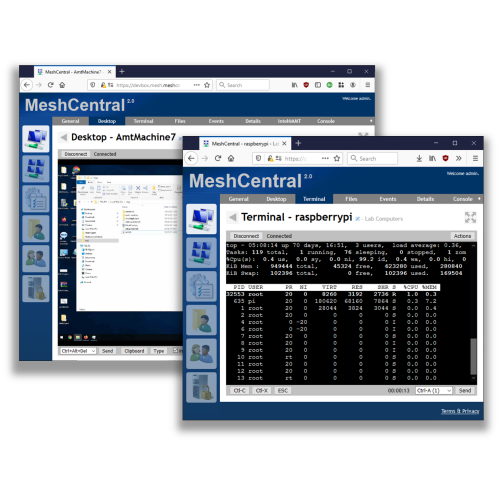
Windows, macOS, Linux… and even servers without a graphical interface. You can open a remote terminal on a headless Raspberry Pi. Classy.
♾ Unlimited machines
10, 50, 200 machines? No limits. No per-device pricing. You install the agent and that’s it.
💰 100 % free
Open-source under Apache 2.0 license. No hidden « Pro » version, no throttled features. Everything is included.
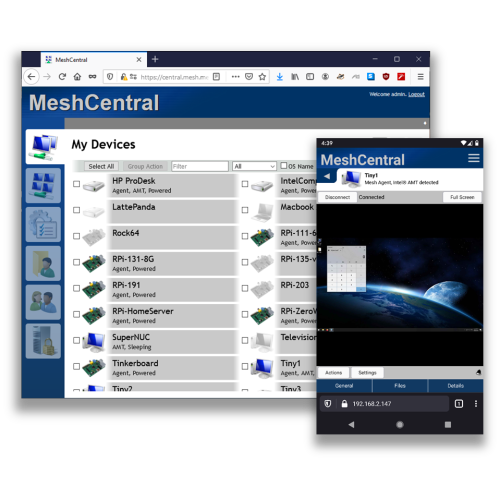
Well, the only small downside is that the design is very ugly. But I prefer ugly that works very well to very beautiful but paid software that doesn't offer more.
Installation guide: step by step
Well, enough talking. Let's get serious. Here’s how to set up your own MeshCentral server. I promise, it's less complicated than assembling IKEA furniture (and there won't be any extra screws at the end).
You need a server accessible from the Internet. A small VPS is perfect. Personally, I use Hostinger for about 120 € per year, which is 10 € per month. That's more than enough.
Choose a Ubuntu 22.04 LTS or Debian 12 distribution. A VPS with 1 GB of RAM and 1 vCPU is sufficient to manage dozens of machines.
MeshCentral runs on Node.js. Let's install it :
sudo apt update && sudo apt upgrade -y
curl -fsSL https://deb.nodesource.com/setup_20.x | sudo -E bash -
sudo apt install -y nodejs
Check the installation with node -v and npm -v.
This is the magic part: a single command.
mkdir ~/meshcentral && cd ~/meshcentral
npm install meshcentral
Yes, that's it. No compilation, no obscure dependencies, no ritual sacrifice. npm does the job.
On the first launch, MeshCentral generates a configuration file. Run it for the first time :
cd ~/meshcentral && node node_modules/meshcentralStop it with Ctrl+C, then edit the file ~/meshcentral/meshcentral-data/config.json :
{
  "settings": {
    "cert": "your-domain.com",
    "port": 443,
    "aliasPort": 443,
    "redirPort": 80,
    "allowLoginToken": true,
    "allowFraming": false,
    "newAccountsRights": [],
    "agentPing": 60
  },
  "domains": {
    "": {
      "title": "My MeshCentral",
      "title2": "Remote Management",
      "newAccounts": false
    }
  },
  "letsencrypt": {
    "email": "your-email@example.com",
    "names": "your-domain.com",
    "production": true
  }
}
The letsencrypt section automatically takes care of generating and renewing your SSL certificates. Point your domain name to your server's IP, and MeshCentral does the rest. Magic.
To ensure MeshCentral starts automatically on server boot :
sudo cat > /etc/systemd/system/meshcentral.service << 'EOF'
[Unit]
Description=MeshCentral Server
After=network.target

[Service]
Type=simple
LimitNOFILE=1000000
ExecStart=/usr/bin/node /home/your-user/meshcentral/node_modules/meshcentral
WorkingDirectory=/home/your-user/meshcentral
Environment=NODE_ENV=production
User=your-user
Group=your-user
Restart=always
RestartSec=10

[Install]
WantedBy=multi-user.target
EOF

sudo systemctl enable meshcentral
sudo systemctl start meshcentralIf you are the paranoid type (and in cybersecurity, that's a quality), you can place MeshCentral behind Tailscale. This way, only your Tailscale network can access the admin interface.
curl -fsSL https://tailscale.com/install.sh | sh
sudo tailscale up
Then configure MeshCentral to listen only on the Tailscale interface. Your agents will continue to connect via the public port 443, but the web interface will only be accessible from your private Tailscale network. Double layer of security, zero hassle.
Once connected to the MeshCentral web interface, create a machine group, then click on « Add an agent ». You will receive a download link for each platform :
- Windows : an .exe to install (or in portable mode)
- macOS : a .pkg
- Linux : a one-line installation script
The agent automatically connects to your server and the machine appears on your dashboard. No network configuration on the client side, no port to open. The agent initiates the outgoing connection in HTTPS : it goes everywhere.
⚠️ Important note : antivirus and exclusions
Attention ! The MeshCentral agent is a remote control tool. By nature, this type of software is often flagged as « potentially unwanted » by antivirus programs (including Windows Defender).
It is not a virus. It is a false positive.
To avoid problems, add the following exclusions in your antivirus :
- The agent installation folder :
C:\Program Files\Open Source\MeshAgent\ - The executable :
MeshAgent.exe - If you are using Windows Defender, add these exclusions in Windows Security > Virus Protection > Exclusions
Without these exclusions, the agent may be silently removed with each signature update. And you will find yourself wondering why Aunt Jacqueline's machine has disappeared from the dashboard… again.
In summary
If you are tired of :
- ❌ TeamViewer treating you like a CAC 40 company
- ❌ Paying subscriptions to access your own machines
- ❌ Opening dubious ports on your router
- ❌ Being limited in the number of machines
Then MeshCentral is for you :
- ✅ Open-source and free
- ✅ Unlimited machines
- ✅ Multi-platform
- ✅ Native HTTPS on port 443
- ✅ Active community and regular development
- ✅ You keep total control of your data
MeshCentral is an open-source project under the Apache 2.0 license.
Official site : meshcentral.com — Source code : GitHub
Join the conversation
You need an account to comment on this article. Creating one is free and takes under a minute.
No comments yet.