Azure DevOps API for Your Artificial Intelligences
🚀 Digital3D DevOps API – An API Designed for Artificial Intelligence
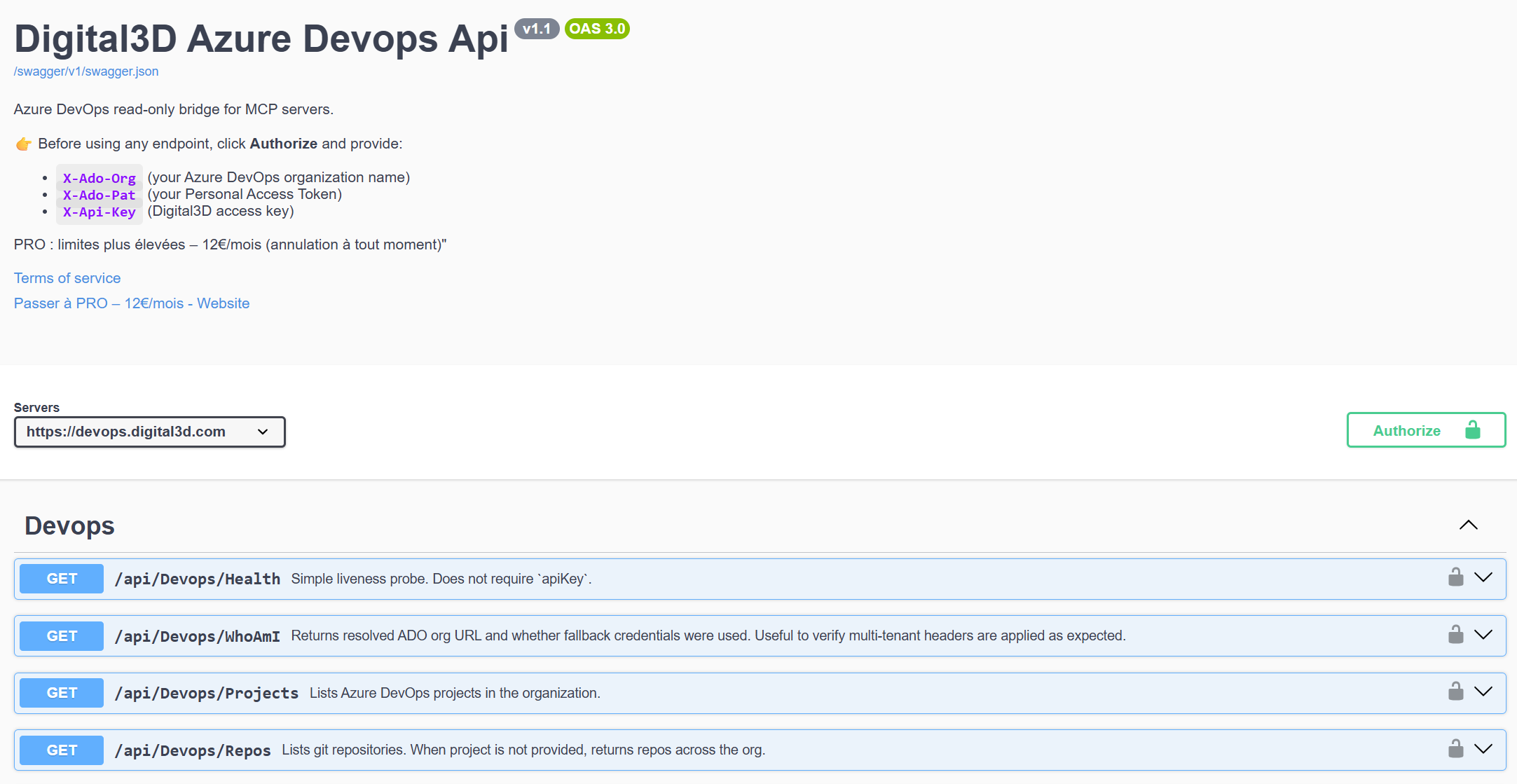
I am very happy to present to you my new DevOps API service, accessible via interactive Swagger documentation:
👉 https://devops.digital3d.com/swagger/index.html
But let's be clear from the start:
👉 this site and this API were primarily designed to be used by an artificial intelligence for developers, architects, or others
Humans are of course welcome 😄, but the main goal is to provide a clear, deterministic interface that can be utilized by AI agents capable of understanding, analyzing, and acting on real DevOps environments.
🤖 An AI-First DevOps API
Modern artificial intelligences are no longer limited to answering questions.
They are becoming autonomous agents capable of:
- querying APIs,
- interpreting structured responses,
- making technical decisions,
- triggering automated actions.
This DevOps API was designed from the outset for this type of usage.
Design Principles
- Endpoints clear and unambiguous
- Predictable JSON responses
- Implicit logical zero
👉 An AI should never guess how a DevOps API works.
👉 It should be able to query it cleanly and act reliably.
🧠 Why Connect DevOps and Artificial Intelligence?
In the very near future (and already well present), an AI will be able to:
- detect anomalies in your code
- analyze recurring failures
- propose or trigger corrective actions
- serve as a conversational interface between humans and infrastructure
This API constitutes a fundamental brick for this type of scenario.
🤖 A Swagger Documentation Usable by Humans and AIs
The Swagger documentation is not just for the comfort of the developer.
👉 It also serves to:
- provide a clear contract between the API and an AI
- enable self-discovery of capabilities
- facilitate integration into AI agents or MCP connectors
- immediately test endpoints
📍 Direct access: https://devops.digital3d.com/swagger/index.html
🔗 AI-Oriented Use Cases
🤖 Intelligent DevOps Assistant
“Does my code in the file 'MyFile.cs' contain bugs?”
➡️ The AI queries the API and responds in natural language.
🤖 Autonomous Monitoring Agent
➡️ Detection of recurring failures → analysis → decision → action.
🎯 Who Is This API For?
This API is designed for:
- AI developers
- DevOps engineers
- creators of autonomous agents
- MCP / LLM tools integrators
- cloud architects
- enthusiasts of intelligent automation
If you work with LLMs, AI agents, or autonomous workflows, this API is for you.
🔐 Installation & Authentication
To use the Digital3D DevOps API, three HTTP headers are required for each request.
📄 Required Headers
X-Ado-Org:

X-Ado-Pat:

X-Api-Key:
These headers allow:
- authentication with Azure DevOps
- identification of the target organization
- securing and controlling access to Digital3D
🏢 X-Ado-Org – Azure DevOps Organization Name
The header X-Ado-Org corresponds to the exact name of your Azure DevOps organization.
How to Find It?
- Log in to https://dev.azure.com
- Observe the displayed URL
Example:
https://dev.azure.com/dev.azure.com/my-company/
👉 The value to use is:
X-Ado-Org: my-company
⚠️ This is not the name of a project, but the name of the organization.
🔑 X-Ado-Pat – Creating the Personal Access Token (PAT)
The PAT allows the API to access Azure DevOps in your name.
Creation Steps
- Log in to Azure DevOps
- Click on your avatar (at the top right)
- Select Personal access tokens
- Click on New Token
Recommended Configuration
- Name:
Digital3D-DevOps-API - Organization: your organization
- Expiration: 30 or 90 days recommended
- Scopes (depending on usage):
- Build (Read)
- Build (Read & Execute)
- Release (Read)
- Project & Team (Read)
⚠️ Copy the token immediately after creation, it will no longer be visible.
Example:
X-Ado-Pat: azdovpatxxxxxxxxxxxxxxxx
🔑 X-Api-Key – Digital3D Access Key
The header X-Api-Key is specific to the key of your account on Digital3D.com
Steps
- Create or log in to your Digital3D account
- Access your user space
- You will see your personal API Key
- Keep it in a safe place
Example:
X-Api-Key: d3d_live_xxxxxxxxxxxxx
🤖 Complete Example of API Call
GET /api/devops/projects
Host: devops.digital3d.com

X-Ado-Org: my-company

X-Ado-Pat: azdovpatxxxxxxxxxxxxxxxx

X-Api-Key: d3d_live_xxxxxxxxxxxxx
This call can be used:
- via Swagger UI
- in a script
- by an autonomous AI agent
- via an LLM or MCP Connector
⏳ API Usage Limit
The Digital3D DevOps API is freely accessible, to allow testing, exploration, and integration with artificial intelligences.
However, usage limits are applied to ensure the stability of the service.
🆓 Without Subscription
- 5 free requests per day
Ideal for:
- tests
- prototypes
- trials with AI agents
🚀 With Subscription
- 1,000 requests per day
Suitable for:
- regular usage
- autonomous AI agents
- CI/CD integrations
- production environments
👉 The subscription allows for extended use while ensuring the quality and sustainability of the service.
If you need more requests per day, contact me
🤖 Conclusion
The Digital3D DevOps API is:
- AI-first
- designed for autonomous agents
- secure and traceable
- easy to integrate
- documented and immediately testable
👉 Start now: https://devops.digital3d.com/swagger/index.html
Join the conversation
You need an account to comment on this article. Creating one is free and takes under a minute.
No comments yet.