SpeakerManager
Your speaker schedule, without spreadsheets. Who is coming, who is leaving, who is available, who has already presented which subject and when. You see the entire year on a single screen, and you can write to the coordinator on the other end in two clicks.
Version 1.3.2 for Windows, Linux and macOS. Free, with no account and no subscription.
A simple idea
Organizing public talks means juggling three things at once: dates, people and subjects. An Excel file can keep track of dates. It cannot tell you that Pierre, Paul or Jacques left twelve days ago, that someone is on leave in July, or that this subject was already presented at your congregation in March. SpeakerManager knows, and shows it to you before you make a mistake.
What it does for you
The schedule of visiting speakers
One column per speaker, one row per Sunday. The talks already arranged, rest periods, holidays and Sundays blocked by a circuit assembly are all shown on the same grid.
The letter to the talk coordinator
The one sent twice a year. For each date you still need to fill, it already suggests a speaker from the congregation you are writing to, along with a subject that has not been heard at your congregation for a long time. Your contact only has to confirm.
The exchange between coordinators
A .spkm file contains your list of visiting speakers. You send it, the other coordinator imports it, and their database is up to date. They see a summary of what will change before anything is saved, and can cancel.
Reminders for speakers
By e-mail or WhatsApp, using a template you write once and for all. The name, date, subject number and meeting address fill themselves in.
The directory
The coordinators, their phone numbers, their addresses and the meeting time. The contact details of the speaker you need to call no longer live in a text message from last year.
Your data stays with you
A local database, backed up automatically, on your own machine. No cloud, no account to create, and no data sent over the Internet.
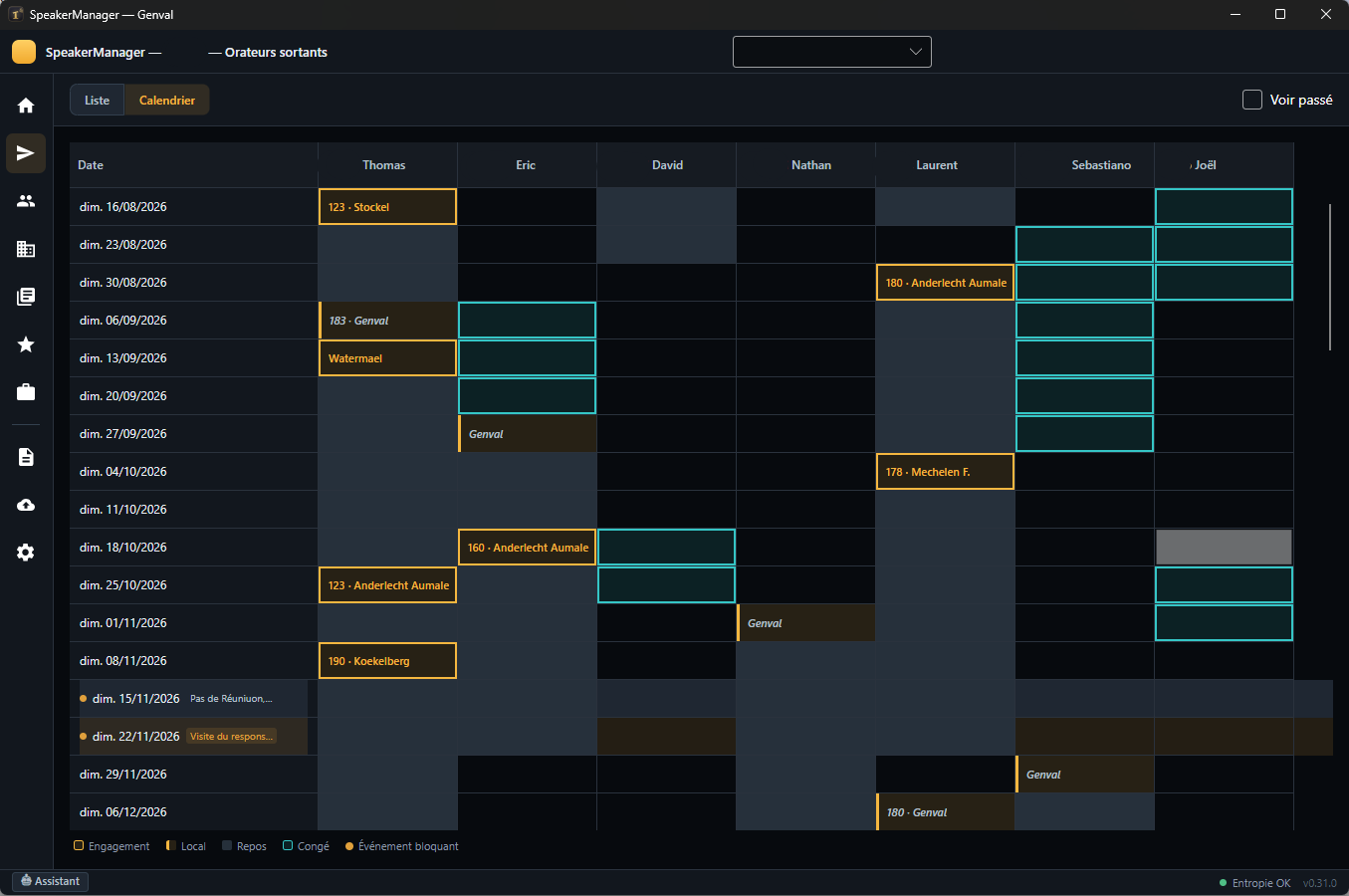
The golden cells are talks already arranged, with the subject number and so on. The cells circled in blue are holidays. The two dotted lines at the bottom are blocked Sundays.
How it works
You enter your speakers
Their topics, their desired spacing between two assignments, their contact details. Once. If you use New World Scheduler on Windows, SpeakerManager reads and writes its files: nothing to enter again.
You set the dates
The calendar shows you who is available and warns you if two of your brothers were scheduled for the same Sunday, or if a speaker is returning too soon after his last assignment.
You write, it drafts
The letter to the coordinator and reminders to the speakers are prepared for you. You review them, make corrections if you wish, and send them.
What you can ask the built-in assistant
- “When did Thomas last present talk 123?”
- “Which Sundays still have no speaker scheduled through the end of the year?”
- “Which topics have never been presented here?”
- “Who from Koekelberg has already come this year?”
The assistant is read-only, never modifies anything, and remains inactive until you have entered your own OpenAI key in the settings. It is the only software feature that communicates with the outside world.
Under the hood
| Platforms | Windows 10 and 11 (64-bit and ARM), Linux (64-bit and ARM), macOS 12 and later (Apple Silicon and Intel) |
|---|---|
| Technology | .NET 9 and Avalonia 11.3 |
| Storage | Local SQLite database, automatic backups with retention |
| Exports | PDF, HTML, .spkm interchange file |
| Sending | Direct SMTP, webmail, Outlook draft, WhatsApp |
| Interoperability | Import and export of New World Scheduler files, Windows only |
| Installation | None. On Windows, unzip and run SpeakerManager.exe, on Linux SpeakerManager. On Mac, open the .dmg and drag the application into the Applications folder. |
Free, with no strings attached
No trial version, no restricted features, no license to purchase. I wrote it because I needed it every week, and I am offering it to you free of charge, wholeheartedly.
No advertising, no telemetry, no account. The software does not even know that you have installed it.
Take back control of your schedule
Download SpeakerManager below, place it wherever you like, and launch it. The database is created automatically on first startup, and you can import your existing data right away.
Version 1.3.2 · Windows, Linux and macOS · Free
Join the conversation
You need an account to comment on this article. Creating one is free and takes under a minute.
No comments yet.