Agent Loops: Claude Code’s creator no longer prompts, he writes loops
Agent loops: the creator of Claude Code no longer prompts, he writes loops
“I no longer prompt Claude. I have loops running, and they are the ones prompting Claude and deciding what to do. My job is to write loops.” The quote is from Boris Cherny, the creator of Claude Code, and the clip got roughly 700,000 views in 24 hours on X. Since then, everyone has been talking about “loop engineering”, and almost no one explains how to build one.
We’re going to fix that, starting from scratch. No prerequisites, other than having typed a question into Claude Code at least once. First, we’ll look at the loop that is already running right before your eyes without you knowing it, then we’ll build a real one, in three levels of difficulty, with the files to copy and the exact place to put them.
Along the way, we’ll clear up a very common misunderstanding: Claude Code’s /loop command is not an improvement loop. It’s a timer.
Five vocabulary words, and then we’re good
If you’re just starting out, half the confusion comes from the jargon. Five definitions and we won’t need to talk about it anymore.
- A tool: an action that Claude is allowed to perform on your machine. Read a file, write one, run a command in the terminal, search the web. Claude does not execute them itself; it requests them, and the Claude Code program executes them on its behalf.
- A turn: one complete back-and-forth. Claude speaks, tools run, and the results come back to it. A somewhat substantial question can take five, ten, or thirty turns, and all you see is text scrolling in the terminal.
- The context: everything Claude can see at a given moment. Your request, the files it has read, and command outputs. It is limited, it fills up, and when it is full Claude summarizes the old content to make room. This summary is called compaction, and it causes details to be lost.
- The
CLAUDE.mdfile: a text file placed at the root of your project and loaded at the beginning of each session. It is your permanent house rules. Unlike an instruction given only in the conversation, which may disappear during compaction, the rootCLAUDE.mdis reread and re-injected afterward. - A sub-agent: a disposable Claude launched by the main Claude for a specific task, with its own fresh context. It works on its own, and only its conclusion is sent back. It is a Markdown file in
.claude/agents/, and you can write as many as you want.
Let’s add a sixth word, the one that will change everything later on: a hook is a small script of your own that Claude Code executes automatically at a given moment, for example just before writing a file, or just before handing control back. A script, not an AI. It does what it is told, the same way every time, and it doesn’t cost a single token.
The loop that is already running without you asking for anything
Before building anything, you need to see the one that already exists. Anthropic’s documentation on the agent loop describes it in five stages, and that is exactly what happens every time you press Enter.
- You send your request.
- Claude reads it and responds, either in text or by requesting tools.
- Claude Code executes the requested tools.
- The results are sent back to Claude and added to the context.
- We go back to step 2 and repeat until Claude responds without requesting any tools. That message closes the loop.
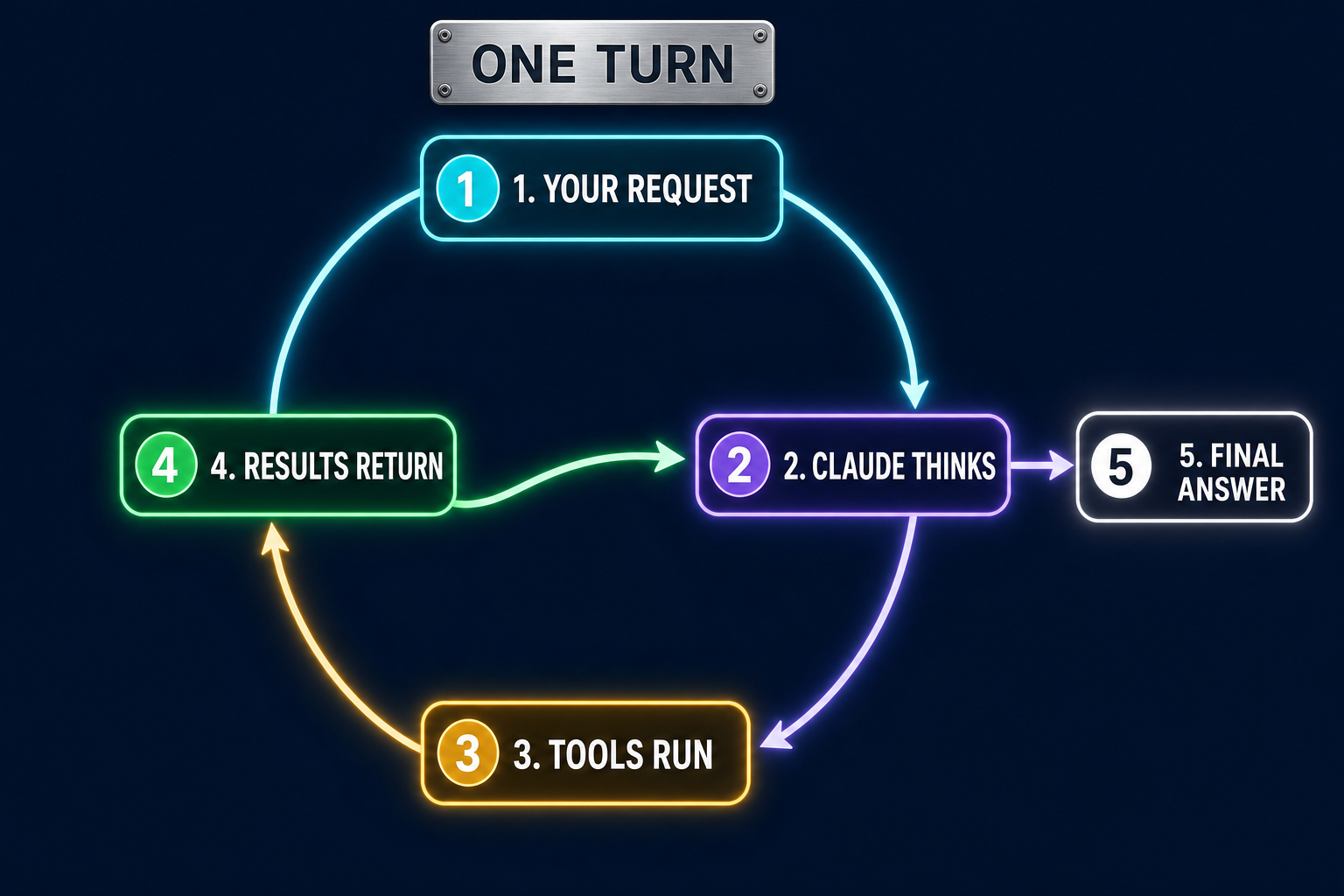
Let’s make this concrete. You type “fix the tests that are failing in auth.ts”. Here is what really happens, while all you see is a wall of scrolling text:
| Round | What Claude asks for | What comes back |
|---|---|---|
| 1 | runs npm test | three failing tests |
| 2 | reads auth.ts and the test file | the contents of both files |
| 3 | modifies auth.ts, runs npm test again | everything is green |
| 4 | nothing, it responds in text | end, the loop stops |
Four rounds. You wrote only one sentence, and there were four back-and-forth exchanges, six tool calls, and a stopping decision. That's the loop.
Remember the consequence, because it's the whole article: an agent IS already a loop. Everything you add on top, sub-agents, hooks, config files, slash commands, serves only one purpose: deciding when it is allowed to stop.
And that is the problem. By default, it is Claude itself that decides it is done. In round 4, it deemed the task complete. It did not check that the entire project still compiles, nor that no one had broken something elsewhere. It simply had the feeling that it was finished. Loop engineering means taking that decision back and entrusting it to something less subjective than an impression.
The four loop families
The Claude Code team defines a loop as “an agent that repeats work cycles until a stopping condition is met.” There are four kinds, and they are not used for the same things at all. This is the table to keep handy.
| Family | Trigger | Stopping condition | What it's for |
|---|---|---|---|
| Per round | your prompt | Claude considers the task complete | everyday work, short tasks |
By objective (/goal) | your prompt | the objective is reached, or the round quota is exhausted | anything with a verifiable criterion |
By time (/loop) | an interval | you cancel, or the session closes | monitoring, external systems |
| Proactive | an event, without you | each task exits when its goal is reached | bug triage, migrations, upgrades |
No, /loop doesn't improve anything
The confusion comes from its name. Look at what it really does:
/loop 5m vérifie si le déploiement est terminéEvery five minutes, Claude Code sends this same prompt, word for word. Not “better” each time: identical. The documentation is crystal clear: the command “repeatedly runs a prompt as long as the session remains open.” It's cron with a brain, not an upward spiral. Two useful details nonetheless: if you omit the interval, Claude self-schedules between iterations, and if you omit the prompt, it will read .claude/loop.md.
The command that actually improves things is /goal. It takes a condition in natural language, and Claude continues working across turns as long as that condition is false:
/goal monte le score Lighthouse de la page d'accueil à 90 ou plus, arrête après 5 essaisTwo things matter in this line, and if you retain only one paragraph from the entire article, make it this one.
“90 or higher,” first. A measurable condition can be verified without any possible debate. Compare that with “make the page faster”: faster than what, judged by whom? A loop needs a number or a test that passes, not an adjective. Writing a loop first means forcing yourself to turn a wish into a verifiable criterion, and frankly, that's the difficult part.
“Stop after 5 attempts,” next. A loop without a counter is a bill. The model never gets tired, never gets bored, and has no idea what the thirtieth attempt costs.
“Do my agents in .claude already count as a loop?”
This is THE question I receive, and the answer is no. Well, not quite, and the detail is worth exploring.
Let's take a classic configuration, the kind many people end up writing after a few weeks: an architect sub-agent that designs before anyone codes, a developer sub-agent that implements, a reviewer sub-agent that reviews the work, and a CLAUDE.md that specifies the order in which to call them. It's clean, useful, and avoids a tremendous number of mistakes. But as it stands, it's a chain, not a loop.
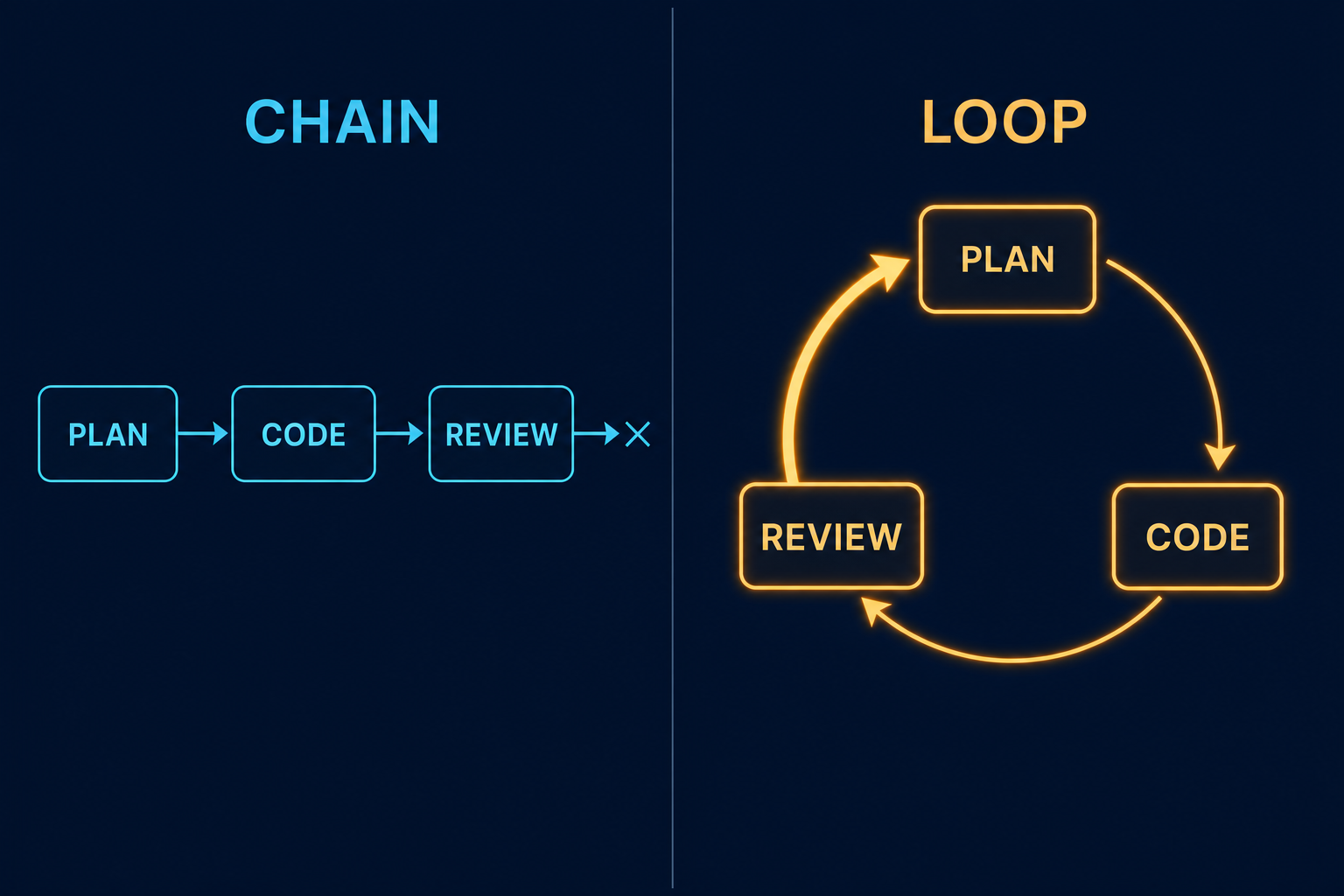
The difference comes down to a single pencil stroke. In the chain, the reviewer is the last box: they deliver their report, and the turn ends. In the loop, their report becomes an input for the developer again, and it starts over as long as the verdict isn't good.
A loop needs three ingredients, and the third is the one we systematically forget:
- a repeatable action, which you already have: it's your sequence of agents,
- a measurable stopping condition, not “when it's good” but “when the build passes and the reviewer finds no more blocking issues,”
- a feedback edge, that is, a path that brings the reviewer's output back into the developer's hands.
Without the third, your reviewer produces a nice report at the end and nobody reads it. With it, the chain becomes a cycle and the program improves with every turn. Good news: closing this edge takes about ten lines.
Level 1: your first loop fits in one line
Before writing a single file, know that 80% of the benefit comes from typing this into Claude Code:
/goal le build passe et les tests sont verts, arrête après 5 essaisClaude will code, run the build, see the error, fix it, run it again, and it will only hand control back to you when the condition is true or when it has exhausted its five attempts. You have just created loop engineering. Really. Try this before anything else.
The limitation is that it only lasts for the duration of your command. Tomorrow, in a new session, you'll have to type it again, and you'll forget. Hence the next two levels, which make the rule permanent.
Level 2: the definition of “done,” written once and for all
The CLAUDE.md is loaded at the beginning of every session. The file placed at the project root is also reread and reinjected after a context compaction. This is stated explicitly in the SDK documentation: persistent rules belong there, not in your first message, which will eventually disappear. This is therefore where the stopping condition lives.
Create the file at the root of your project, if it does not exist, and add this block:
## Definition of Done

Une tâche n'est considérée comme terminée que si toutes les conditions applicables sont vraies :

1. le build réussit
2. les tests concernés passent
3. le sous-agent reviewer retourne VERDICT: PASS
4. HISTORY.md et la version du projet sont mis à jour lorsque la nature du changement le nécessite

Tant qu'un point est faux : corrige, puis reprends au point 1.
It's short, numbered, and above all, the last line explicitly draws the return edge. From now on, Claude will reread its work and go back on its own in most cases.
In most cases, yes. Not all of them. A model is still a model, and sometimes it decides it's finished when it isn't, especially at the end of a long session. If you want this to be a law rather than advice, you need level 3.
Level 3: the Stop hook, the one with the right to say no
Here is the complete directory structure we'll end up with. Everything happens in a .claude/ folder at the project root, to be created if it does not exist.
votre-projet/
  .claude/
    settings.json          quels hooks lancer, et quand
    agents/
      reviewer.md          le sous-agent relecteur
    hooks/
      done-or-continue.sh  le script qui accepte ou refuse la fin
  CLAUDE.md                les règles permanentes (niveau 2)
1. A reviewer that delivers a machine-readable verdict
The trap with the reviewer sub-agent is that it produces prose. Very well written, often accurate, but impossible to turn into an automatic decision: no script knows how to read “overall it's correct but I have some doubts about the error handling.” So we impose a standardized final line on it, and anything becomes possible.
File .claude/agents/reviewer.md. The section between the two lines of dashes is called the frontmatter; it is the agent's identity card. The rest consists of its instructions.
---
name: reviewer
description: Relit le travail après chaque implémentation terminée.
model: opus
tools: Read, Glob, Grep, Bash
---

Tu relis UNIQUEMENT ce qui vient de changer (le diff, plus les fichiers non suivis).
Classe chaque remarque en CRITICAL, WARNING ou INFO.
Tu n'écris jamais de code, tu ne commites jamais.

Écris ton rapport dans .claude/last-review.md et termine-le par une ligne seule :
VERDICT: PASS   s'il ne reste aucun CRITICAL
VERDICT: FAIL   sinon
Note that the tools: list contains neither Edit nor Write. The reviewer therefore does not have access to specialized file-modification tools. It does, however, retain Bash, which is necessary here to examine the Git diff and save its report. It must therefore be explicitly forbidden from modifying production files. We separate, as much as possible, the one who develops from the one who judges, in order to preserve an independent perspective on the changes.
2. The script that refuses to end the turn
The Stop hook is triggered precisely when Claude wants to hand control back to you. It is allowed to refuse. File .claude/hooks/done-or-continue.sh, to be made executable with chmod +x:
#!/usr/bin/env bash
# Refuse la fin de tour tant que la Definition of Done est fausse.
set -uo pipefail

[ -f .claude/loop.off ] && exit 0          # interrupteur d'urgence

STATE=.claude/loop-count
COUNT=$(cat "$STATE" 2>/dev/null || echo 0)
if [ "$COUNT" -ge 5 ]; then                 # disjoncteur
  rm -f "$STATE"
  exit 0
fi

if ! npm run build >/tmp/build.log 2>&1; then
  echo $((COUNT + 1)) > "$STATE"
  jq -n '{decision:"block",
          reason:"Le build casse. Lis /tmp/build.log, corrige, puis reprends."}'
  exit 0
fi

if ! grep -q "VERDICT: PASS" .claude/last-review.md 2>/dev/null; then
  echo $((COUNT + 1)) > "$STATE"
  jq -n '{decision:"block",
          reason:"Build vert mais pas de VERDICT: PASS. Relance le sous-agent
                  reviewer, applique les CRITICAL, puis reprends."}'
  exit 0
fi

rm -f "$STATE"
exit 0
If you do not read bash fluently, here is the same thing in French, in order:
- if the file
.claude/loop.offexists, we do nothing and let Claude stop. This is your switch: atouch .claude/loop.offdisables the loop without killing anything. - we read a counter stored in a small file. If it is already at 5, we give up and let it pass. This is the circuit breaker; it prevents an infinite loop.
- we run the build. If it fails, we increment the counter and respond with
blockwith a reason. Claude cannot stop and receives this reason as a new instruction. - if the build passes, we look for the line
VERDICT: PASSin the reviewer's report. If it is absent, we block again, stating precisely what needs to be done. - if everything is good, we delete the counter and exit silently. Claude is allowed to finish.
Three fields are enough to control all of this, and there are no others you need to know to get started. decision: "block" prevents Claude from stopping and passes your reason to it as a new instruction. continue: false stops everything, no matter what happens. And hookSpecificOutput.additionalContext injects a note without blocking, when you want to provide guidance rather than force an action. Note for those who do not have jq installed: the hook can write an explanation to standard error, then terminate with exit 2. For a Stop hook, this also prevents Claude from stopping and passes the message to it as feedback. However, this method does not use a structured JSON response: choose either exit 2 with a message on stderr, or exit 0 with a JSON object, but do not mix the two approaches.
3. Declare the hook
All that remains is to tell Claude Code when to launch this script. File .claude/settings.json:
{
  "hooks": {
    "Stop": [
      {
        "matcher": "",
        "hooks": [
          { "type": "command", "command": ".claude/hooks/done-or-continue.sh" }
        ]
      }
    ]
  }
}
4. Check that it works
Here is the simplest test. Really do it, otherwise you'll spend three days doubting yourself. Deliberately break a line of code, ask Claude for any small modification, and let it try to finish. It should start again on its own and fix the issue, with your reason phrase visible on screen. If nothing happens, check in this order: that the script is executable, that the path in settings.json is correct, and that running the script manually in a terminal produces no errors.
Result: the developer codes, the reviewer judges, the hook refuses to allow the process to exit until the verdict is good, and it runs up to five times before stopping cleanly. Now, yes, you have a loop.
Note for production use
The loop presented here is deliberately minimal to make its mechanism easy to understand. A version intended to run autonomously on a real project should also:
- verify that the reviewer's verdict corresponds to the current Git diff;
- reject outdated or incomplete verdicts;
- verify the functional acceptance criteria;
- detect files modified outside the intended scope;
- fail cleanly when a check could not be run;
- enforce a maximum number of cycles.
The principle remains the same: measure the state of the project, fix whatever fails, then start again until all exit conditions are genuinely satisfied.
Three loops to try tonight
Harmless examples to get some practice, from simplest to less simple.
/goal all tests pass, stop after 5 attemptsThe classic. Works on any project that has a test command.
/goal no more linter warnings in src/, stop after 3 attemptsAn excellent first attempt, because the criterion is binary and the fixes are safe.
/loop 10m watch the new files in ./inbox, summarize each one in ./resumesThat one is a monitoring loop, not an improvement loop, and it illustrates the difference well. It does not progress; it keeps watch.
The self-improving loop
There is one more level. So far, the loop improves the program. It can also improve itself, and that is the pattern Andrej Karpathy popularized in March 2026 with his autoresearch repository, which surpassed 50,000 stars on GitHub in a few weeks. The principle can be summed up in one sentence from its README: give an agent a real, small model training task, it modifies the code, trains for five minutes, checks whether the metric has improved, keeps or discards the change, and starts again. All night long.
What makes the difference with a simple /loop is memory. A file that the agent rereads at the beginning of each pass and updates at the end with what it has just learned. Without this file, iteration 200 is just as dumb as iteration 1; it makes the same mistakes with the same enthusiasm.
Transposed to a normal project, that means a few more lines in CLAUDE.md:
## Self-improvement

Before handing control back:

- if I had to correct you, add the corresponding rule to LESSONS.md,
  one terse sentence, in the imperative, never an explanation
- if a step was redone twice, note why in NOTES.md
- if a manual check comes back on every project, turn it
  into a script

LESSONS.md is reread at the beginning of every session, before any action.
After a month, LESSONS.md is worth more than the code. It is the record of mistakes the loop will not make again. And it is the file everyone forgets to fill in, even though it costs nothing.
Beginner mistakes that cost dearly
The patterns that come up among everyone running loops in production are not particularly glamorous, but they are what keep the house standing.
- An unclear stopping condition. “When the code is clean” is not a condition, it is an opinion. If you cannot verify it with a command that answers yes or no, your loop will never stop at the right time.
- No ceiling. The SDK exposes
max_turnsandmax_budget_usd, and when the limit is reached, the result comes back with an explicit subtype (error_max_turns,error_max_budget_usd) instead of silently going off the rails. Use them, and always start with a low ceiling. - The same agent does the work and verifies it. In the same context, it always reviews its own work benevolently. A sub-agent starts with a fresh context, which provides a genuine outside perspective, and it costs less since only its conclusion is returned.
- Two loops in the same folder. They will overwrite each other’s files. Git worktrees solve this for next to nothing.
- No switch. Always plan for a marker file that you can create manually to stop everything without killing the process. You will need it sooner than you think.
- Run everything on the largest model. A loop that runs every five minutes means 288 executions per day. The choice of model and effort level is the first cost lever, by far ahead of everything else.
On cost, in fact: a poorly bounded loop is the only known way to spend a monthly budget during lunch. Start with a narrow objective, a five-turn ceiling, and see what it consumes before opening the floodgates.
Two weeks later: the four things that bit me
I wrote this article on July 26. Since then, I have been running this mechanism for real, every day, on my .NET projects. The structure described above holds up; I would not remove a single line from it. But four things bit me, and none of them could have been predicted when I wrote the rest. Here they are, in the order in which they cost me the most.
1. The reviewer must not write its own verdict
Above, I have the reviewer finish with VERDICT: PASS. It is convenient for a script to read, and it is a bad idea.
An agent that signs its own report proves nothing. It can list three serious problems in its report, then conclude with a PASS because the last sentence seemed more agreeable to it. Nothing checks that the verdict matches what came before.
What needs to be done instead: the hook reads the report and derives the verdict from it. A [CRITICAL] found in the text means FAIL, regardless of what the agent wrote at the bottom of the page. The hook then stores the verdict in its file with a stamp, such as writtenBy: "hook", and ignores any verdict file that does not bear it. So an agent that took the initiative to write its own to save time gets rejected.
The agent produces the text. The hook produces the verdict. Never the same hand.
2. A verdict on its own means nothing
A PASS stored in a file says only this: someone reviewed something, at some point. If you do not attach it to a specific state of the code, it remains valid for eternity, including after twenty changes.
The workaround fits in one line. When recording the verdict, calculate a fingerprint of the contents of the modified files, and store it alongside it. At the end of each round, calculate it again. Different fingerprint, stale verdict, request another review.
Except that this creates a problem I had not anticipated. If the fingerprint also covers the documentation, then correcting a sentence in a NOTES.md after the review makes the verdict stale. In my case, this produced the dumbest scenario imaginable: the review flagged an imprecision in the documentation, I corrected it, and that correction triggered a full review. Twice in a row on the same project, for around 75,000 tokens that verified absolutely nothing.
The fix: two fingerprints instead of one. The first covers the entire modified batch, the second the same batch minus inert prose (README, notes, docs). If the first has changed but not the second, then no code line has changed, and the verdict still holds. Be careful, though: a Markdown file that IS behavior, an agent prompt, a SKILL.md, or a command must count in the second fingerprint. It is not documentation, it is code written in French.
3. What your hook writes to the screen goes nowhere
This one is the most devious, and it is the one that made me lose the most time.
A Stop hook that finishes normally, with a return code of 0: everything it prints goes into the debug log. Not to you, not to Claude, not into the transcript. So my beautiful explanatory messages spoke to no one for weeks, and I thought the mechanism was silent when it was actually working perfectly.
What works is outputting JSON to standard output. Three channels, and they do not do the same thing:
{"decision":"block","reason":"..."}
        relance un tour, et le modele LIT le contenu de reason

{"systemMessage":"..."}
        s'affiche a VOUS, sans relancer le modele, donc gratuit

{"hookSpecificOutput":{"hookEventName":"Stop","additionalContext":"..."}}
        le modele le lit et le tour continue, donc ca coute un tour entier
The first is the loop engine. The second is used to keep you informed and costs nothing. The third relaunches the model to give it context without blocking: reserve it for cases where it really needs to act afterward, otherwise you pay for a full round trip just to say that everything is fine.
The rule I take away from this: if your loop looks like it's doing nothing, it's probably not broken. It's talking into the void.
4. A loop that triggers every turn becomes unbearable
The setup described above closes the loop at the end of every turn. Technically, that's correct. In practice, it's exhausting.
I looked at my own figures over eleven days: 71 reviews launched for 16 projects actually completed. That's 4.4 reviews per project, each paid at full price. A good half of them only served to recheck code that had already been approved, which I'd touched to change a comma.
I'd nevertheless planned a way to pause the loop while I was coding. I used it three times in eleven days. That's when I understood something uncomfortable: a rule written in CLAUDE.md isn't a mechanism. The model rereads it every turn and still forgets it, because it's busy with the task.
The fix is to reverse the default. The project automatically opens in deferred mode as soon as the first write occurs. As long as it's open, the hook no longer requires anything on every turn. And a UserPromptSubmit hook injects two status lines before every response: which repository, how many files changed, and how many turns ago. No one uses that one, which is a real shame. Beyond a threshold, it tells the agent to suggest closing the project. It asks the question at the right time, rather than making me remember to ask it.
One last point, and it matters: deferral must never become cancellation. The review debt remains due. The marker expires automatically after fifteen turns, when the session changes, or after four hours. A forgotten project will always end up asking for its review.
These four points have something in common, and it jumped out at me as I was writing them. Each time, I was trusting something that wasn't measured: the verdict the agent assigns to itself, the freshness of that verdict, whether my message is read by anyone, my own discipline. A loop doesn't hold because it's well designed. It holds because everything it depends on is a verifiable fact, not a promise.
Running this without you
Once the loop is closed, you can connect it to something other than your keyboard. The composition recommended by Anthropic simply combines a clock and an objective:
/schedule every hour: check #project-feedback for bug reports.
/goal: don't stop until every report found this run is triaged,
actioned, and responded to.
The first decides when; the second decides how far. That's exactly what Cherny describes when he talks about hundreds of instances reading GitHub issues, Slack feedback, and X threads to come up with the next thing to do. No one at the keyboard, and yet work is moving forward. But don't go there before you've run levels 1 through 3 for a few days, under your watch.
What this changes in practice
Moving from a prompt to a loop isn't a vocabulary fad. Writing a prompt means asking for a result. Writing a loop means describing what a good result is and letting the machine keep banging against it until it gets there. The work shifts: less formulation, more acceptance criteria, automatable checks, and guardrails.
Personally, the part I find most underestimated is the line VERDICT: PASS. Three words imposed on a sub-agent, and a prose report becomes a stopping condition that can be used by a ten-line shell script. That's loop engineering in practice: making measurable what wasn't measurable. The rest is plumbing.
Sources
- Anthropic : How the agent loop works
- Anthropic : Loop engineering, getting started with loops
- Claude Code : command reference (/loop, /goal, /code-review)
- Claude Code : hooks, including Stop and SubagentStop
- Claude Code : sub-agents
- Andrej Karpathy : autoresearch
- From Prompts to Loops : a practical guide to building agentic workflows
- Memeburn : Boris Cherny says loop engineering has replaced prompting
Join the conversation
You need an account to comment on this article. Creating one is free and takes under a minute.
No comments yet.