ClaudeClaw - Use Claude as OpenClaw
ClaudClaw: I transformed my Claude subscription into a fleet of agents that work for me 24/7
I was using a ready-made tool for my AI agents: OpenClaw. Convenient, but stagnant: a closed box where you can hardly
do anything but "add another agent." Then I discovered the Claude Agent SDK. And there, everything changed: I no longer configure a product, I build my own — brick by brick — and I control it from Telegram, face-to-face, like chatting with a very competent friend who never sleeps.
The trigger: closed product vs Lego box
Turnkey solutions for "AI agents" are appealing: you install, you click, it works. But after a few days, you hit the walls. You want to connect this specific API, add this in-house tool, trigger a routine at 6 AM, or simply understand what's going on under the hood… and you can't. The tool is finished. It does what it was designed for, no more, no less.
With OpenClaw, I also had another issue: it forgot. Whether after a restart or an update, some agents that were working very well no longer responded. It was a hassle… I had to ask it each time, via Telegram or its interface: "What's going on?" and often open an ssh command to fix and restart OpenClaw.
Second point: the use of a paid API. I was using OpenAI Codex under OpenClaw, but I already had a Claude Max subscription. However, since the beginning of 2026, it is no longer possible to use a Claude subscription with OpenClaw. This represented an additional cost.
Third point: I love Claude! I find it smart, fluid, and for coding, I think there's nothing better.
I was eagerly waiting for a kind of OpenClaw with a Claude twist, but what I discovered goes a thousand times further than what OpenClaw can offer.
Claude Agent SDK takes the problem from the other side. Instead of offering a turnkey product, it gives you the engine of Claude Code: the same one that reads your files, executes code, and navigates the web. Then, it lets you dress it up however you want.
It's a bit like the difference between buying a pre-assembled model from the factory… and receiving a bag of bricks.
I have therefore created my own OpenClaw, which I have called ClaudClaw. I will now use this name to refer to my own tool based on Claude Agent SDK.
« A ready-to-use tool saves you a day. An open SDK saves you a platform. »
The idea, in one sentence
Imagine the power of a cutting-edge development assistant — the one that opens a terminal, writes code, reads your documents, searches the web — but lives in the cloud, never shuts down, and you talk to it from your phone. You write to it (or you talk to it, we'll get back to that), it thinks, acts, and responds. While you sleep, some of its agents are already working.
Ready-made vs custom
Let's be honest: a turnkey tool is perfect for starting in five minutes. But here's what happens when your needs grow:
| Turnkey tool (OpenClaw, Hermes) | Claude Agent SDK | |
|---|---|---|
| Startup | Immediate | A bit of setup |
| Customization | You "add agents", that's it | Brick by brick, without limits |
| In-house tools / API | What the publisher has planned | Yours, via MCP |
| Plugins / Skills | Some from the publisher without source code | You create your own plugins from scratch |
| Cost of the "brain" | Often the API charged per token | Your reused Claude subscription (* Here a caveat starting from 15/06/26) |
| Evolution | We are waiting for the next version | The agent edits its own code on demand |
No witchcraft trial: closed products have their place. But when you want a platform of your own, that grows with your ideas, the SDK wins on all the axes that matter in the long run.
I started by installing Claude Code on my Linux server, as root. I know, it's not ideal, but I wanted it to be able to install the Claude Agent SDK, as well as all the tools it needed. Of course, don't forget to remove root rights afterwards.
I then asked Claude Code to install Claude Agent SDK and create a central hub capable of receiving Telegram messages. For this, I created a new bot via BotFather.
Automatically, Claude Agent SDK was able to find my Claude Code subscription thanks to the file ~/.claude/credentials.json. From that moment on, I could already send a Telegram message to Claude Agent SDK via my hub. It had created it itself, and I could now remotely control via Telegram anything I wanted.
I then enriched this central hub, brick by brick, to add new commands: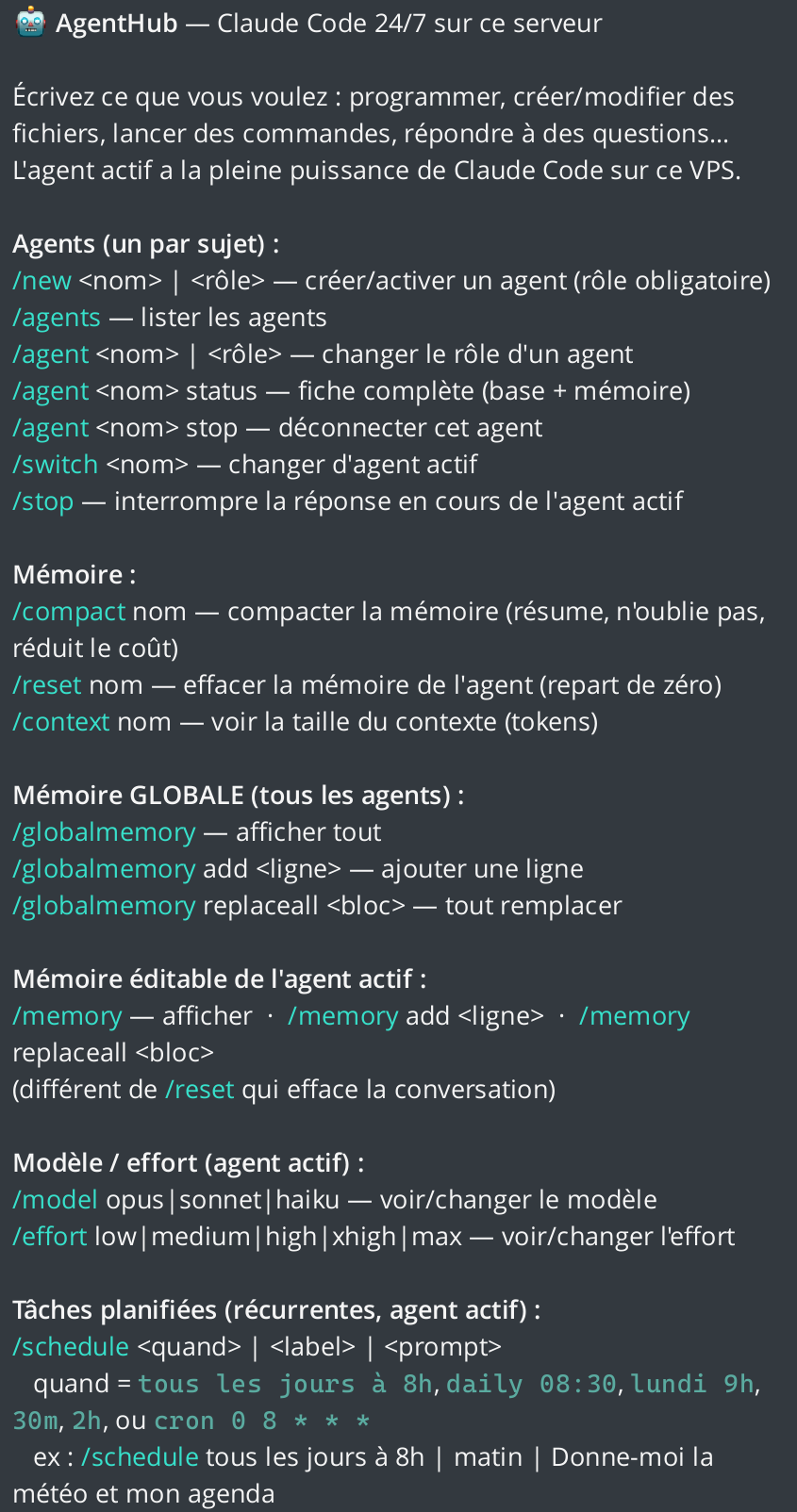 An excerpt of the commands I added brick by brick via Telegram (sorry for non-French speakers)
Here is an example with the Weather agent, which sends me every day at 8 AM an image created by a Python script, based on weather information collected from two sites: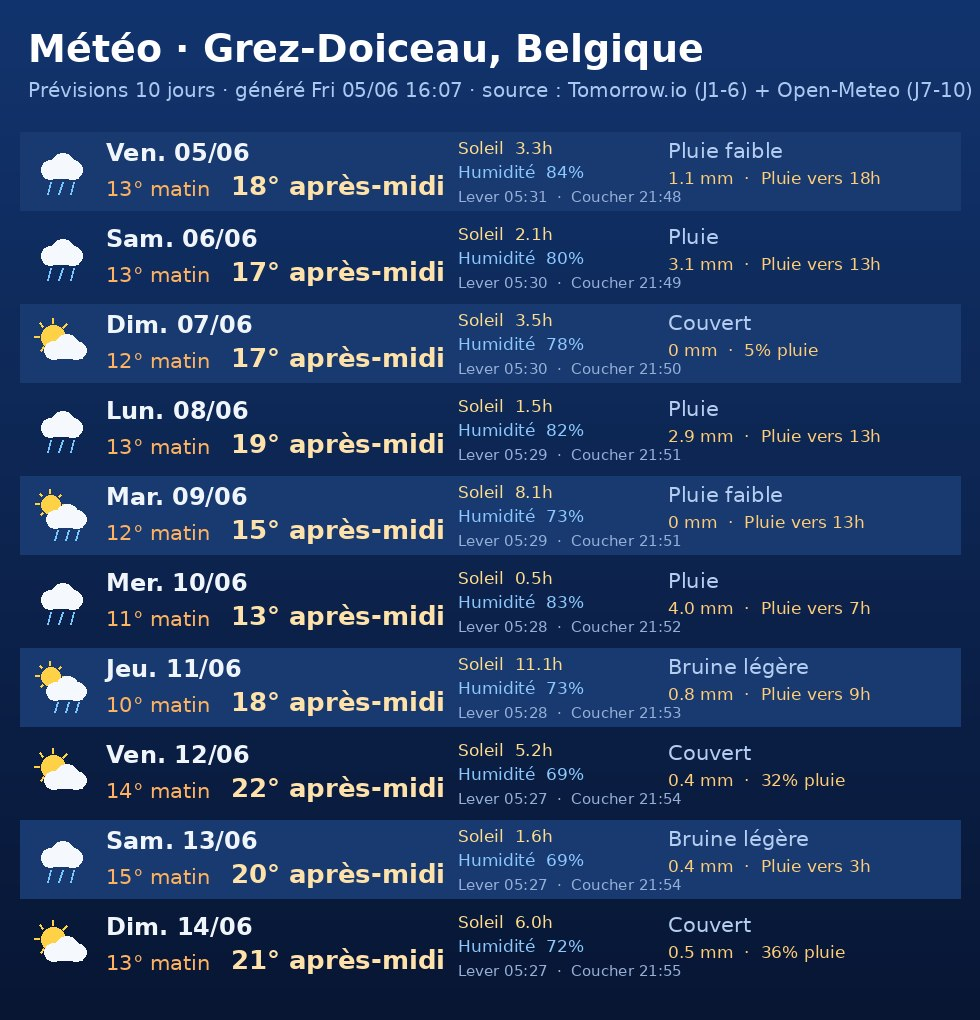
Big advantage: your Claude subscription, not the API... at least for now
Here is the argument that, by itself, convinced me. Most agent frameworks consume their provider's API: every word sent or received is charged on a meter. For an assistant running continuously, the bill adds up quickly.
The Claude Agent SDK, on the other hand, knows how to reuse your Claude subscription (Pro, Max, or Ultra) already paid for. Technically, it relies on the authentication of the official claude client already present on the machine: no API key to paste, no token charged per piece. On the SDK side, the source of the API key is simply… none — the agent borrows your subscription credentials, just as Claude Code would on your workstation.
💡 In short
Your fleet of agents runs on the plan you already pay for each month. No double billing, no nasty surprises at token time. The marginal cost of a daily routine? Almost zero.
Why a VPS? Because a sleeping assistant is useless
A VPS is a small server rented in the cloud, for you, running 24/7. It's the ideal foundation for ClaudClaw, a small machine with 8GB RAM on Hostinger.com will do the job:
- ⏱️Always online. The 6 AM routines trigger even if your laptop is closed.
- 📌Stable address. Webhooks, emails, third-party APIs: everything points to a fixed and reliable point.
- 🔧You are in control. Full access to the machine: you install whatever you want.
- 🔁Clean restart. Managed like a system service, the agent restarts on its own after a reboot — and resumes its conversations where it left off.
- 🛡️Your data stays with you. No intermediary: the code and history live on your server.
Under the hood of ClaudClaw: architecture at a glance
Nothing complicated. A single program runs continuously and bridges between Telegram and the agents. Here’s the flow:
(HUB Python)
(notifications, emails, images, trading…)
(agents work alone)
without billed API key
Specifically: a single process receives your Telegram messages, routes them to the right agent (each agent has its own Claude session), and also exposes in-house tools and a scheduler. All backed by your subscription.
Brick #1 — Creating agents (each with their own role, each with their own memory)
In my ClaudClaw, an agent is not just a "profile". It is an entity with: a role (its mission), an isolated work directory (its office, which it does not share with anyone), and a multi-tier memory (it uses SqlLite). You can create as many as you want: a "secretary" agent for emails, a "weather" agent, a "market watch" agent, a "writer" agent… Each stays in its own lane.
Memory in Russian dolls (4 levels)
It’s one of my favorite details.
It was necessary that at each restart of my server, or at each update of an agent, it did not lose track of its ideas. More importantly, I needed a global memory, shared by all agents, with clear directives such as: “do not read the secret files .env” or “always respond to me in French.”
These are global directives that all agents, existing and future, must know.
But each agent also needed to have its own memory, in addition to this global memory, with a well-defined role to perform its work correctly.
To achieve this, I added to my hub a global memory, stored in a simple file GLOBAL.md, as well as an individual memory for each agent, recorded in an SQLite database. These individual memories are not shared between agents.
Brick #2 — The full power of Claude Code, in your pocket
Each agent inherits the integrated tools of Claude Code, self-authorized: it can open a terminal, read and write files, search in the code, browse the web, and execute code. It’s not a chatbot that “talks”: it’s a colleague that does.
When I type /new agent, I must give it a name and a role. This information is then saved in an SQLite table for this new agent.
Then, still via Telegram, I can for example ask it to write a Python script that reads my agenda for today and tomorrow, then sends it to me on Telegram every day at 8 a.m.
The command is then sent to my hub ClaudClaw, which uses Claude Agent SDK, the engine of Claude Code without an interface, to create the agent from A to Z.
I can't tell you the difference in quality between the final agent obtained this way and what I knew with OpenClaw!
Result: I can create infinitely autonomous, specialized agents that never forget.
I have enriched my ClaudClaw, brick by brick, by adding new options:
🛠️ It acts
Bash, reading/writing files, searching, web, executing scripts… Give it a concrete task, it accomplishes it from start to finish.
👁️ It reads what you send it
Send a photo (it describes it, OCRs it), a PDF, a Word, or an Excel — it extracts the content and utilizes it.
🎙️ It listens to you
A voice message? It is transcribed and then processed as text. You talk to your assistant, no need to type.
🖼️ It responds to you with images
It can generate a figure, a map, a graph (PNG) and send it directly to you on Telegram.
Brick #3 — Your own superpowers, via MCP
Here is the heart of the "custom-made". The MCP (Model Context Protocol) is a standard that allows you to give new tools to the agent. ClaudClaw comes with its own internal MCP server that exposes about fifteen in-house tools. Here are some concrete examples:
Adding a tool means writing a small Python function and declaring it: the agent "sees" it immediately and knows how to use it. It's exactly that, building brick by brick.
🔌 And this is just the beginning: third-party MCP servers
Beyond your in-house tools, you can connect external MCP servers already made to multiply capabilities:
Brick #4 — Agents that work on their own (the cron)
This is where my ClaudClaw stops being a chatbot and becomes a true digital butler. An integrated scheduler (with persistent tasks that survive restarts, in the correct time zone) triggers an agent at the specified time. Upon the deadline, it slips a command to it, retrieves the result, and pushes it directly to you on Telegram. You have nothing to do: it just happens, that's all.
trigger
does the work
on Telegram
sipping a coffee
Some routines that can be set up in two minutes:
🌤️ The morning weather, illustrated
every day, 8 amA weather agent aggregates several forecasting models, generates a nice visual (temperature, sun, rain, sunrise/sunset) and sends it to you as an image. No need to open an app.
📧 Email sorting
every nightThe secretary agent scans your inbox, summarizes what matters, identifies the urgent, and presents you with a clear digest upon waking — even drafts of responses ready for review.
📅 Daily brief
7:30 AMConnected to your calendar, it recaps the day for you: appointments, scheduling conflicts, travel time, “don’t forget to call X.” A real report, not a raw list.
📊 And everything else
on demandCompetitive intelligence, weekly reports, website monitoring, backups, birthday reminders… If you can describe it, you can schedule it.
Brick #5 — Security, the one we always forget
Giving a terminal to an AI makes you think.
For my part, I created a directory called /secret on my Linux server. In this folder, I place all files containing a password, an API key, a certificate, or any other sensitive information.
I then prohibit Claude Agent SDK from reading these files, which always end with the .env extension. For example, I have a file openai.env that contains the OpenAI key used for the TTS model, as well as a file gmail_token.env that contains the data needed to access my Gmail account.
I also instructed Claude Agent SDK, in its memory, to never read these files so that it does not directly access my passwords, API keys, or other secrets. However, it can use them as references in the Python scripts it creates, for example by reading a variable like OPENAI_API_KEY.
In this way, it never directly reads the value of my secrets, and this information is never sent to Anthropic's servers.
🔐 Secrets are untouchable
A filter blocks all access to sensitive files (keys, tokens, passwords, secret configuration). The agent can do everything… except read what it shouldn't.
✋ Sensitive actions require a green light
Placing a real order? The agent stops and asks you for confirmation via a Telegram button, with strict limits and a record of each decision.
👤 Strictly private conversation
The bot only obeys you, head-to-head. No groups, no strangers: the fleet is compartmentalized by user.
📝 Everything is logged
Sensitive decisions leave an auditable trail. We know who requested what, and what was authorized or blocked.
The final touch: the agent that improves itself
Here comes the moment where the loop closes and where you smile stupidly at your screen. Since my HUB ClaudClaw is code, and the agent knows how to code… the agent can modify its own code. You describe an improvement to it via Telegram; it edits the files, checks that everything imports correctly (anti-crash), records the version in Git, and then restarts itself with the new functionality. And if something goes wrong? A rollback takes it back to the previous version.
🚀 Specifically: “Add me a command to summarize a PDF” — a few minutes later, the agent restarts, and the command exists. The tool grows while you use it.
Another important point: each created agent has its own directory, with its own Git repository. This allows for versioning its work and easily reverting in case of an error.
In conclusion, I do not have source code to provide you at the moment, but this article gives you the main lines of an approach that, in my opinion, greatly surpasses OpenClaw or Hermes.
Obviously, this is not intended for non-programmers. You need to have some programming basics and be able to guide Claude Agent SDK to create this central hub, which I have called ClaudClaw.
I hope this article will inspire you to get started. Honestly, for me, there is nothing better currently.
Join the conversation
You need an account to comment on this article. Creating one is free and takes under a minute.
No comments yet.