ASP.Net: Increment and display the latest version of your website
It is interesting to display at the bottom of your website, a version like: v.1.10.2
Why display a version at the bottom of my site?
If you use multiple environments in your developments, you may not know if the DEV version is the latest version, if the STAGING (QA) version is the previous version, and if in PRODUCTION we have the same version as in STAGING (QA). Therefore, it is nice to display the latest version of your site in the footer at the bottom.
How to do it?
It is enough to add the following at the bottom of the _layout.cshtml page in an ASP.Net MVC project (normally in /Views/Shared:_layout.cshtml):
<footer>
<span>Copyright © [MySite] 2019 - <!-- version -->v1.0.0.0<!-- version --> </span>
</footer>I added this to my footer:
<!-- version -->v1.0.0.0<!-- version -->Next, you need to create a VBscript file named "ScriptChangeVersion.vbs" in the root of your ASP.Net solution with the following code:
'*** BY Dado 08/05/2019
'*** Change automatically a string in a File .aspx or .ascx or .cshtml on each Build through Visual Studio

'Take one or more arguments
'Normally we must have minimum one argument, the path of the current script
'Visual Studio doesn't give per default the Current Directory: File.GetAbsolutePathName(".") return Empty string
Set oArgs=WScript.Arguments

'Instance Regex object for line
Set regex = new RegExp
regex.Pattern = "<!-- date -->[^<]+<!-- date -->"
regex.IgnoreCase = true
regex.Global = true

'Instance Regex object for version
Set regexVersion = new RegExp
regexVersion.Pattern = "<!-- version -->v?\.?([\d]*)\.?([\d]*)\.?([\d]*)\.?([\d]*)<!-- version -->"
regexVersion.IgnoreCase = true
regexVersion.Global = true

'This is the temporary file to work on it
tmpFile = "c:\windows\temp\tempFooter.txt"

'Instance Object
Set Shell = CreateObject("WScript.Shell")
Set File = CreateObject("Scripting.FileSystemObject")

'If you execute this script manually, you can retrieve the path but not through Visual Studio
'currentDirectory = File.GetAbsolutePathName(".")

'Get the file
fileName = oArgs(0) & "Views\Shared\_Layout.cshtml"

'Open this file and create a new one
Set CurrentFile = File.OpenTextFile(fileName)
Set OutputFile = File.CreateTextFile(tmpFile,True)
If Not File.FileExists(fileName) Then
Wscript.Echo "This file is not found: " & fileName
Return
Else
Wscript.Echo "Found file: " & fileName
End If
'Parse each line
Do Until CurrentFile.AtEndOfStream
    'Read the line
    strLine = CurrentFile.ReadLine
    'Check if RegEx found the pattern
    If regex.Test(strLine) Then
        'Change the line
    	strLine = regex.Replace(strLine, "<!-- date -->(" & Right("0" & Day(Now), 2) & "/"& Right("0" & Month(Now), 2) & "/" & Year(Now)& " "& Right("0" & Hour(Now), 2) & ":"& Right("0" & Minute(Now),2) & ")<!-- date -->")
        'Change the Version
    End If

	If regexVersion.Test(strLine) Then
            'Change Version
            version = regexVersion.Execute(strLine)(0).SubMatches(0) '[v.1.0.3]
			WScript.Echo "version found: " & version
            maxNumber = regexVersion.Execute(strLine)(0).SubMatches(1)
			WScript.Echo "maxNumber found: " & maxNumber
			mediumNumber = regexVersion.Execute(strLine)(0).SubMatches(2)
			WScript.Echo "mediumNumber found: " & mediumNumber
			minorNumber = regexVersion.Execute(strLine)(0).SubMatches(3)
			WScript.Echo "minorNumber found: " & minorNumber

			If version = "" Then
				version = 1
			End If
			If maxNumber = "" Then
				maxNumber = 0
			End If
			If mediumNumber = "" Then
				mediumNumber = 0
			End If
			If minorNumber = "" Then
				minorNumber = 0
			End If

			minorNumber = minorNumber + 1
			if minorNumber = 100 Then
				minorNumber = 0
				mediumNumber = mediumNumber + 1
				if mediumNumber = 100 Then
					mediumNumber = 0
					maxNumber = maxNumber + 1
					If maxNumber = 100 Then
						maxNumber = 0
						version = version + 1
					End if
				End If
			End If

			newVersion = "<!-- version -->v." & version & "." & maxNumber & "." & mediumNumber & "." & minorNumber & "<!-- version -->"
			WScript.Echo "Change version to : " & newVersion
			strLine = regexVersion.Replace(strLine, newVersion)

        End If
    'Write the line
    'WScript.Echo strLine
    OutputFile.Write(strLine & vbCrLf)
Loop
'Close All
OutputFile.Close
CurrentFile.Close

'Delete the original file
File.DeleteFile(fileName)
'Rename the temporary file
File.MoveFile tmpFile,fileName

'GET Full Control permission on this file
Shell.Run "cacls " & fileName & " /E /T /C /G ""Everyone"":F ", 2, True
This script, once executed, will load the _layout.cshtml page, look for the version indicated between the <!-- version --> tags, and save everything!
To automate this now, you need to create a POST BUILD event in your ASP.Net solution (after the build of your solution) like this:
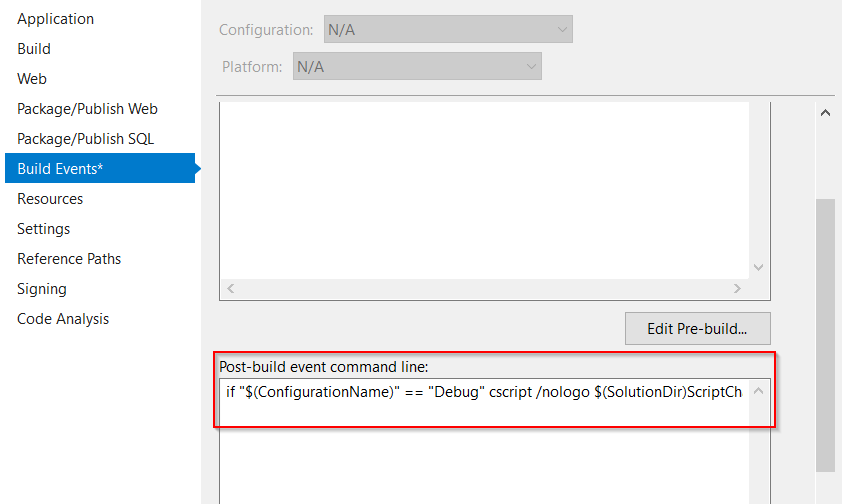
You put the following line:
if "$(ConfigurationName)" == "Debug" cscript /nologo $(SolutionDir)ScriptChangeVersion.vbs "$(ProjectDir)"Every time you build your solution in DEBUG mode, the .vbs script will be executed and will change the version of your page in the footer.
Your version will automatically increment, like this:
v1.0.0.0
v1.0.0.1
v1.0.0.2
...
v1.0.0.99
v1.0.1.0
v1.0.1.1
...
v1.0.99.99
v1.1.0.0
...
v1.99.99.99
v2.0.0.0
There you go! Now it's your turn to make some changes to the script if you wish.
I have also added the possibility to include the build date in the script; just add the tags <!-- date --> ... <!-- date --> somewhere in your page.
Join the conversation
You need an account to comment on this article. Creating one is free and takes under a minute.
No comments yet.